When Odoo announced version 20, one of its examples of the new AI was a small one: confirm a sales order automatically the moment the matching email arrives. You describe the process to an AI agent in plain language, the agent explains what it's about to do, and from then on the process runs on its own.
It's a modest example. It also marks the point where Odoo's AI agents start working without anyone in the conversation. For manufacturers, the question is what that does to the shop floor, and it sits squarely inside this month's theme of configuration versus customization. The planner's judgment doesn't leave in Odoo 20. It moves upstream, into how the agent is configured, and it has to get there before the agent touches a production record.
What changes when an AI agent runs inside an automation?
Odoo 19 already used AI to fill in fields and to update them through server actions, and its agents could perform actions from a chat. Odoo 20 widens what agents can do and where they do it. According to the Odoo 20 release notes, agents can now create and update records on request, and they can be summoned by automated and scheduled actions. That second change is the one manufacturers should sit with. An agent in a chat window has someone watching it. An agent inside a scheduled action can run when nobody is looking.
The manufacturing side of the release moves in the same direction. With continuous production switched on for a bill of materials, subsequent operations can start as soon as some quantity is ready. Ongoing manufacturing orders can be split so the remainder is produced later. Reordering rules can now suggest minimum and maximum stock levels based on demand history, desired days of coverage and order frequency. Each of these makes the schedule more fluid, which also means more decisions happen in the gaps between the moments a person checks.
Earlier in this series, we looked at why experienced planners sometimes overrule AI recommendations, usually because they know something the system was never told. Now picture an Odoo 20 setup at a plastics moulder. A vendor emails a revised ship date for a resin order. An automated action hands the email to an agent, and the agent updates the expected receipt date on the purchase order. Every step was done correctly. What the planner knows about that vendor's revised dates never entered the flow, because there was no recommendation screen to decline. The override still exists in Odoo 20. It just has to be written in advance.
Is setting up an AI agent configuration or customization?
Mostly configuration, which is good news for anyone who takes it seriously. Odoo gives you a set of standard levers for shaping what an agent does. Skills (called topics in earlier versions) hold the instructions and tools that govern an agent's behaviour in a given context. Access rights decide which records a user can reach. The automation's trigger decides when the agent runs at all.
That matters, because the tempting response to an agent that once did something odd is to customize: a bespoke approval layer, a module that intercepts the agent's writes, hard-coded rules that live in Python instead of in the configuration. It's an understandable instinct, and in Odoo 20 it carries a specific cost. The release simplifies how permissions work, removing record rules and adding a domain directly to each access right, so custom modules that define their own permissions need checking on upgrade. A skill written in plain language by the person who knows the floor is the planner's override, set down before it's needed, and it isn't the kind of code this release forces you to revisit.
Here's the shift in one picture: the same three kinds of step, arranged in a different order.
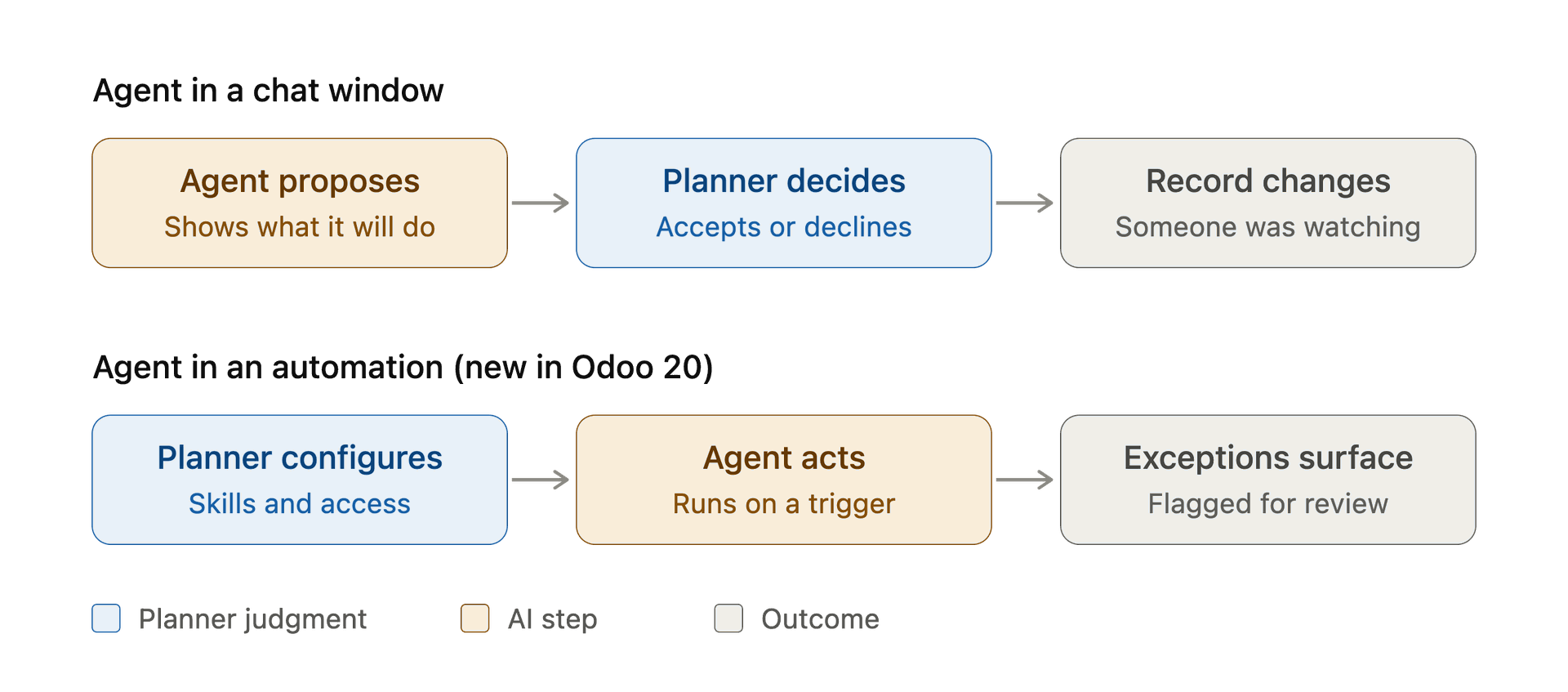
When an agent runs inside an automation, the planner's judgment moves from the middle of the flow to the start.
When a person sits in the middle of the flow, a clumsy setup gets caught one case at a time. When they sit at the start, the configuration is the catch, and every gap in it runs at the agent's speed.
Why does this matter more for Canadian manufacturers right now?
Because the Canadian evidence says AI pays off through what's built around it, and a shop running on thin margins has little room for automation that's quick and wrong.
A Statistics Canada study of AI adoption and productivity, published in April, found that firms using AI had 16.8% higher labour productivity than non-adopters with similar characteristics. Once the researchers accounted for how productive those firms were before adopting, the gap fell to 10.2%. Once they added the capabilities those firms had alongside AI (data analytics, cloud computing, advanced robotics, R&D, technology training for staff), it fell to 5.1% and stopped being statistically significant. Read with an Odoo 20 upgrade in mind, the finding is fairly direct. The gain doesn't come from switching the agent on. It comes from the configuration, data and training around it.
Adoption is moving quickly anyway. Statistics Canada's second-quarter 2026 survey found that 19.2% of Canadian businesses used AI to produce goods or deliver services over the previous year, triple the 2024 share. Among those users, the share using AI-based decision-making systems rose from 5.7% to 13.7% in a year. The same survey named manufacturing, along with information and cultural industries, as a sector where a lack of skilled workers was a barrier to AI use.
Put that alongside the rest of 2026 for a Canadian plant: ongoing tariff uncertainty, the federal Canada Digital Adoption Program wound down in 2025, and provincial support that varies from one province to the next. The configuration work lands on the people already running the floor. That's a practical argument for the configuration path. A skill your planner can read and edit doesn't need a developer at the next upgrade. A custom module does.
What should you set up before an agent touches production data?
Most of the work is deciding where the agent's authority stops, and writing down what your best people already know.
- Let agents draft before they confirm. For anything that moves the schedule, such as manufacturing orders, receipt dates or reorder points, set the automation up so the agent prepares and flags while a person confirms. Widen that once you've watched it behave for a few weeks.
- Write the floor's exceptions into the skill. The vendor whose revised dates slip again, the press that runs slower on nights, the customer whose "firm" forecast rarely is. If it lives only in a planner's head, the agent can't use it. It's the same honesty about capacity and cycle times that a sound work centre setup depends on.
- Check whose rights an automated agent uses. Before switching on an automation, confirm which user's permissions it acts under, and scope that user to what the task needs.
- Treat suggested reorder levels as a starting point. Suggestions built from demand history will faithfully reproduce whatever shaped that history, including a tariff-driven stockpile or a customer you've since lost. Review them against what you know is coming, the way you'd review any replenishment rule.
- Review what the agent changed, not just whether the process ran. A regular look at the records an automated agent touched during its first months will show you where your configuration is thin.
- Check how AI usage is billed before scaling up. An agent that fires on every incoming email runs far more often than one a person calls up in chat, so confirm what that volume costs on your plan.
Where does that leave the planner?
When the AI only recommends, the planner's most useful phrase is "no, not that one." Once it runs inside an automation, the phrase becomes "only if." The work is the same judgment, moved earlier and written down: which records an agent may change, which ones it should only draft, and which suppliers it shouldn't take at their word.
That's what configuration versus customization comes down to on an Odoo 20 shop floor. Both can encode a planner's judgment. The question worth asking before any rollout is who gets to write that judgment down, who can still read it six months later, and whether it survives the next upgrade.