Production rework can quietly drain a manufacturer’s margin. A correctable defect may consume unplanned machine time, labour, components, and work centre capacity long before it appears in a month-end review.
Across Canadian and North American manufacturing, skilled labour and available capacity are hard to replace. Odoo 20 Enterprise Shop Floor allows production teams to record additional work orders and components directly during production, providing a clear record of rework as it happens.
Turn Production Rework Into Cost Visibility
Production rework is additional work required to bring a produced item back to specification. Scrap is different: scrap removes material or finished goods that cannot be recovered. Manufacturing scrap rates can affect profitability. For guidance on measuring material losses separately, see our article Manufacturing Scrap Rate: How to Measure and Reduce Material Waste in Production.
Rework in manufacturing affects more than direct labour. Repeated machining, assembly, inspection, or finishing can extend an order’s duration and delay the next scheduled job. It can also create extra component demand and reduce available work centre time.
We recommend reviewing these cost drivers together:
- Added components and consumables
- Extra operation time
- Work centre cost settings
- Inventory valuation and product costing records
A Bill of Materials (BoM) defines the standard components and operations for a product. In Odoo 20 Shop Floor, supervisors can add an extra work order directly to an individual Manufacturing Order when additional processing is required. This records the additional operation for that order without changing the standard BoM routing.
Record Rework Work and Materials in Shop Floor
Odoo 20 Shop Floor is an Enterprise-only feature that provides a visual interface for processing Manufacturing Orders and Work Orders. Its Options menu includes Add Work Order and Add Component, allowing supervisors to record additional operations and material requirements against an existing Manufacturing Order.
When a defect requires another production operation, open the relevant Manufacturing Order in Shop Floor and use the Options menu to select Add Work Order. Specify the operation after which the additional work should be inserted, enter an operation title, select the Work Center, and set the Expected Duration. You can also assign an optional start date and employee.
For example, a metal
component that requires additional machining after inspection can receive an
extra machining work order on the same Manufacturing Order. The operator can
then process the added operation in Shop Floor and record the time spent. Odoo
records the additional work as a work order, but does not automatically
classify it as rework or calculate a separate Rework Cost.
If corrective work requires additional material, open the Manufacturing Order in Shop Floor, select Add Component from the Options menu, and choose the component to add. Return to Shop Floor using the Back to Shop Floor button. The additional component can then be consumed during production.
Odoo 20 documentation specifies that additional components consumed in Shop Floor have their stock moves validated when the Manufacturing Order is closed. This allows the extra material to be included in the production record. Managers can compare the additional component quantities with the original BoM requirements and review the resulting cost information after production. The financial effect depends on the product costing and inventory valuation configuration.
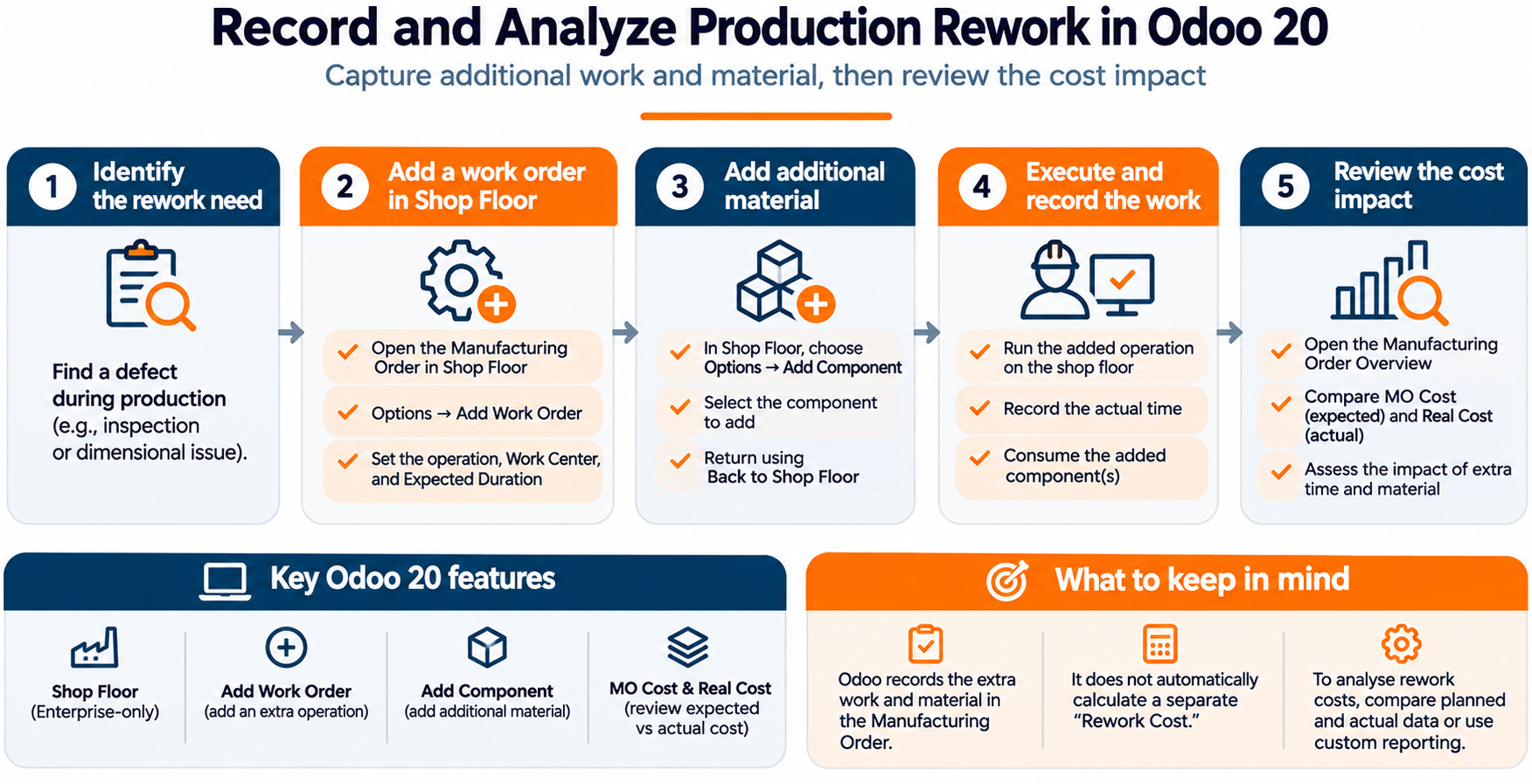
Production rework workflow in Odoo 20: recording additional operations and components, tracking actual production activity, and reviewing the cost impact.
Analyze Expected and Actual Costs
Odoo 20 distinguishes between MO Cost and Real Cost. MO Cost represents the expected manufacturing cost based on the BoM, including planned component quantities, operation durations, and configured work centre costs.
Real Cost reflects the actual manufacturing cost of the Manufacturing Order, including all components consumed, recorded operation durations, work centre costs, and employee costs.
Production rework can affect cost review in several ways:
- Extra components can increase material consumption
- Repeated operations can increase recorded duration
- Work centre settings may assign costs to added time
- Inventory valuation settings affect financial value reporting
For a broader view of manufacturing costs, operation duration, component consumption, and production output, see the Odoo 20 Production Analysis documentation.
To review an individual Manufacturing Order, open it from Manufacturing → Operations → Manufacturing Orders and click the Overview smart button. The overview shows MO Cost and Real Cost, including component and operation cost details. Before production begins, both values represent the expected cost. As components are consumed and work orders are completed, Real Cost can differ because of additional material use, longer operation times, or differences in employee costs. In Odoo 20, the MO Cost field on the overview shows provisional cost while the order is in progress and real cost once the order is complete.
Odoo 20 does not document a separate automatic Rework Cost total. To estimate the cost of rework, manufacturers can compare the additional work order duration, extra component consumption, and related costs with the original production plan. A separate rework figure may require manual calculations, exported data, analytic methods, or custom reporting. The result depends on accurate time records, component consumption, and configured work centre and employee costs. Reliable results also depend on current product costs, accurate work centre settings, disciplined time tracking on the shop floor, and confirmation of the applicable Odoo 20 costing behaviour.
Review a Canadian Metal Manufacturer Scenario and Build a Routine
Consider a fictional Ontario manufacturer producing precision metal brackets. During final inspection, a batch needs additional machining to correct a dimensional defect. The original routing includes 45 minutes of machining and planned steel inserts. If the company’s verified Odoo 20 configuration supports the required workflow, the supervisor records the additional machining activity and the operator records 25 extra minutes. The team also records two additional steel inserts, valued at a hypothetical CAD 18 in total, through its approved inventory process. These figures are illustrative only. Actual values, currency treatment, available interface actions, and costing outcomes depend on each company’s verified version and configuration. The production manager can compare planned and actual operation duration, inspect added component consumption, review available Manufacturing Order cost information, and decide whether the issue calls for supplier review, engineering changes, maintenance work, or a quality-control investigation.
For this illustrative example, assume the additional machining time costs CAD 30, based on a combined work centre and employee rate of CAD 72 per hour. Adding CAD 18 for the two steel inserts brings the estimated rework cost to CAD 48. This is a manual calculation using hypothetical figures, not a separate cost automatically calculated by Odoo.
Before clicking Produce, the supervisor reviews MO Cost and Real Cost in the Overview, while the two columns still differ.. The additional machining time and consumed inserts may increase Real Cost according to the configured work centre, employee, and component costs. The rework portion must still be isolated through comparison with the original production plan.
A dependable review routine starts when rework occurs, not weeks later. Teams should record added work, components, and actual time immediately through their verified process, then review Manufacturing Orders with extra work or consumption on a regular schedule. Compare expected and actual costs, then look for recurring patterns by work centre, product family, defect type, or supplier material where your data supports that review. Clear records turn production rework from an informal explanation into evidence your team can use for better production decisions.
Turn Rework Data Into Better Decisions
Kodershop helps manufacturers connect operational records with the reporting needed to control cost exposure and improve accountability. See how production rework can fit into a practical Odoo manufacturing approach tailored to your business. To discuss your reporting needs and implementation priorities, contact us for a consultation.