The manufacturing scrap rate turns recorded material loss into a number your team can review, compare, and act on. For Canadian and North American manufacturers dealing with changing material prices, tight margins, traceability demands, and uneven shop-floor records, that visibility supports better production and purchasing decisions.
Even a small amount of production scrap can affect material cost, available inventory, throughput, production plans, and inventory valuation. We recommend focusing first on recorded loss. A Scrap Order shows that a quantity left usable inventory, but it does not independently prove why the loss occurred.
For a material-based calculation, use:
Manufacturing scrap rate (%) = recorded scrap quantity ÷ (MO consumed quantity + Scrap Order quantity) × 100
Calculate the total material input by adding the quantities consumed through Manufacturing Orders to the quantities recorded through separate Scrap Orders. Odoo records these scrap movements separately, so excluding Scrap Order quantities would understate the total material input. Keep units of measure and reporting periods consistent. Calculate rates separately for different materials unless their quantities are converted to a common unit. If you measure scrap of finished products, use a separate output-based calculation.
Finished-product scrap rate (%) = scrapped finished units ÷ total finished units produced × 100
Define Production Scrap Before Measuring It
Production scrap is material, a component, or a finished good that cannot be used or sold as intended after a manufacturing-related issue. Common sources of material waste in manufacturing include cutting errors, poor incoming material, machine setup loss, damaged components, process variation, and failed finished goods.
Not every production variance is scrap. Clear definitions keep reporting useful:
- Rework is potentially recoverable material or product that needs more labour, inspection, or processing.
- By-products are intentional secondary outputs that can be configured and valued separately in Odoo. They should not automatically be counted as waste.
- Scrap is identified unusable stock removed from its source location to a designated scrap location.
- Inventory adjustments correct differences between counted and system stock, which may have many possible causes.
Inventory shrinkage is different again. It is an unexplained stock discrepancy that may include loss, damage, theft, counting errors, or missed transactions. We treat identified production scrap separately from inventory shrinkage and stock discrepancies because each calls for a different review process. For a closer look at inventory tracking and unexplained stock differences, see our guide to How to Reduce Inventory Shrinkage in Odoo: Smart Tracking.
Record Production Scrap in Odoo 20
Odoo 20 records unusable inventory through Scrap Orders. A Scrap Order moves a product quantity from a source location to a scrap location, creating an inventory record of the removal. Accurate locations matter because they affect stock availability, traceability, and, where configured, inventory valuation.
The main fields serve distinct purposes:
- Product identifies the item being scrapped.
- Quantity records how much is being removed.
- Source Location shows where the stock is held or consumed from.
- Scrap Location identifies the physical or virtual destination for unusable stock.
By default, the Scrap Location is Virtual Locations/Scrap. This is a virtual inventory location used to record products removed from usable stock; it does not represent a physical storage area. The Source Location identifies where the product is taken from. Both locations can be changed when the warehouse workflow requires it.
The location fields are displayed when Storage Locations is enabled in Inventory app → Configuration → Settings.
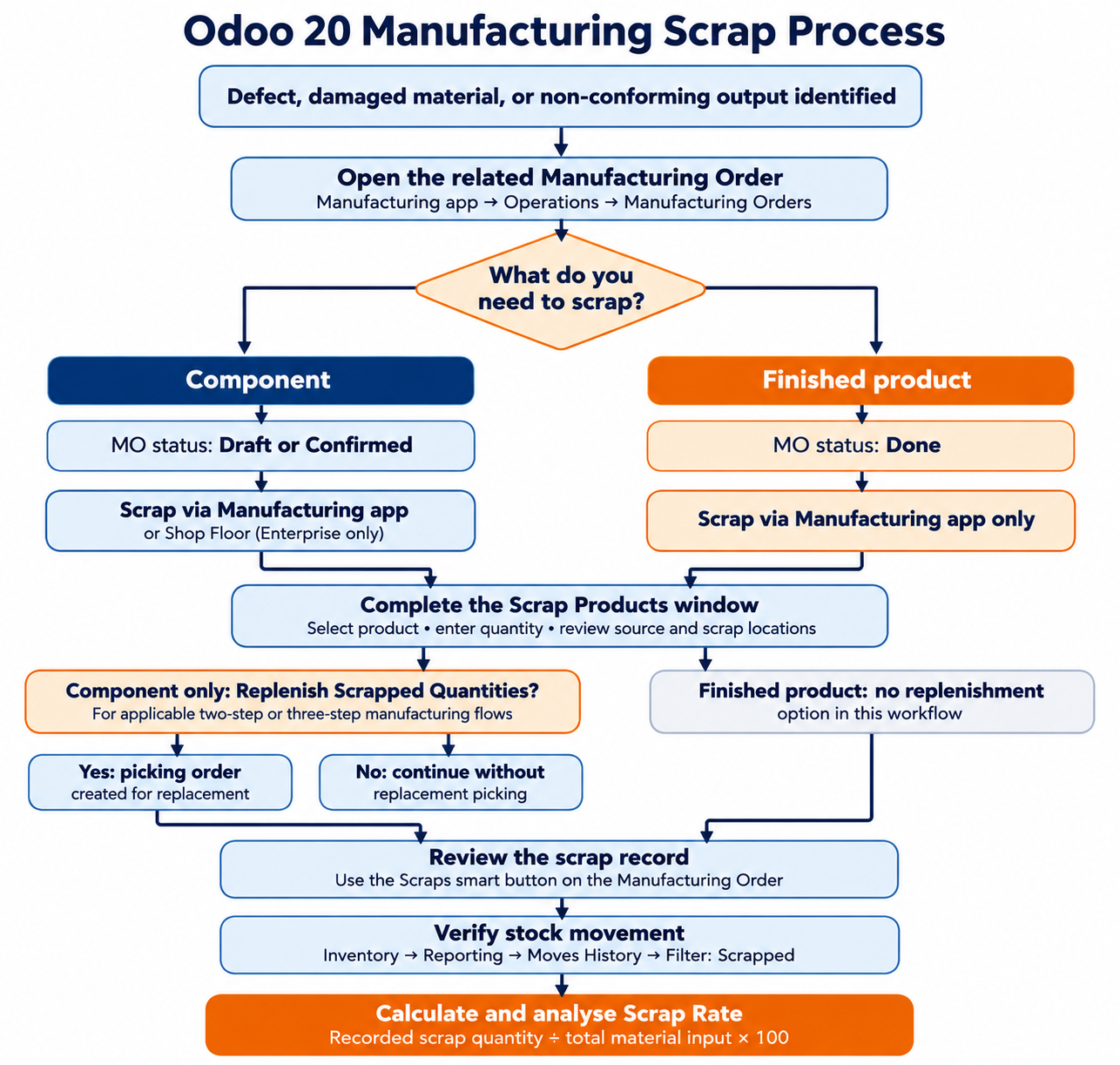
To scrap a product from a Manufacturing Order, open Manufacturing app → Operations → Manufacturing Orders and select the relevant MO.
Click the Actions menu and select Scrap.
Odoo 20 applies different rules depending on the product being scrapped. Components can be scrapped from a Manufacturing Order while it is in Draft or Confirmed status. Finished products can only be scrapped from the Manufacturing app after the MO reaches Done. In the Scrap Products window, select the product, enter the quantity, and review the Source Location and Scrap Location before confirming. Click Scrap Products to create the scrap record.
Shop Floor provides another way to scrap components during manufacturing, but it does not support scrapping finished products. This workflow is available in Odoo Enterprise and is not included in Community edition. To scrap a component, open Shop Floor and locate the relevant Manufacturing Order card. Click its Actions menu, select Scrap, and use the Scrap Products window to choose the component and enter the quantity. Review the source and scrap locations, then click Scrap Products to confirm. The Manufacturing app must be used to scrap finished products, and only after the related Manufacturing Order reaches Done.
When scrapping a component, users can enable the
Replenish Scrapped Quantities checkbox in the Scrap Products window. After the
scrap is confirmed, Odoo creates a picking order to replace the scrapped
component. This option is intended for warehouses using two-step or three-step
manufacturing, where components are picked separately before production.
To process the replacement,
open Inventory and use the To Process button on the Pick Components card to
access the generated picking order.
Connect Scrap Records to Actual Production Costs
A Bill of Materials establishes planned component needs. Manufacturing Order records then show what was actually consumed and what finished quantity was produced. Scrap Orders add evidence that a specific quantity was removed as unusable stock.
Together, these records help your team compare:
- Planned component requirements from the Bill of Materials
- Actual recorded component consumption
- Completed finished quantities
- Recorded production scrap and related inventory movements
That comparison can reveal an unusual material variance, but it should not lead to quick assumptions. Extra consumption may reflect approved substitutions, yield differences, rework, incomplete reporting, or work in progress rather than waste alone.
Scrapping reduces available inventory and can affect inventory valuation, depending on the product category's costing method and inventory valuation configuration. Odoo calculates Manufacturing Order costs separately. The MO Cost represents the expected cost of completing the Manufacturing Order based on the Bill of Materials, planned component quantities, operation costs, and work centre operating costs. The Real Cost reflects actual component consumption, recorded operation durations, work centre costs, and employee costs. A Scrap Order should not automatically be treated as an additional cost posted to the related MO. Finance and production teams should review scrap stock moves, component consumption, inventory valuation, and MO cost details together when reconciling production losses.
Standard Odoo records that can support analysis include Manufacturing Order cost details, Bills of Materials, component consumption records, Scrap Orders, stock moves, and inventory valuation information where configured. Odoo does not automatically calculate a complete manufacturing scrap rate from Scrap Orders alone unless that capability has been confirmed in your environment. Most manufacturers need a consistent calculation, period grouping, a defined input denominator, and data-quality checks. Custom Odoo reporting, spreadsheet analysis, BI tools, or tailored development may be needed for management reporting.
To review recorded scrap movements, open Inventory → Reporting → Moves History. Apply the Scrapped filter to display completed stock movements involving scrapped products. The report shows the product, quantity, source location, destination location, and movement date. Access to Moves History requires administrator permissions.
Use Scrap Rate Trends to Find Losses
Consider this hypothetical example. A Canadian sheet-metal manufacturer records 3,000 kg of steel consumed through three Manufacturing Orders during one month, excluding separately recorded scrap. During the same period, Scrap Orders record an additional 150 kg of unusable steel removed from production inventory.
Using actual steel consumption as the denominator, the manufacturing scrap rate is:
150 kg ÷ (3,000 kg + 150 kg) × 100 = 4.76%
This means that recorded scrap represents 4.76% of the total steel material input during the reporting period. The calculation should use consistent material units and should not combine different material categories or finished-product quantities. That figure is a starting point, not a full material reconciliation. The remaining balance still needs review for finished goods, work in progress, reusable offcuts, intentional by-products, and possible recording gaps.
Patterns become more useful when you compare scrap across product, Bill of Materials component, operation, work centre, supplier batch, shift, or Manufacturing Order. Repeated scrap on one component after a cutting operation could justify review of machine calibration, tooling condition, incoming material quality, nesting assumptions, or operator instructions. Recorded quantities show where to investigate, but they do not establish root cause on their own. For a broader view of production losses and their effect on output, see our guide to Track Manufacturing Downtime and Production Losses in Odoo 20.
For example, if scrap increases on the same steel component across several Manufacturing Orders, start by comparing the related component consumption and Scrap Orders. Group the recorded losses by product, operation, work centre, and supplier batch where the available records allow it.
If the increase is concentrated around one cutting operation, review machine settings, tooling condition, material quality, and the production instructions used for that operation. If the same material batch appears across several affected orders, involve procurement and quality teams in the investigation. Scrap records show where losses were recorded. Additional production, quality, and supplier information is needed to establish the root cause.
Production, quality, maintenance, procurement, and finance teams can use a baseline manufacturing scrap rate to assess whether corrective actions improve results over time. We recommend tracking both quantity and value where suitable, while applying the same definitions across plants and product lines. Standard Odoo production records can supply operational evidence, while barcode capture, quality controls, reporting extensions, and BI integrations can provide a clearer management view.
Strengthen Production Visibility
Reliable scrap analysis depends on disciplined records. Scrap, rework, by-products, inventory adjustments, and ordinary shrinkage should be defined and recorded separately. Bills of Materials must reflect planned requirements, consumption entries must be timely, and Scrap Orders need enough operational context to be meaningful later.
When those controls are in place, production data becomes more than a stock record. It gives your team a consistent way to compare material input, completed output, recorded loss, and recurring process issues. That makes the manufacturing scrap rate a practical management measure for finding losses, reviewing corrective actions, and improving confidence in production decisions.
Turn Scrap Data Into Measurable Cost Control
Kodershop can help you connect shop-floor data, quality records, and reporting around your manufacturing scrap rate. Our team works with manufacturers to create clearer visibility into material variances and the operational factors behind them. If you need a system that supports more reliable waste analysis and corrective action, contact us to discuss your requirements.