Manufacturers often need the same steel blanks, fasteners, packaging, or components across many production runs. We recommend a blanket purchase order when you want negotiated supplier terms without putting every future release on one oversized order.
A Blanket Order is the long-term supplier agreement. An RFQ is a draft request for one material release, and a Purchase Order is that RFQ after confirmation. Product replenishment identifies potential purchasing needs.
How Blanket Orders Create Commercial Guardrails
A blanket purchase order, sometimes called a blanket purchase agreement or long-term purchase agreement, records the commercial terms for repeated buying from one supplier. It can include the vendor, covered products, planned quantities, agreed unit prices, and validity dates.
For recurring materials, a blanket order gives the purchasing team a consistent commercial reference for each release. Buyers can create RFQs directly from the confirmed agreement, while Odoo tracks the total quantity ordered through linked RFQs in the Ordered field. The agreement does not automatically schedule delivery dates, reserve warehouse stock, or guarantee supplier capacity. Each material release still requires a separate RFQ and Purchase Order, with quantities and delivery dates based on the current production schedule.
We see this approach work well when production demand is regular release timing changes. Common examples include:
- Steel blanks and fabricated parts
- Electrical components and fasteners
- Industrial consumables
- Packaging materials
Contract details such as volume rebates, freight terms, quality requirements, or price-index clauses may need attachments, custom fields, supplier portals, approval rules, or additional integrations.
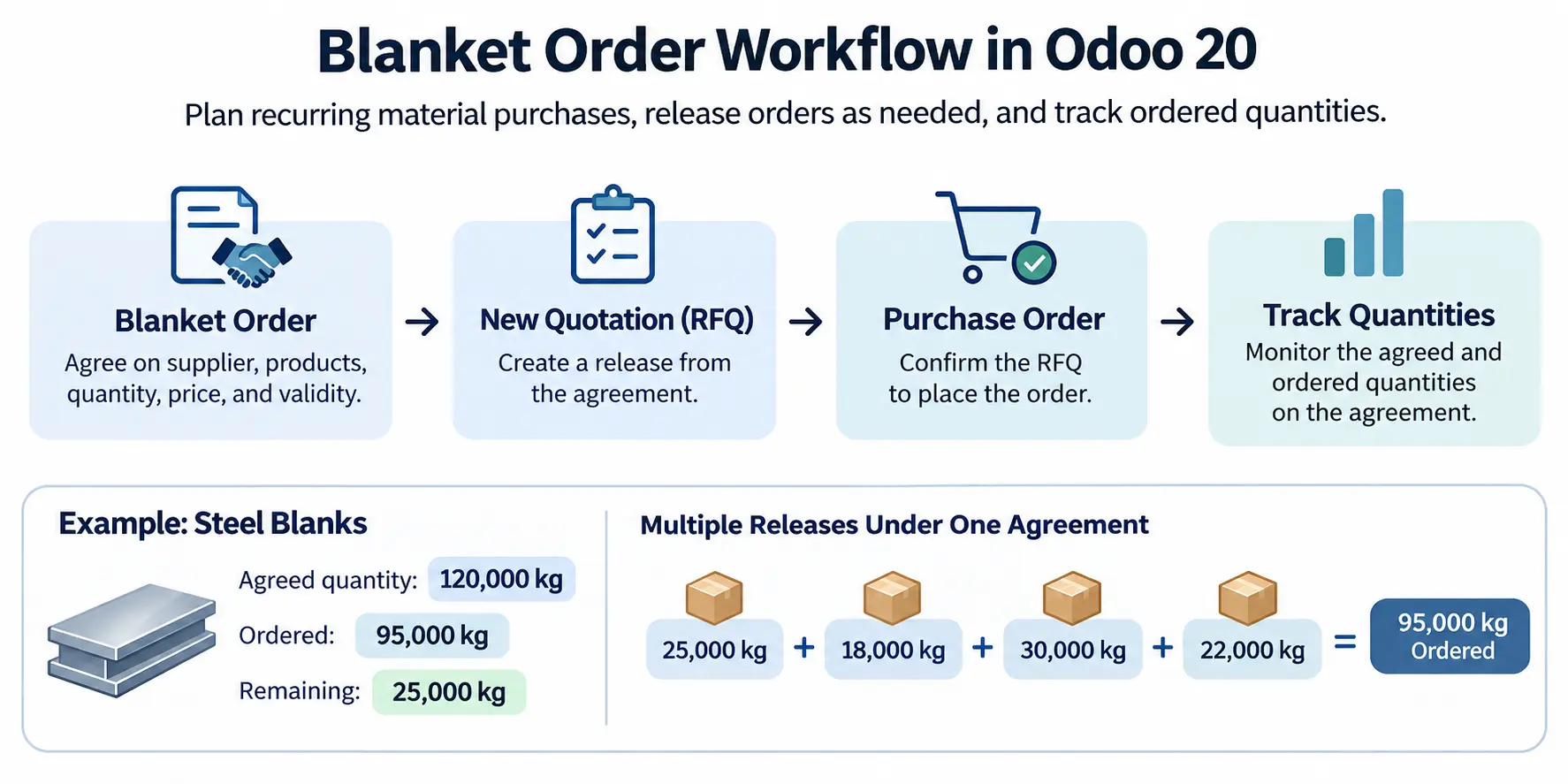
Blanket Order workflow in Odoo 20, showing the agreement, RFQ creation, purchase order confirmation, and ordered quantity tracking.
Configure Blanket Orders in Odoo 20
To configure blanket orders in Odoo 20, first enable Purchase Agreements in the Purchase app. Navigate to Purchase → Configuration → Settings, find the Orders section, enable Purchase Agreements, and save the settings.
Next, go to Purchase → Orders → Purchase Agreements and click New. Select the Vendor, assign a Buyer, and confirm that the Agreement Type is set to Blanket Order. Set the Currency and Agreement Validity period. Review the Reference, Operation Type, and Company fields where applicable.
On the product lines, click Add a line and select the materials covered by the agreement. Enter the agreed quantities and negotiated prices in the Quantity and Unit Price columns. Existing product prices are not automatically populated in new blanket order lines, so enter and verify the agreed supplier price manually. Click Confirm. The agreement moves from Draft to Confirmed and becomes available for creating new RFQs. Set the agreement validity period to cover the planned purchasing cycle. Before creating a new RFQ, check that the agreement is still valid and that the negotiated prices and supplier terms remain current.
Additional requirements such as EDI document exchange, automatic price escalation formulas, specialized compliance checks, and supplier-specific approval workflows may require integrations, custom fields, additional applications, or custom development. These requirements should be assessed separately from the standard blanket order workflow.
Turn Agreements Into Controlled RFQs
Once a blanket order is confirmed, buyers can create a new RFQ directly from its form by clicking New Quotation. Odoo pre-populates the RFQ with information from the agreement, including the supplier and applicable product details. The buyer can review the quantities, adjust the release requirements, and set the expected delivery details before sending the RFQ to the supplier.
After creating the RFQ, Odoo links it to the blanket order. The RFQs/Orders smart button on the agreement provides access to the related quotations and purchase orders.
Odoo automatically updates the agreement's Ordered field with the total quantities of products ordered through linked RFQs. This allows purchasing teams to compare the agreed quantities with the amounts already ordered.
Before confirming an RFQ, check the following:
- The required material quantity based on the production plan
- The planned delivery date and receiving warehouse
- The agreed unit price and any updated supplier terms
- The quantity already ordered under the agreement
- The remaining quantity available against the agreed total
The Ordered field supports quantity monitoring, however, buyers should not assume that Odoo automatically blocks an RFQ or Purchase Order that exceeds the agreed quantity. If a proposed order exceeds the remaining agreed quantity, obtain the required approval or negotiate revised terms with the supplier before proceeding.
Plan Steel Purchases Against a Blanket Purchase Order
Consider a Saskatchewan manufacturer of agricultural equipment that regularly purchases laser-cut steel blanks from one approved supplier. Based on its six-month production forecast, the company expects to require 120,000 kilograms of steel blanks for equipment-frame production. The material is needed in smaller deliveries throughout the period.
The purchasing team creates a blanket order with the supplier, sets a six-month validity period, and adds the steel blanks as a product line. The agreed quantity is 120,000 kilograms, with a negotiated unit price of CAD 2.80 per kilogram. The agreement provides a common commercial reference for recurring purchases while allowing the buyer to request individual deliveries as production requirements arise.
When the production schedule indicates that 25,000 kilograms are needed, the buyer opens the confirmed blanket order and clicks New Quotation. Odoo creates an RFQ linked to the agreement. The buyer reviews the quantity, delivery requirements, and supplier terms before sending the RFQ and confirming the Purchase Order. As production continues, the buyer creates additional releases of 18,000, 30,000, and 22,000 kilograms through the same blanket order.
After all four Purchase Orders are confirmed, the Ordered field shows 95,000 kilograms against the agreed 120,000 kilograms. The remaining quantity is 25,000 kilograms. This gives the purchasing team a clear view of the commitment still available under the agreement.
Before placing another order, the buyer compares the remaining quantity with the updated production forecast. If the next planned release exceeds the remaining commitment, the team can discuss revised terms with the supplier, create a new agreement, or obtain approval for purchasing outside the existing arrangement.
Put Supplier Agreements Into Action
Blanket Orders give manufacturers a structured way to manage recurring purchases where pricing, planned volumes, and supplier coordination matter. Individual RFQs and Purchase Orders still give your team control over every material release.
Review each blanket order alongside production requirements, open RFQs, confirmed purchase orders, supplier performance, and the remaining agreed quantity. Odoo can use vendor information from a confirmed blanket order in product replenishment, including the supplier, price, and agreement reference.
Before confirming a replenishment proposal, compare the suggested quantity and required date with current production demand, open purchase orders, the agreed supplier price, and the remaining commitment under the blanket order. Clear ownership for agreement renewals, quantity reviews, and releases outside agreed terms helps maintain purchasing control. For a closer look at managing recurring maintenance materials and replacement parts, see our guide to managing spare parts and MRO inventory in Odoo 20.
Turn Agreement Data Into Better Purchasing Decisions
Kodershop helps manufacturers assess whether a blanket purchase order workflow fits their purchasing controls, approval process, and Odoo 20 configuration. Our team can identify where standard functionality ends and where tailored configuration or development may be needed. To discuss your procurement requirements, contact us for a focused consultation.