TL; DR
- Planning: Choose per operation type whether procurement creates draft or confirmed manufacturing orders. Reset validated or canceled orders to draft, split orders mid-run, and let backorders plan themselves.
- Shop floor: Work center barcodes, one "Produce" button everywhere, richer instructions, and lots and serials generated automatically at close.
- Costs and engineering: Provisional vs. real MO cost, BoM comparison, and a universal ECO report with cost comparisons.
- Inventory and purchasing: Suggested min/max levels on reordering rules, a single upstream and downstream traceability report, and vendor quality rates.
- Canada: HS codes per product variant, landed costs per product, retroactive cost updates, and CPA 005 pre-authorized debit files.
- Before you upgrade: Flexible consumption is now the default for every order, and access rights and tracking have changed under the hood. Check your customizations first.
Buried in the Manufacturing section of the Odoo 20 release notes is a one-line setting: on the "Manufacturing" operation type, you can now choose whether procurement creates draft or confirmed manufacturing orders. Two entries further down, validated or canceled orders can be reset to draft. A few more down, ongoing orders can be split so the remainder is produced later.
None of these will headline a keynote. Together they say a lot about who this release was built for.
Watch the Odoo 20 release
Odoo unveiled version 20 at Odoo Experience in Brussels. The official release video gives a tour of its best features:
The keynote covers the whole platform. The sections below narrow it down to what changes for manufacturers.
What's new in Odoo 20 for manufacturers?
Odoo 20 was released today (Sept 24, 2026). For manufacturers, the changes fall into five areas: planning, the shop floor, costs and engineering changes, inventory and purchasing, and AI agents.
Read as a list, it looks like a long run of incremental fixes. Read together, most of these changes are about plans that don't hold still. Orders can wait before they commit, go back when something changes, split when half the batch is ready, and replan themselves when a backorder appears.
The big picture: Odoo 20 treats a production plan as something that gets revised several times a week. That's closer to how most plants run than the confirm-once, execute-once model ERP systems tend to assume.
Everything below comes directly from Odoo's release notes.
How does Odoo 20 change manufacturing order
planning?
Odoo 20 gives planners more control over when an order becomes final and how the schedule reacts once it is.
Headline feature: Each "Manufacturing" operation type now has a setting that decides whether procurement creates draft or confirmed manufacturing orders. If you want every automatically generated order reviewed before it reserves components, that's now standard behaviour.
Reset to draft. Validated or canceled manufacturing orders can go back to draft, instead of being recreated from scratch.
Split ongoing orders. An order already in progress can be split so the remaining quantity is produced later.
Planned ASAP, in the order you set. Orders are now planned as soon as possible by default. When several are planned together, their sequence in the list sets priority.
Backorders that plan themselves. Backorders of planned productions are scheduled automatically as soon as they're created, so leftover quantities don't fall off the plan.
Continuous production. Produced quantities can be recorded on individual work orders. With "Continuous Production" enabled on the BoM, the next operation starts as soon as some quantity is ready.
New planning views. The manufacturing order Kanban is redesigned, with cards grouped by week showing component status, active work center, deadline, and remaining time. Work orders get their own Kanban view and a drag-and-drop Gantt view, including a view by employee. Work orders can be confirmed from the Gantt view even when the plan contains drafts, and processed in blocked work centers.
Here's how the draft setting and reset option reshape an order's lifecycle:
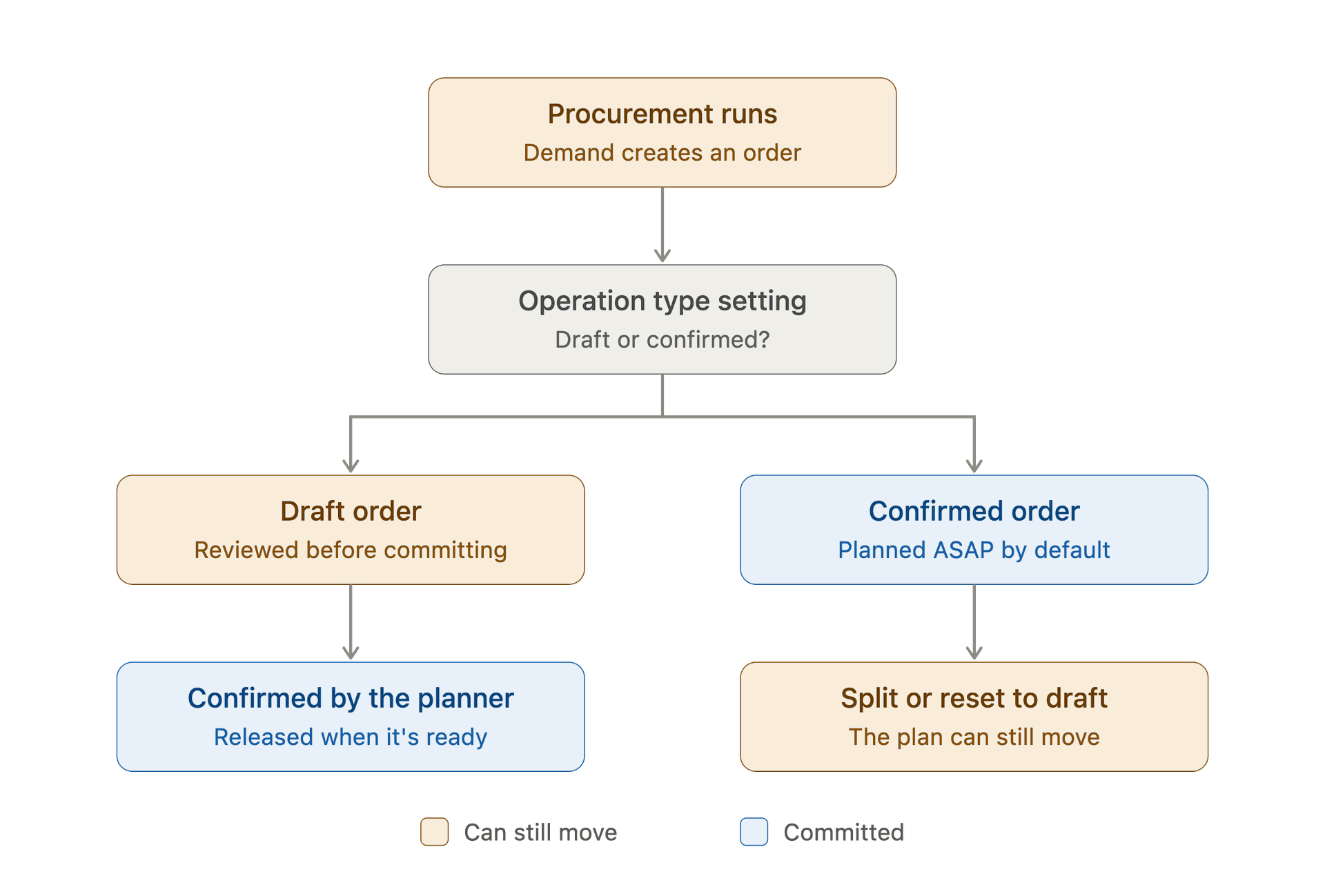
Neither branch is new on its own. What's new is that a planner can choose between them per operation type, and that the right-hand path no longer ends in cancel-and-recreate.
What changes on the shop floor in Odoo 20?
The shop floor changes are smaller individually. Together they mean fewer taps between an operator and a finished task.
Headline feature: In Shop Floor, operators can scan a work center's barcode to select it.
One Produce button. "Produce" and "Produce All" are now a single "Produce" button across Manufacturing, Shop Floor, and Barcode.
Richer instructions. The note field on manufacturing orders is now an HTML field, so instructions can carry formatting. When instructions are updated, the current version is pre-filled for quick corrections.
Lots, serials, and packing at close. Lots and serial numbers are always generated automatically when an order is closed. If a destination package is set on the order, the finished product goes straight into it.
Barcode improvements. Lots and serials can be generated in bulk or entered manually when a label won't scan. Buttons now stay in fixed positions regardless of quantity, which cuts down on mis-taps.
Odoo has also added a downloadable Shop Floor demo sheet for testing barcode capabilities, a low-effort way to trial the flow before printing labels for every station.
How does Odoo 20 handle manufacturing costs and engineering changes?
Cost visibility and change control both get more precise.
Headline feature: In PLM, a universal ECO report shows every bill of materials change in one place, with cost comparisons.
Provisional and real MO cost. The "MO Cost" field shows a provisional cost while an order is in progress and the real cost once it's complete.
Extra costs on the BoM. Extra costs for a manufacturing order can be registered in a dedicated field on the bill of materials.
BoM comparison. Bills of materials can be compared based on the product quantities used, and components and sub-assemblies can be managed directly from the BoM form.
Easier component swaps. The "Used In" smart button on a product lists the exact BoM lines where it appears.
Lighter ECOs. Version updates are now optional when applying an ECO, new products can be introduced as part of one, and product versions are tracked on the product form.
Subcontracting costs. With no linked purchase order, the subcontractor cost is assigned at reception based on the vendor pricelist.
What's new in inventory, purchasing, and quality?
Several changes outside the Manufacturing app feed directly into production.
Headline feature: Minimum and maximum levels on reordering rules are now suggested based on demand history, desired days of coverage, and order frequency.
Simpler replenishment. The replenishment dashboard merges "Order" and "Order to max" into one button. (Our guide to stock replenishment in Odoo covers how reordering rules work.)
Allocation from the forecast. Stock can be allocated directly from the forecast report, and the allocation report has been redesigned.
Traceability built for recalls. One report now shows upstream and downstream lots and serials, with final locations highlighted. Expiration dates appear in manufacturing traceability, and the "Transfers" button on a lot shows the specific delivery lines for more precise recalls.
Supplier performance. Purchasing can see a vendor quality rate based on quality checks. Expected arrival dates can be edited on the purchase order while keeping the vendor's original date for on-time tracking.
Quality and maintenance. A failure location can be set when a quality check fails. Equipment and work center maintenance requests get dedicated Gantt views.
Where do AI agents fit in Odoo 20 for manufacturers?
AI agents can now create and update records on request, including from an uploaded file of instructions. They can be triggered by automated and scheduled actions, show live updates on what they're doing, and ask for confirmation through clickable buttons. Odoo can also connect to outside tools through MCP (model context protocol).
Worth knowing: All AI features now require credits, bought through IAP.
For a manufacturing team, the most immediate use is probably the unglamorous one: having an agent create or update records from a document instead of keying them in by hand.
What does Odoo 20 mean for Canadian manufacturers?
For Canadian manufacturers, 2026 has been a year of tariffs that change faster than price lists do. Several Odoo 20 features bear directly on that, even though none is labelled as a tariff feature.
Headline feature: When a product's cost changes after it has already been delivered or used, for example through a landed cost that arrives late, the delivery's value is updated retroactively, along with invoice cost under perpetual accounting.
HS codes per variant. HS codes can now be set at the product variant level, which matters wherever variants classify differently at the border.
Landed costs per product. Landed costs can be added to individual products in a transfer instead of spread across the whole receipt.
Default Incoterm per vendor. Set once on the vendor, carried onto every quotation and purchase order.
Cross-border intercompany flows. For operations on both sides of the border run as separate companies, one company can now resupply another through routes, deliver a sales order from another company's warehouse, and carry valuation across correctly.
Canadian localization. Detailed expense accounts, reworked and localized asset models, and batch processing of customer invoice payments through CPA 005 Pre-Authorized Debit files.
What should manufacturers check before upgrading to Odoo 20?
Some changes remove settings or alter default behaviour. Better to know before an upgrade than after.
Watch out: The flexible consumption setting has been removed from bills of materials. Every manufacturing order now uses flexible consumption by default, so shops that used strict consumption as a control will need another way to catch over-consumption.
- Pick draft or confirmed per operation type. The new setting only helps once someone decides which operation types should create drafts and who confirms them.
- Review your scheduling assumptions. Orders are now planned ASAP by default, with list sequence setting priority. Test it against real orders.
- Retrain on changed buttons and flows. The single Produce button, the removed return wizard, and the removed "Under Repair" status in Repairs all change what operators see.
- Check customizations against technical changes. Record rules have been removed from access rights, and stored tracking values have been replaced by messages generated on the fly. Review custom modules and reports that depend on either.
- Budget for AI credits. If you plan to use agents, every AI feature now draws on IAP credits.
If you're still weighing when to move, our guide on whether you should wait for Odoo 20 sets out a practical timeline, including why the first stable patch is usually the better target than launch day.
Is Odoo 20 worth the upgrade for manufacturers?
For manufacturers, Odoo 20's headline is less a single feature than a change in posture. Orders can be drafts by design, go back to draft when needed, split mid-run, and replan themselves. Costs can be corrected after the fact. Engineering changes show their cost impact before they're applied.
Most plants already run on plans that change several times a week, and until now the software asked them to pretend otherwise. Odoo 20 seems to be the first version that stops asking.