Repeated manufacturing defects can turn a small quality concern into a larger production, delivery, and customer-service problem. We recommend reviewing quality records across Manufacturing Orders before repeated failures affect annual KPI reviews, demand planning, or future production decisions.
One failed check may be limited to a single job, machine event, or shift. Similar failures appearing across several Manufacturing Orders deserve closer attention. In Odoo 20, the Enterprise-only Quality app records Quality Checks and Quality Alerts, while the Enterprise-only Shop Floor app can provide useful production context. Odoo organizes the evidence, but it does not automatically identify recurring defects, find patterns, or confirm root causes.
Why Repeated Defects Raise Costs
Production defects create more work long after the original failure is found. A part that fails inspection may require more material, added labour, rework, another inspection, or scrap handling. If the issue reaches a customer, it can also put delivery commitments, warranty exposure, and customer confidence at risk.
From an operations view, recurring defects can affect measures your team already watches, including yield, first-pass quality, on-time delivery, and cost per unit. A repeat issue can also consume supervisor time, slow work centres, and create pressure for expedited shipping when replacement parts are needed.
We suggest separating isolated events from repeat patterns:
- An isolated defect may relate to one Manufacturing Order, one material lot, one operator shift, or a temporary machine problem.
- Recurring defects appear in multiple records with shared details, such as a product variant, Work Center, tag, or failed check result.
- A pattern is a reason to investigate, not proof that one factor caused every failure.
For example, several dimensional failures connected to one work centre may point your team toward tooling, calibration, measurement methods, work instructions, or production settings. The Odoo data can show where to look first, but it cannot prove whether tool wear, operator handling, or another condition caused the manufacturing defects.
Create Comparable Quality Alert Records
Useful defect analysis starts with consistent records. If one employee writes “hole offset,” another enters “wrong dimensions,” and a third creates an alert without a product reference or tag, your team has no reliable way to compare the events across Manufacturing Orders.
In Odoo 20 Quality, Quality Alerts give teams a place to document and investigate an issue. Alerts may be created through quality activities or recorded manually. We are keeping that workflow brief here because creating controls and alerts at each production step is outside the scope of this discussion. This discussion takes a different angle: comparing records from separate orders to spot recurring production defects. For a broader overview of setting up quality checks throughout production, see our guide to Odoo: How to Integrate Quality Control in Every Step of the Manufacturing Process
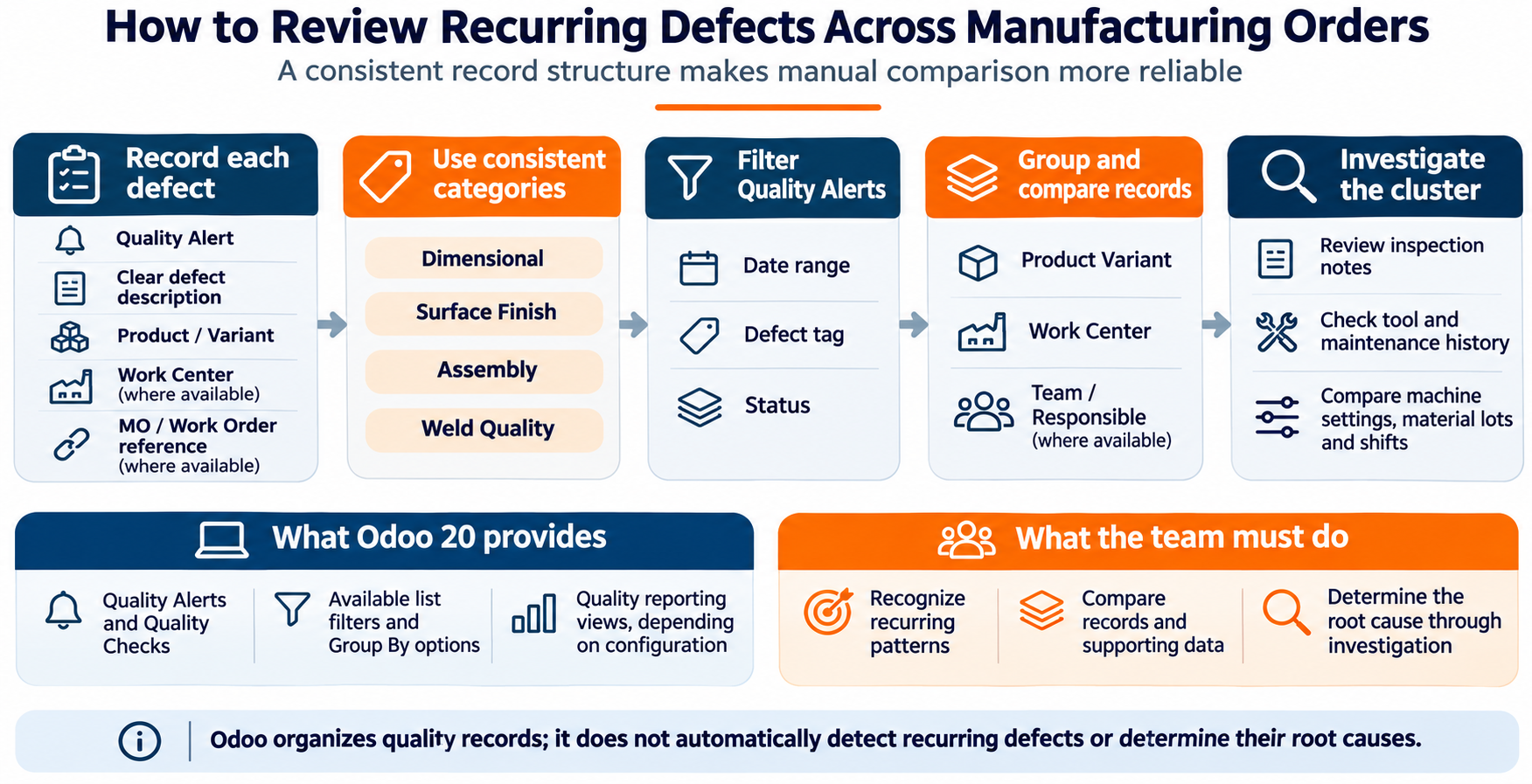
When applicable, we recommend completing the same fields in every alert:
- A clear title or description that uses approved wording for the defect
- Tags that identify the defect category
- Product and Product Variant details
- Work Center, selected on the Quality Alert or pre-filled when the alert is created from a work order in Shop Floor
- A reference to the relevant Manufacturing Order or work order, where available, plus inspection details and notes for later review
A controlled naming convention matters. “Mounting-hole spacing outside approved tolerance” is easier to compare than vague descriptions such as “bad part” or “failed inspection.” Likewise, use a limited, approved tag set instead of allowing near-duplicates such as “Dimension,” “Dimensional Issue,” and “Out of Spec.” For details on configuring inspection points and generating quality checks, see the Odoo 20 Quality Control Points documentation.
For many manufacturers,
a practical tag list may include Dimensional, Surface Finish, Assembly, Weld
Quality, Packaging, Tooling, and Measurement. The right list depends on your
work, but fewer well-defined tags are usually
most useful.
Review Patterns in Odoo 20 Views
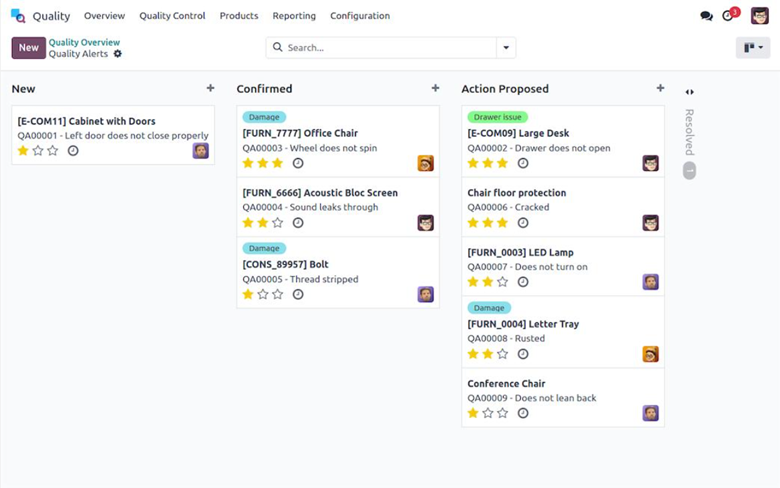
Once records follow the same structure, the quality team can review Quality Alerts using the available list and search views. Filters, custom filters, Group By options, and saved favourites can help compare alerts by Product, Product Variant, Work Center, Tags, Team, Responsible, status, and date, where these fields are available in the view. Additional grouping options may require a custom group based on a field in the alert record.
A practical review might begin in the Quality app’s
Quality Alerts list. Your team can filter for open or closed alerts within a
chosen period, then group the results by Product Variant or Work Center. Adding
a tag filter, such as Dimensional, narrows the review to one defect category rather
than mixing unrelated events together.
Odoo Quality reporting provides statistics on quality checks and alerts, while the records themselves provide the details needed for investigation. The available reports and measures depend on the reporting view and installed configuration. For recurring manufacturing defects, these sources serve different purposes:
- Quality Check records show which inspections passed or failed and provide context about the related operation
- Quality Alerts hold the detailed descriptions, tags, and investigation context behind those failures.
- List-view grouping helps reveal clusters across Manufacturing Orders.
- Saved favourites can make regular reviews more consistent.
Standard views can reveal that several alerts involve the same product variant and Work Center. They cannot automatically label those alerts as recurring defects, determine why the events happened, or perform root-cause analysis.
Deeper comparisons often need manual record review, data exports, spreadsheet work, or custom reporting. Your team may need to compare alerts against machine settings, tool-change history, maintenance records, shift details, operator training, material lots, or external measurement-system data. That is where a tailored Odoo report, dashboard, or integration may be appropriate.
Compare Three Bracket Orders Before Assigning Cause
Consider this fictional example, which is illustrative only and not a Kodershop client case or verified customer result. A Canadian manufacturer produces galvanized steel mounting brackets for commercial equipment. Over several weeks, its quality team records dimensional defects on three separate Manufacturing Orders.
Each Quality Alert uses the description “Mounting-hole spacing outside approved tolerance.” The team applies the Dimensional tag, records the same product and product variant, and includes the CNC Punch Work Center where relevant. By linking each alert to related manufacturing activity and preserving inspection notes, the team creates records that can be compared later.
In the Quality Alerts list, the team filters for the Dimensional tag and the selected date range. After filtering the Quality Alerts by the Dimensional tag and selected date range, the team reviews the records grouped by Product Variant and Work Center. The three alerts all reference the same galvanized bracket variant and CNC Punch work centre, revealing a cluster that warrants further investigation.
That finding supports a focused investigation into possible causes rather than assigning blame to an individual or team. The quality team should review punch alignment, tool wear, machine calibration, production-program changes, gauge accuracy, and shift-level operating conditions to determine which factors contributed to the repeated dimensional defects. Once the underlying cause is identified, the team can define corrective actions to address the current issue and preventive actions to reduce the risk of recurrence. These may include adjusting machine settings, replacing worn tooling, updating work instructions, improving calibration procedures, or adding targeted inspections. The repeated records help direct the investigation, while the evidence gathered determines the appropriate response.
Prioritize the Next Defect Review
For recurring manufacturing defects, we recommend three habits: record Quality Alerts consistently, categorize them with comparable fields and tags, and review them across Manufacturing Orders on a regular schedule. Monthly or quarterly reviews can help your team prioritize patterns with the greatest impact on quality, delivery, safety, or customer commitments.
When standard Odoo 20 views no longer answer the questions your team needs to ask, move beyond basic reporting with a deliberate plan for deeper defect analysis. Comparing quality records with maintenance history, shop-floor information, production settings, and measurement data can turn a visible pattern into a better-informed production decision.
Turn Defect Data Into Clearer Production Decisions
Kodershop can help you connect quality, maintenance, and production information to identify recurring manufacturing defects before they create larger operational costs. Our team designs reporting and workflows around the questions your managers, engineers, and quality teams need answered. Contact us to discuss a practical Odoo solution that supports faster root-cause analysis and more confident corrective action.