Many manufacturers still rely on spreadsheets and manual master production scheduling, which leads to inconsistent planning, inventory imbalances, and slow decision-making. A modern master production schedule creates a structured, demand-driven plan that aligns sales, inventory, and capacity.
Odoo 19 simplifies this by delivering an intuitive MPS planning interface where teams can manage forecasts, calculate replenishment quantities, and synchronize MPS and MRP in real time. Instead of fragmented tools, planners get a unified environment that supports master scheduling, master production planning, inventory control, and production simulation. In practice, the master production schedule becomes the single point where commercial intent meets manufacturing reality, forcing every planning decision to be both measurable and executable.
In this guide, we’ll explain what a master production schedule is, how the master production schedule process works, show practical master production schedule examples, and demonstrate how Odoo 19 uses intelligent planning to improve forecasting accuracy and streamline the entire MPS production planning workflow.
Odoo
19 Master Production Scheduling:
Automated and Data-Driven Planning
Odoo 19 turns the master production schedule into a powerful, fully integrated planning system. The enhanced automation works directly inside MPS forms, forecasts, Gantt charts, and work orders – no add-ons or external tools required. The result is a user-friendly software MPS that replaces spreadsheets and outdated master scheduling tools. Companies get real-time MPS scheduling that supports modern master production planning and improves overall MPS supply chain performance by reducing stockouts, preventing overproduction, and cutting planning time dramatically.
Automated Replenishment Suggestions
Odoo 19 automatically calculates suggested quantities based on demand forecasts, BoMs, on-hand inventory, and historical data to generate realistic replenishment proposals for your master production schedule. One-click fill populates planning periods with accurate quantities, delivering precise master production scheduling without Excel or extensive manual calculations. Planners can view practical examples of master production schedules to understand real-world applications.
Enhanced Demand Forecasting Inside MPS Planning
Automated features combine actual sales orders, inventory levels, and historical trends to produce reliable forecasted demand. The system suggests replenishment quantities, respects batch constraints (defined in BoMs), and helps planners answer core questions: what is MPS planning and how does it impact business operations?
Smart Replenishment & MPS and MRP Integration
A seamless connection between MPS and MRP ensures that approved MPS lines trigger manufacturing and purchasing flows automatically. This provides a complete MPS in ERP workflow – from master scheduling to actual production execution – and supports advanced features like master production schedule integration with external systems when needed.
Capacity Awareness and Indirect Demand Visibility
The MPS highlights indirect demand for components, potential stock issues via color-coded indicators, and integrates with Gantt, kanban, or pivot views for better overview of real-world master production schedule scenarios. Teams can monitor material readiness and lead times for more reliable MPS manufacturing execution.
Ready-to-use Master Production Schedule Examples & Templates
Odoo 19 includes built-in master production schedule templates and options. Users can customize periods, set safety stock, define replenishment rules, and instantly understand how to create a master production schedule using proven planning techniques and automated calculations.
Configuring
the Master Production Schedule in Odoo
19
Before building your first Master Production Schedule, planners must activate the MPS feature inside the Manufacturing module. Odoo 19 keeps the setup process simple, but these early steps determine how accurate your master planning schedule will be. This section walks through module activation, core configuration, and the first look at the planning interface so users can start working with Odoo manufacturing planning immediately. In just a few minutes you’ll have a live, AI-powered MPS scheduling, faster than opening another Excel file.
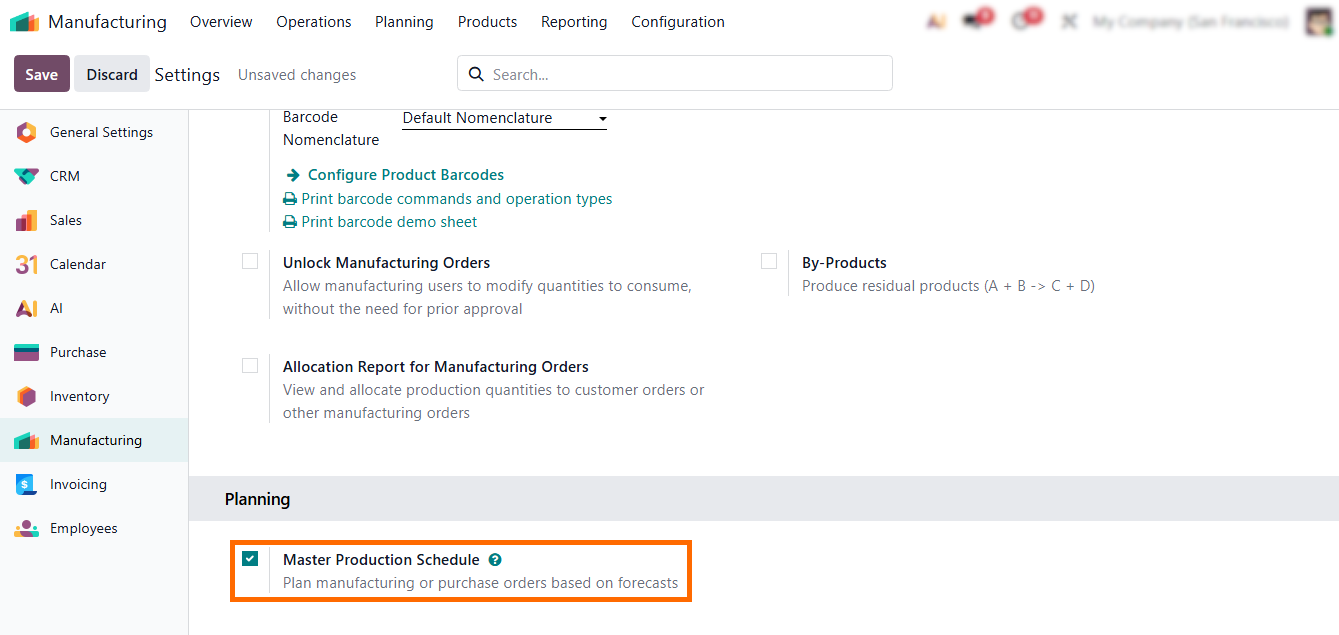
- To
start, open the “Manufacturing” module settings and enable the “Master Production
Schedule” under the “Planning” section.
- After
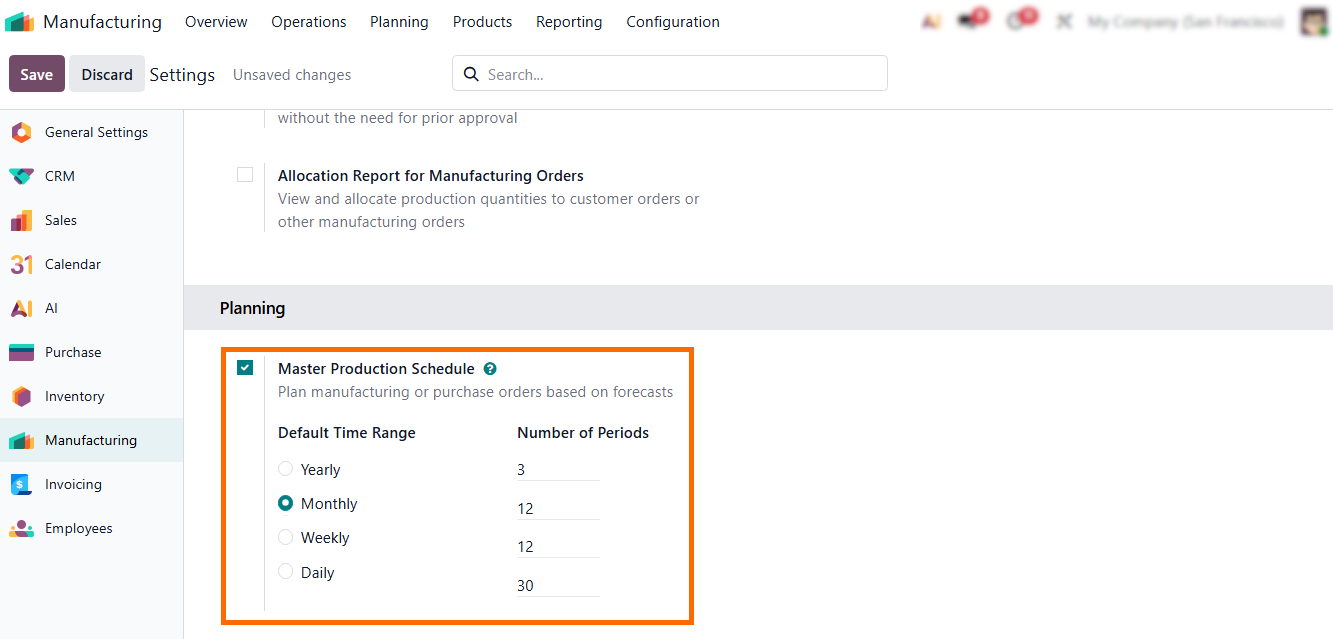
activation, the system allows you to choose the planning period — weekly,
monthly, or daily. Shaping how your “Master
Production Schedule” will be structured and
calculated.
Adding
Products in Master Production Schedule
After activating the Odoo master production schedule, the first practical step is adding the products you want to plan. This is the foundation of your master schedule production and drives the accuracy of your MPS scheduling. Proper product setup ensures that your MPS in ERP reflects real demand, available inventory, and manufacturing capacity. By carefully configuring each product, you enable effective master production planning, optimizing MPS supply chain performance, and create reliable master production schedule examples for all manufacturing operations. How a product is configured in MPS determines whether planning remains a high-level guide or becomes a precise driver for downstream MRP execution.
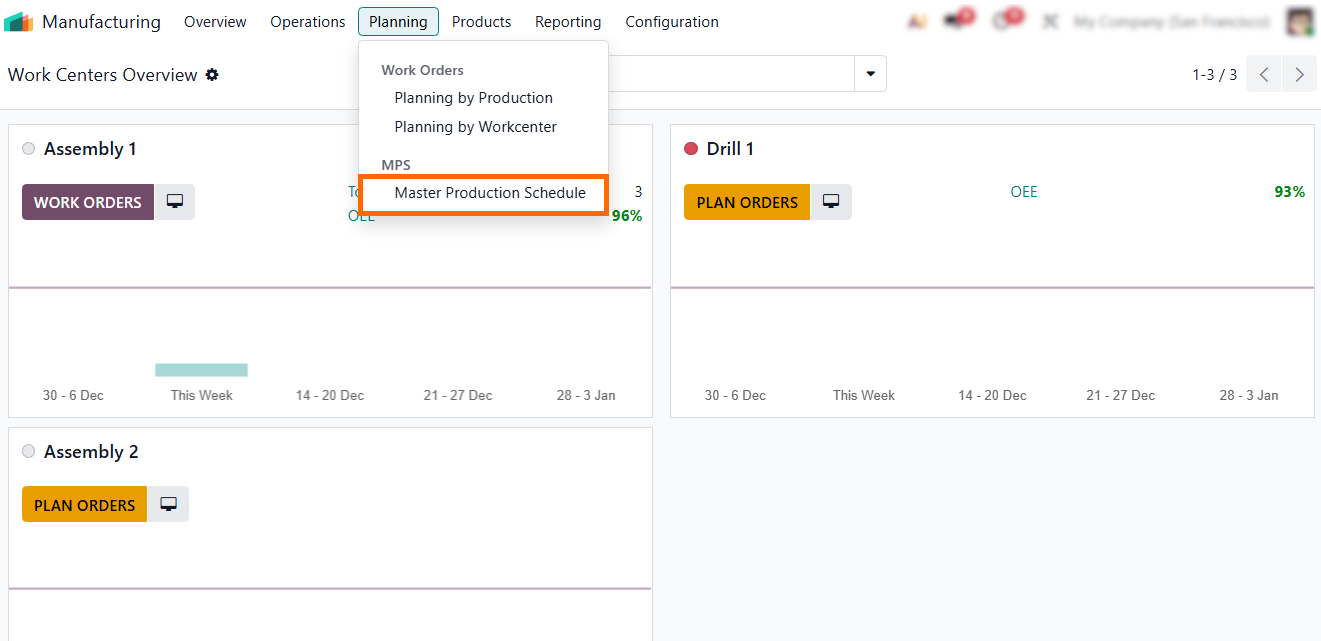
- To start, navigate to “Planning” and select “Master Production Schedule”, as shown in the screenshot.
- On the main “Master
Production Schedule” screen, your products and their current
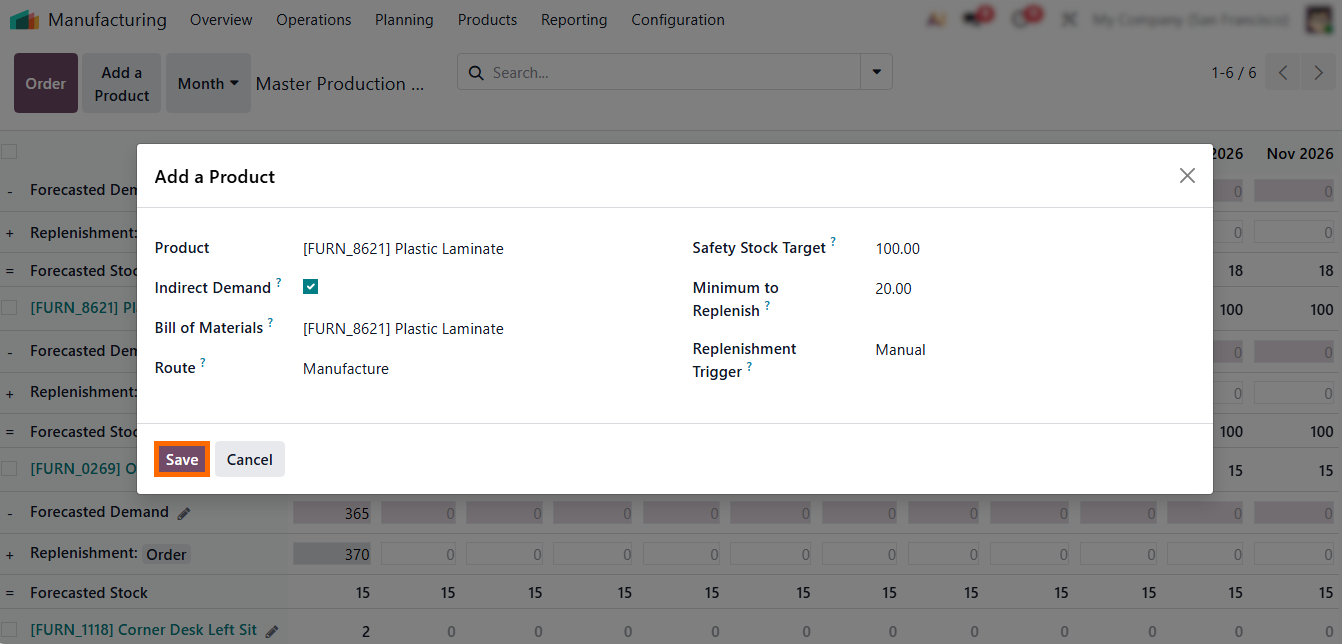
planning status are displayed. Click “Add Product” to open the configuration popup.
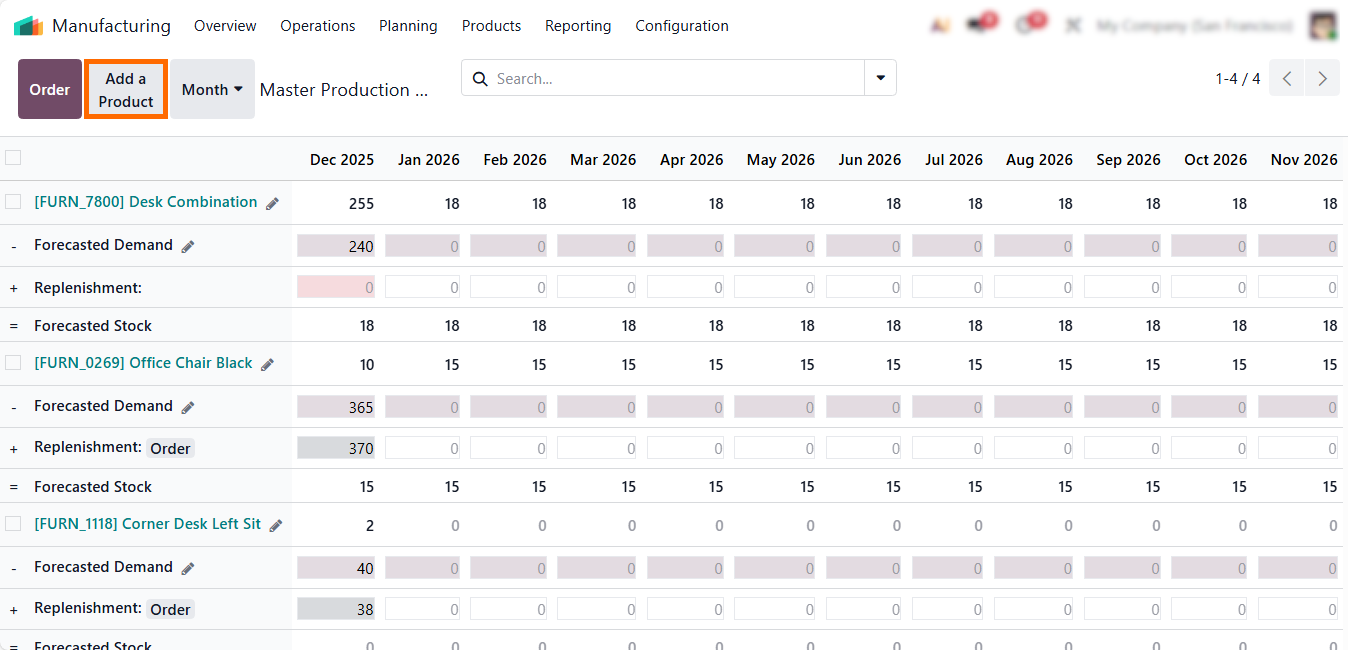
- Here you can define MPS planning strategy, replenishment method, forecasted demand, and minimum/maximum stock levels.
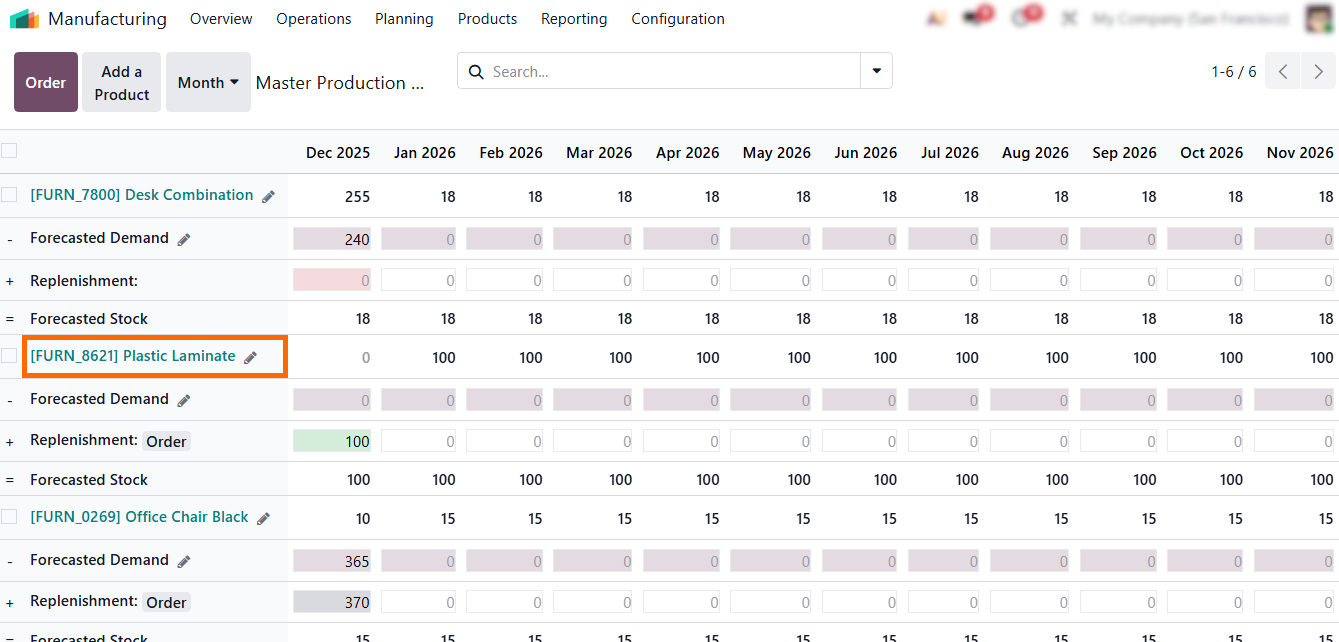
- Once the product is added, it will appear in your MPS
dashboard, ready for MPS
production planning and master scheduling adjustments, as shown in the screenshot.
-
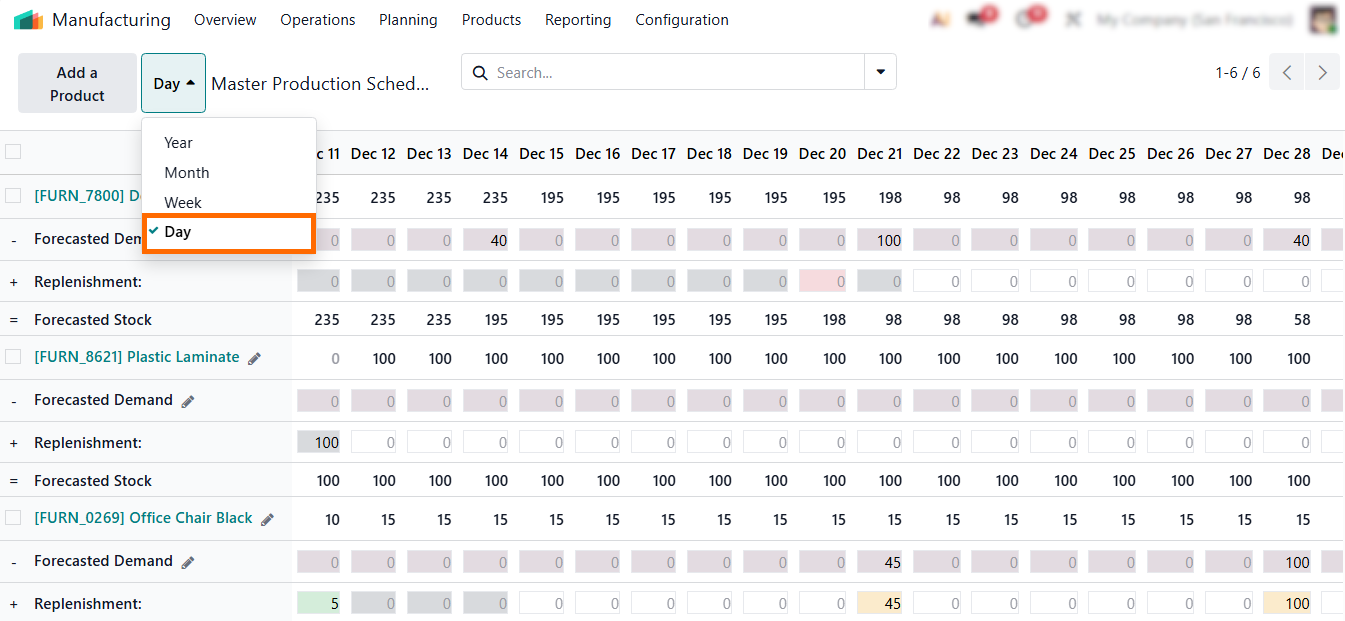
Odoo 19 lets planners
choose yearly, monthly, weekly, or daily horizons so the MPS scheduling format fits the company’s
planning cycle and supports both long- and short-term scheduling
Master Production Scheduler: From Planning to Execution and Demand Oversight
Although Odoo MPS offers advanced AI features and automated master production scheduling, many manufacturers still need the flexibility to override system suggestions and adjust quantities manually. Not every demand pattern is predictable, and not all production decisions can rely solely on algorithms. Seasonal spikes, last-minute customer requests, urgent custom orders, supplier delays, and unexpected machine downtime often require planners to intervene directly. Manual planning in the master production schedule allows teams to correct AI-generated proposals, fine-tune replenishment quantities, anticipate upcoming production constraints, and synchronize supply with the real operational insights.
- You can manually adjust MPS quantities for any period, updating forecasted demand or replenishment values when real production needs differ from automated suggestions.

Every manual change is saved instantly, letting planners update the master schedule in real time without switching screens or running batch calculations —
ensuring a smooth, continuous MPS planning workflow.

- Use filters and custom rows to structure your MPS planning view, helping planners focus on priority products, specific replenishment types, or critical horizons.
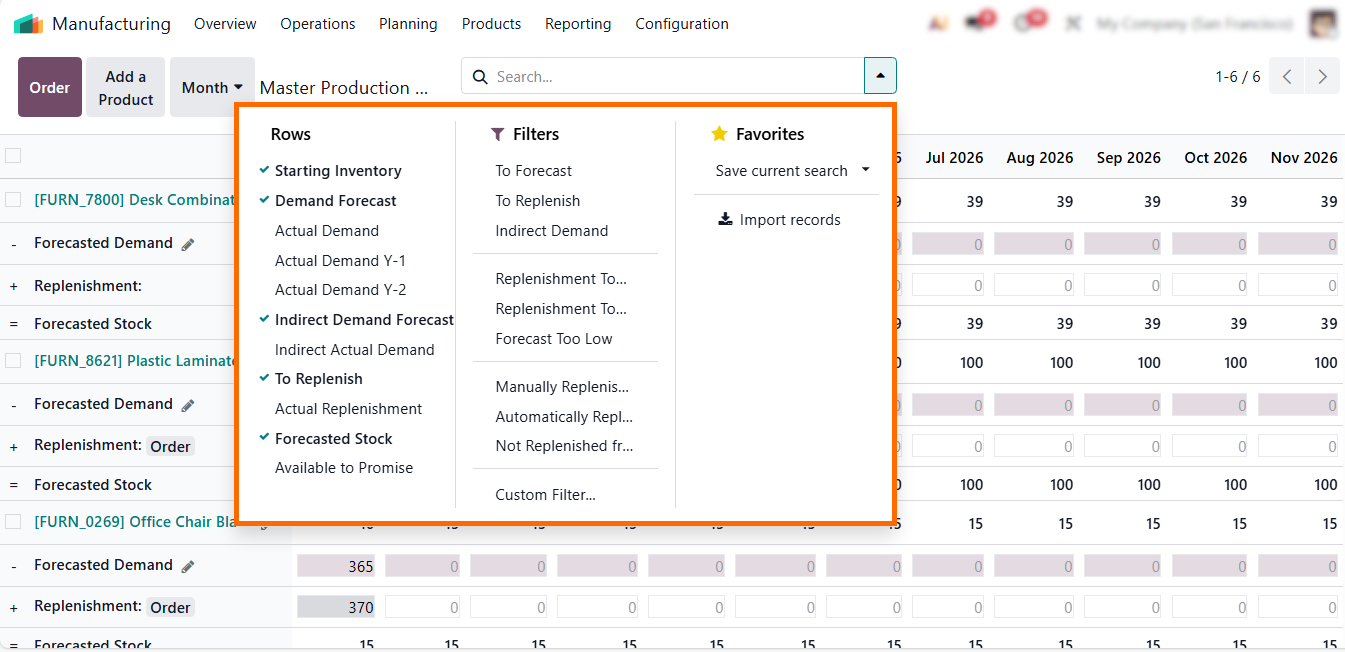
Planners can plan, analyze, and control the master production schedule in real time – ensuring that the MPS master production schedule remains accurate, executable, and aligned with the operational constraints.
Executing
Decisions in Daily MPS Manufacturing
Operations
The Odoo master production schedule serves as both a planning hub and an operational command center, enabling precise MPS execution and informed master scheduling decisions. Built-in actions features allow planners to move instantly from analysis to execution – exporting data, triggering production or purchase orders, cleaning outdated plans, and controlling indirect demand visibility. These actions support the full master production schedule process, helping teams manage MPS manufacturing, align MPS and MRP, and keep the master schedule production accurate without relying on external tools or manual spreadsheets. For companies using software MPS inside ERP, these are a key part of daily MPS planning and operations management.
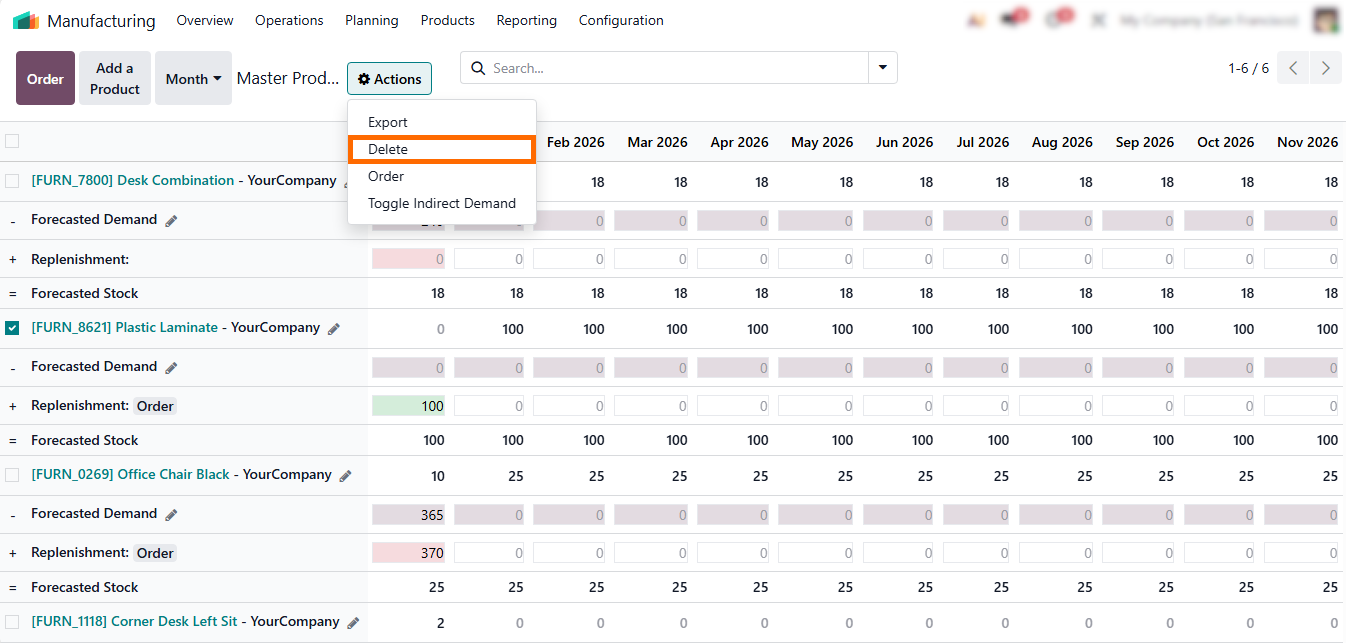
- The
“Delete” action allows planners to remove obsolete or
incorrect lines from the master production
schedule, keeping MPS planning
clean, accurate, and aligned
with current demand.
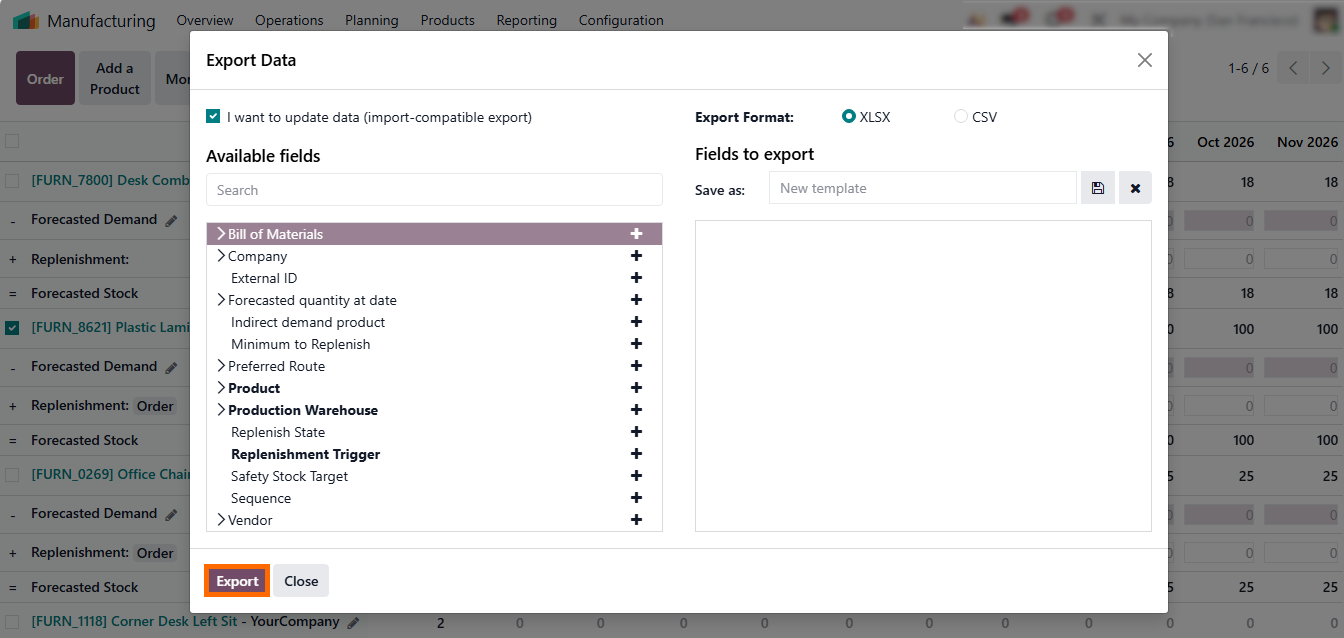
- The “Export” action in the Odoo master production schedule lets planners quickly download a structured master production schedule to share data, document decisions, or present a clear planning example directly from the MPS view.
-
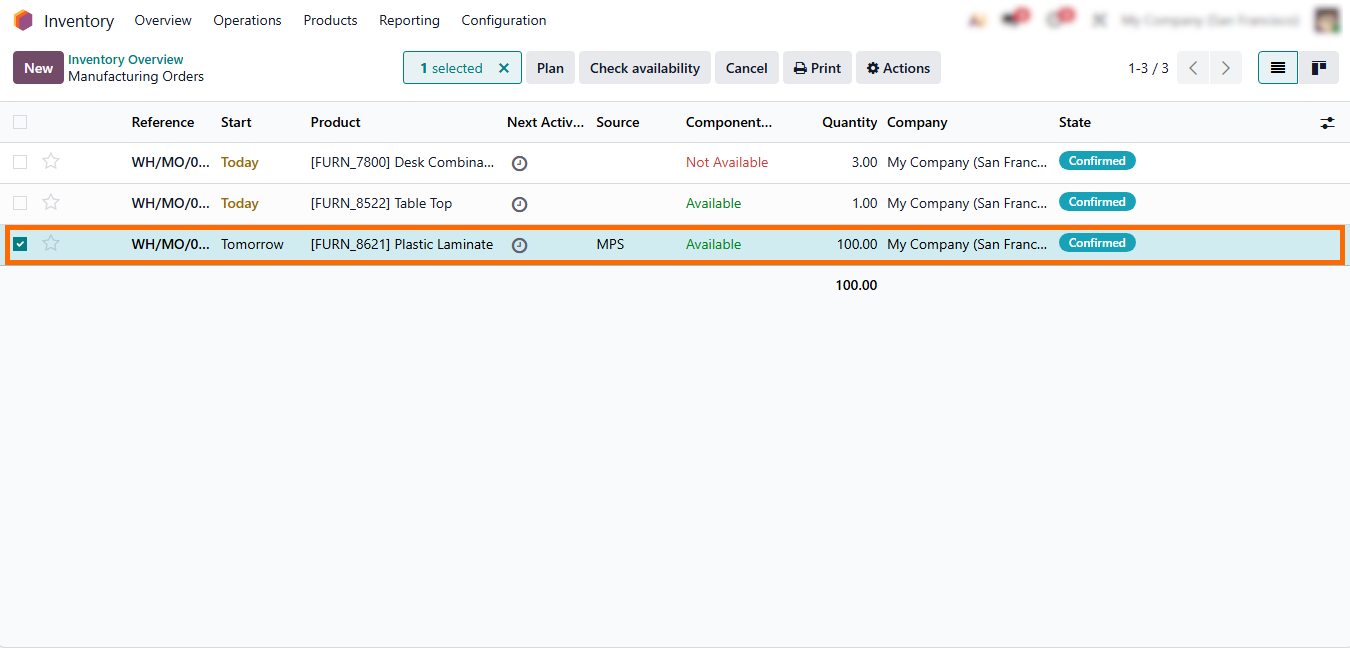
With the “Order” action, approved MPS quantities can be
instantly converted into manufacturing or purchase orders, seamlessly linking master scheduling with MRP
execution.
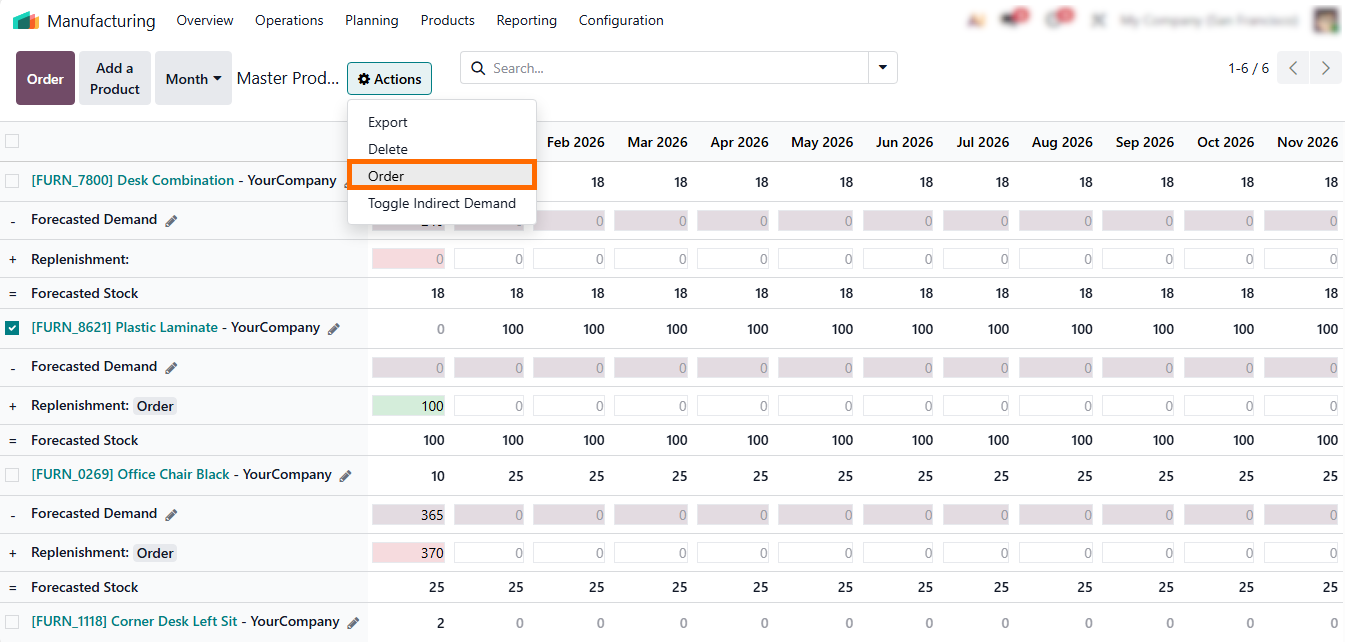
- As a result, planners create manufacturing orders directly from the master production schedule sample, converting approved MPS quantities into production orders while keeping MPS and MRP fully synchronized in ERP.
Monitoring,
Analyzing, and Reporting MPS Scheduling
with the Dashboard Features
It consolidates forecasts, replenishment proposals, inventory signals, and execution status into a single real-time view, turning the master production schedule into a live decision-making tool rather than a static plan. Planners can quickly identify variances, assess planning assumptions, and prioritize corrective actions before deviations escalate into execution issues. This visibility directly supports the master scheduling process and clarifies what is master production scheduling in real business conditions. By centralizing planning and performance data, the MPS dashboard reinforces the role of the master production schedule in operations management, helping teams move from reactive adjustments to structured, data-driven control.
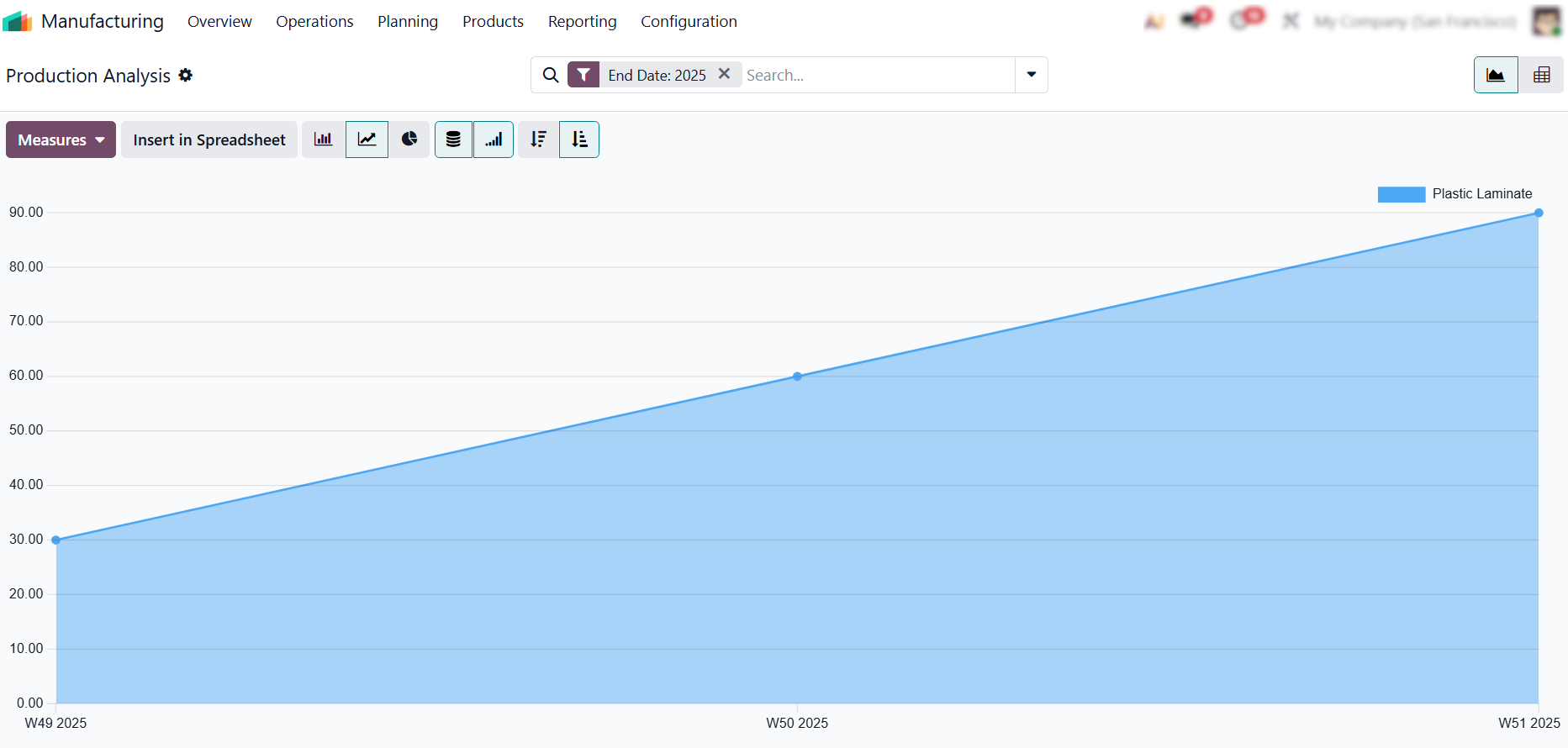
- With the built-in integration between Manufacturing, Inventory, Sales, and MRP,planners can also rely on the Odoo dashboard for deeper MPS operational analysis.
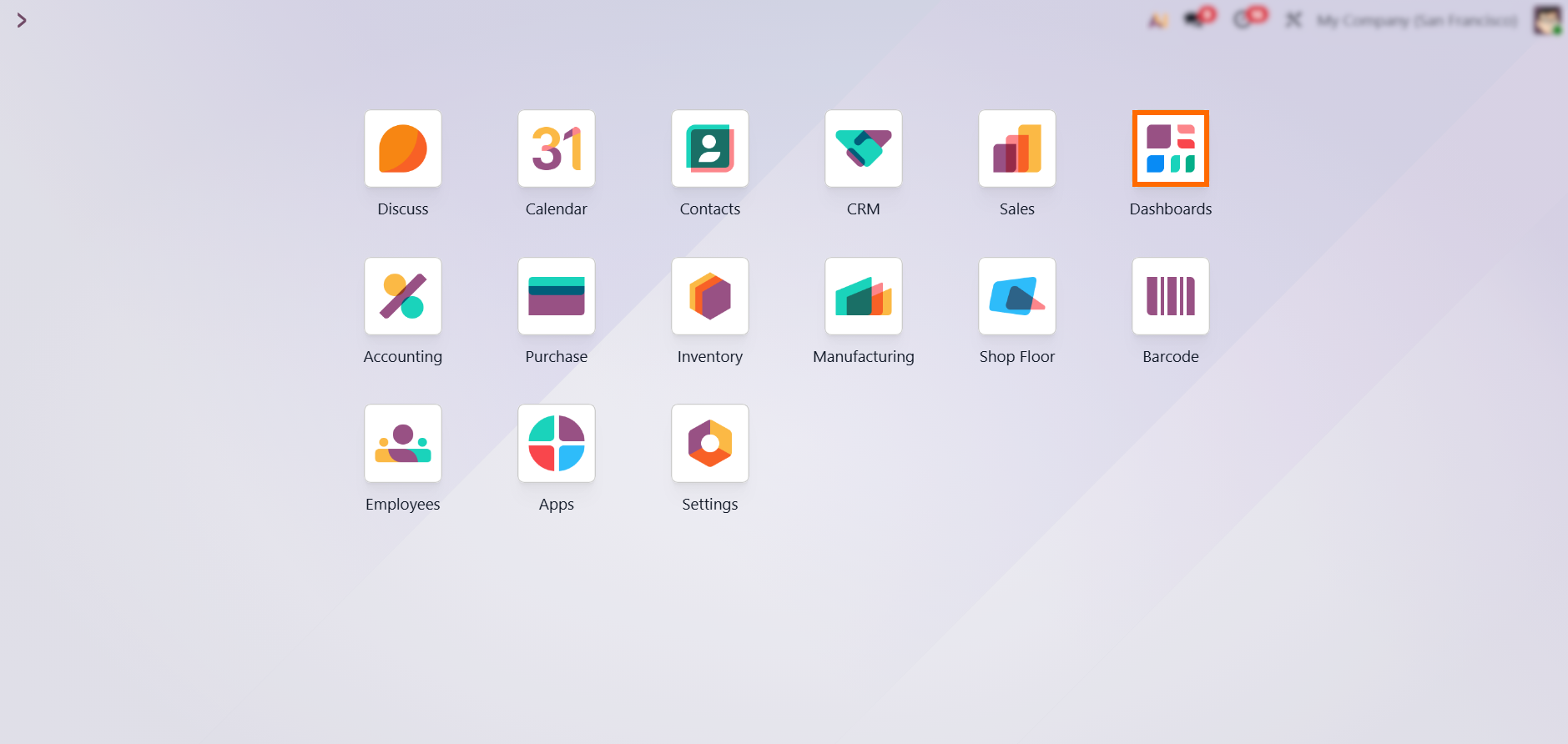
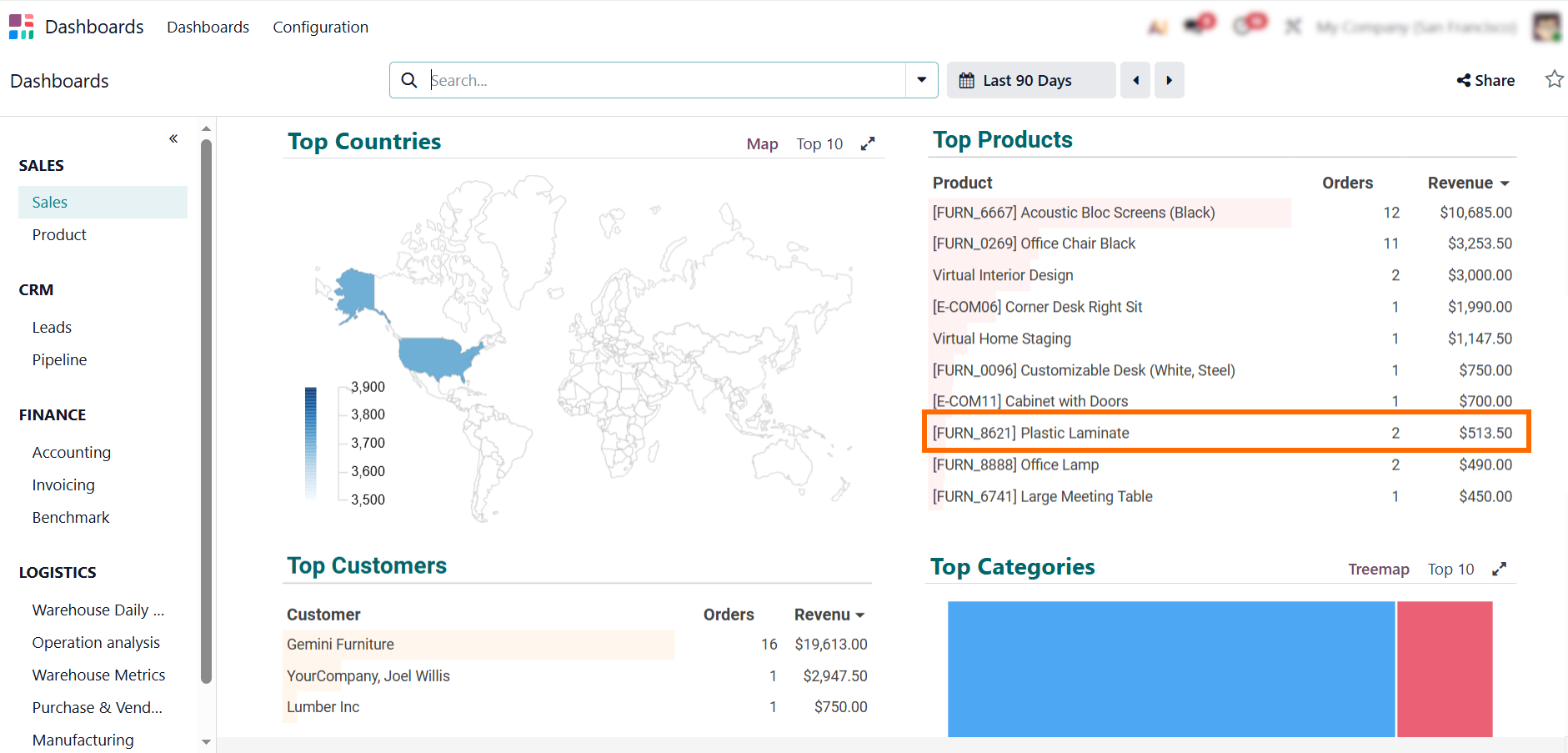
- The dashboard highlights forecasted demand, inventory levels, replenishment quantities, and production status, enabling teams to validate the master production schedule, track variances, and assess scheduling performance.
-
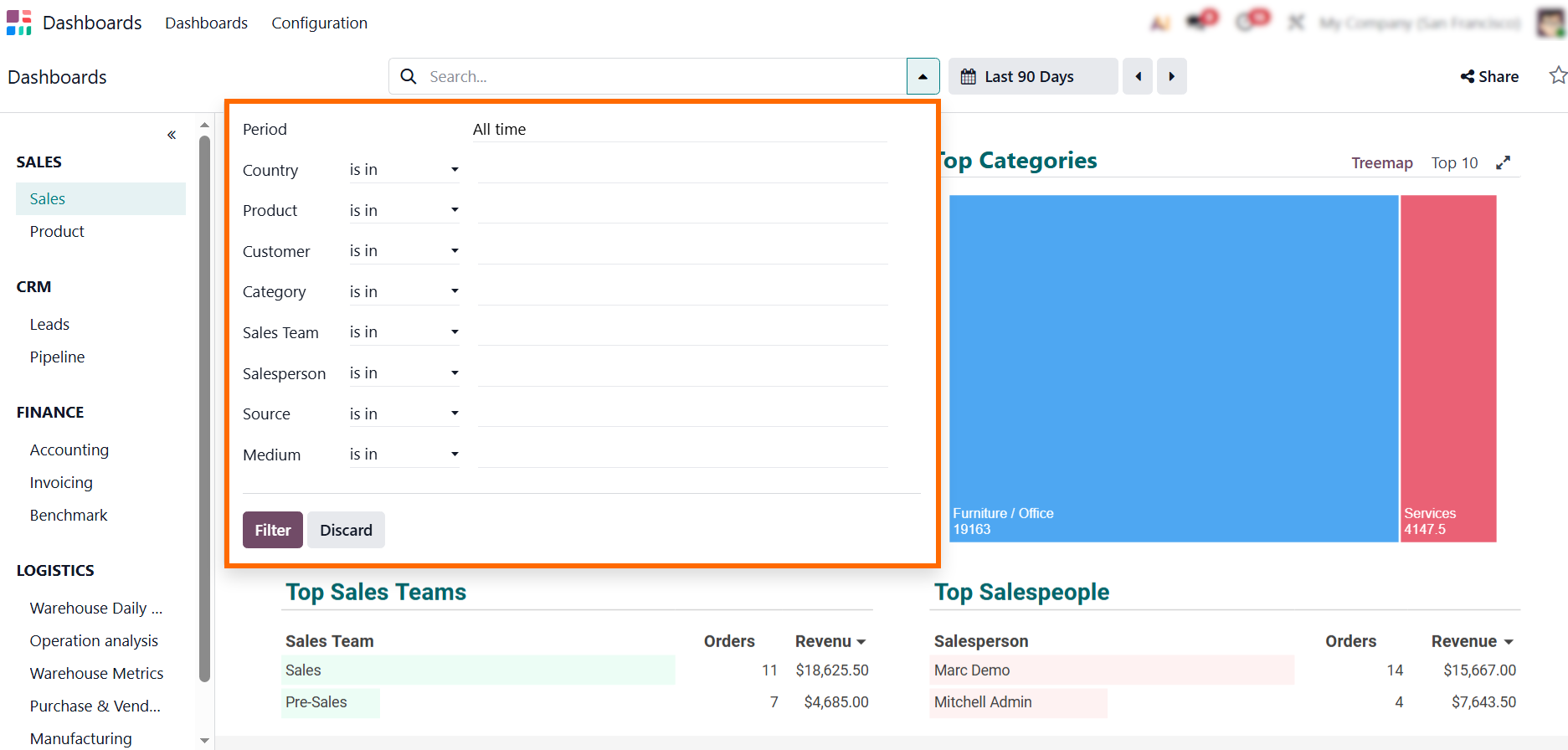
Select the desired
period, product, or planner to focus your analysis and gain actionable
insights, helping teams spot trends, anticipate stockouts, and optimize
replenishment across MPS manufacturing
and supply chain operations.
Avoiding
Common Master Production Scheduling
Mistakes in Daily Operations
The Odoo master production schedule becomes truly effective when manufacturers combine structured planning, clear scheduling logic, and reliable data inputs. Instead of treating the MPS as a static spreadsheet alternative, top-performing teams use it as a dynamic master production planning environment that connects forecasts, capacity, inventory, and replenishment workflows. By clearly understanding what is master production schedule in business, operational terms, planning teams can avoid common execution errors and turn MPS into a daily decision-support system rather than a theoretical framework. The following best practices summarize how innovative factories optimize MPS scheduling, strengthen MPS supply chain visibility, and make better production decisions across planning horizons.
Why an Unstructured MPS View Slows Daily Planning
A focused Odoo master production schedule helps planners work faster and avoid noise in large catalogs. With filters by category, replenishment type, or planner, teams build a clean master scheduling workspace tailored to their roles. Custom rows allow grouping by demand patterns or planning horizons, simplifying navigation through large master production schedules. This structured layout improves visibility when comparing forecasts vs. actual demand, validating master production schedule format, or adjusting safety stock.
When Forecasts Are Not Reconciled With Real Demand
Effective master production scheduling relies on balancing forecasted demand with real sales orders and on-hand MPS inventory. Odoo’s MPS lets planners fine-tune forecasts, override weekly demand, and instantly preview the impact on the production schedule in units. By applying consistent rules, companies improve overall master schedule planning, detect deviations earlier, and minimize stockouts. This reflects the core definition of master production schedule: a master production schedule specifies what to produce, when to produce it, and in what quantities.
The Risk of Ignoring Capacity Constraints in MPS Planning
Even the most accurate forecast fails if the factory cannot execute it. Odoo’s manufacturing planning tools help validate capacity limits, component availability, and realistic lead times before finalizing the master planning schedule. This ensures every master production schedule example or sample master production schedule aligns with material readiness and work-center capacity – critical for strong MPS operations management. Adjusting the master production schedule calculation based on bottlenecks or supplier variability keeps the plan feasible and cost-efficient.
Use MPS Insights to Improve Your Overall Supply Chain Strategy
The MPS is more than a planning view — it becomes the central driver of replenishment, purchasing, and the broader MPS supply chain. Odoo’s analytics, pivot tables, and forecasting tools help teams refine safety stocks, strengthen master scheduling techniques, and optimize long-term planning. Regular analysis boosts accuracy across the MRP master schedule, reduces inventory costs, and prevents shortages common in poorly structured master production scheduling examples. This transforms the MPS into a strategic asset rather than just software MPS for calculations.
Conclusion
MPS Scheduling delivers a comprehensive, data-driven framework for modern manufacturing operations. Leveraging AI-powered scheduling, flexible manual adjustments, and advanced analytics, manufacturers can maintain precise master schedule production, minimize stockouts, and streamline MPS-driven supply chain processes. By grasping the fundamentals of a master production schedule and implementing proven scheduling techniques, companies can achieve dependable, actionable planning that seamlessly integrates with both MPS and MRP, strengthens operational control, and boosts overall factory efficiency.
Сlear functions of master production schedule, guidance on how to calculate master production schedule, and integration with material production schedule processes ensure teams can achieve the objectives of master production schedule while maintaining compliance with Odoo security documentation and SAP-ready practices.
Production planning improvements rarely come from adding features alone. Real progress is driven by greater visibility, earlier constraint validation, and tighter alignment between planning decisions and execution. The system enables this shift by positioning the master production schedule as a practical control layer that connects demand, inventory, capacity, and MRP execution within a single planning workflow — aligning modern MPS practices with master production schedule SAP principles and enterprise planning standards.