Accountants exploring storno accounting in Odoo 19 often expect a dedicated button or configuration similar to traditional accounting systems. In Odoo Accounting, storno is not implemented as a separate mode but as a structured financial reversal designed to preserve data integrity and audit transparency. Understanding storno in Odoo 19, therefore, requires shifting the focus from interface settings to accounting logic, where corrections are performed through controlled reverse entries rather than direct edits.
In Odoo 19, storno accounting replaces manual adjustments and overwritten postings with a clear reversal mechanism that keeps the original transaction intact. Each correction is recorded as a linked accounting entry that offsets the initial posting, following classic red storno principles while maintaining full traceability. This approach ensures that errors remain visible in the ledger, allowing accountants to see when, why, and how a transaction was corrected without altering historical financial data.
Storno accounting in Odoo 19 defines a structured approach to reversals across journals, periods, and reports. Standardized storno processes replace ad-hoc adjustments and support accurate general ledger reporting, tax calculations, and management analysis. In this role, storno accounting functions as a control mechanism that reinforces consistency, compliance, and long-term reliability in financial records.
How Storno Accounting Is Used for Accurate
Financial Corrections
In practical accounting workflows, corrections involve more than simple manual adjustments. Instead of modifying posted transactions or applying informal changes, Odoo Accounting relies on storno accounting as a controlled method for reversing incorrect entries. To understand what storno means in this context, it should be seen as a structured reversal process. This process preserves the original transaction while ensuring accuracy, traceability, and audit compliance across Odoo 19 accounting records. This approach ensures that all corrections follow the same accounting logic,regardless of journal type or reporting period.
Applying Red Storno to Maintain Traceable Reversals
Red storno is a foundational concept within storno accounting. In Odoo accounting, red storno is implemented by creating a reversal entry that mirrors the original transaction with opposite values. This red storno approach ensures that storno accounting highlights errors instead of concealing them. By using red storno, storno accounting in Odoo maintains a complete audit trail that clearly shows both the incorrect posting and its correction. For auditors and finance teams, red storno provides full transparency into how and why adjustments were made.
Enforcing Disciplined Corrections Through Storno Accounting
One of the key strengths of storno accounting in Odoo is its ability to enforce disciplined correction behavior. Posted entries cannot be edited directly, which forces accountants to rely on storno accounting rather than manual rewrites. This design ensures that storno accounting is applied uniformly across journals and users. As a result, storno accounting in Odoo 19 becomes an internal control mechanism that limits unauthorized changes and protects financial data integrity.
Managing Period-Based Adjustments Using Storno Accounting
Accounting errors are often discovered after reporting periods are closed. Storno accounting in Odoo 19 allows these errors to be corrected without reopening historical periods. By separating the original transaction from its storno accounting reversal, finance teams can maintain clean period closures while ensuring that corrected balances are reflected in subsequent reports. This makes storno accounting essential for organizations that require strict month-end and year-end controls.
Improving Visibility of Corrections Through Storno Accounting
From a financial transparency perspective, corrections should be easy to trace and understand. Because each reversal in Odoo 19 is directly linked to the original entry, stakeholders can clearly see what was corrected and why. This level of visibility reduces reconciliation issues and strengthens confidence in reported figures. When applied consistently, storno accounting supports reliable financial analysis and long-term reporting accuracy.
Pro-tip: Linking Reversals for Faster Audits
Always connect reversal entries to the original invoices or journal items, and include a brief note explaining the correction. This ensures smooth audits, clear transparency, and easier reconciliation across multiple periods.
How Proper Accounting Configuration Enables Red Storno
Effective storno accounting in Odoo 19 starts with a correct accounting configuration rather than with a separate storno feature. Users trying to understand what is storno often expect a dedicated activation step for storno accounting, but storno accounting in Odoo 19 is applied through standard accounting setup by default. Core elements such as journal structure, posting rules, fiscal periods, and user access rights determine how storno accounting in Odoo 19 behaves across the system. When these components are properly aligned, storno accounting in Odoo enforces controlled reversals instead of direct edits, ensuring that every correction follows red storno principles and remains fully traceable. This foundation allows storno accounting to function consistently across journals and reporting periods in Odoo 19 without relying on manual adjustments or informal fixes.
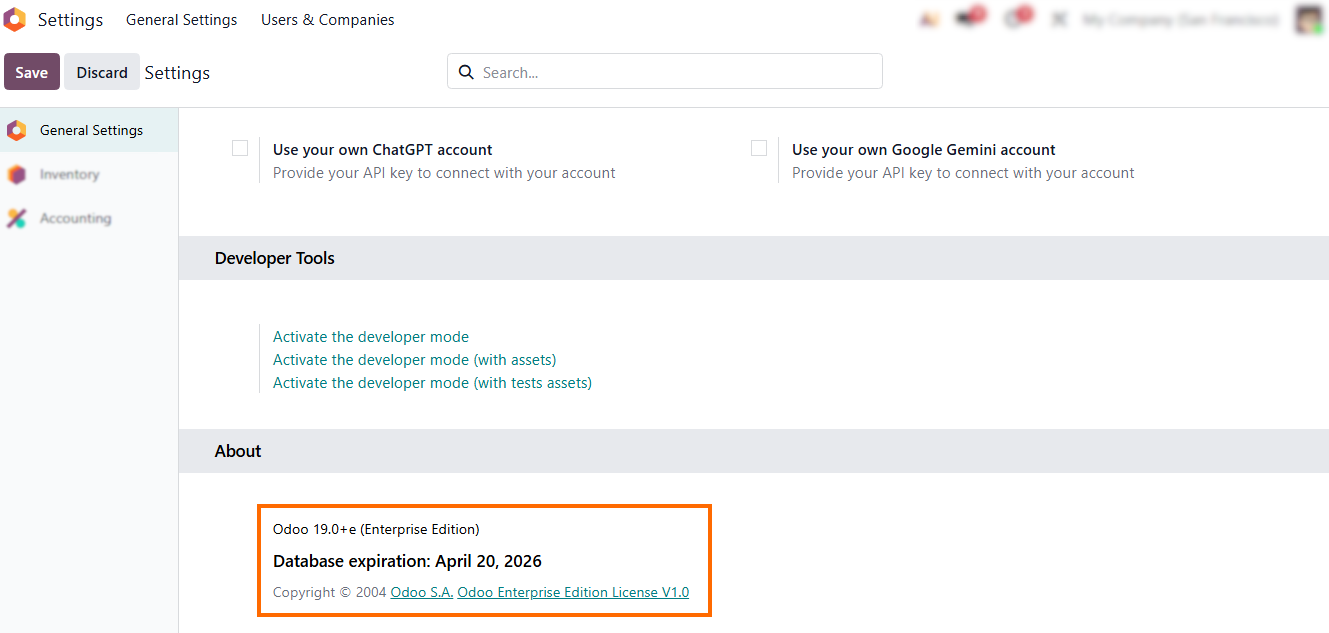
- Start by confirming that you are working in Odoo 19. In this version, storno accounting is applied by default, whereas earlier releases handled red storno differently.
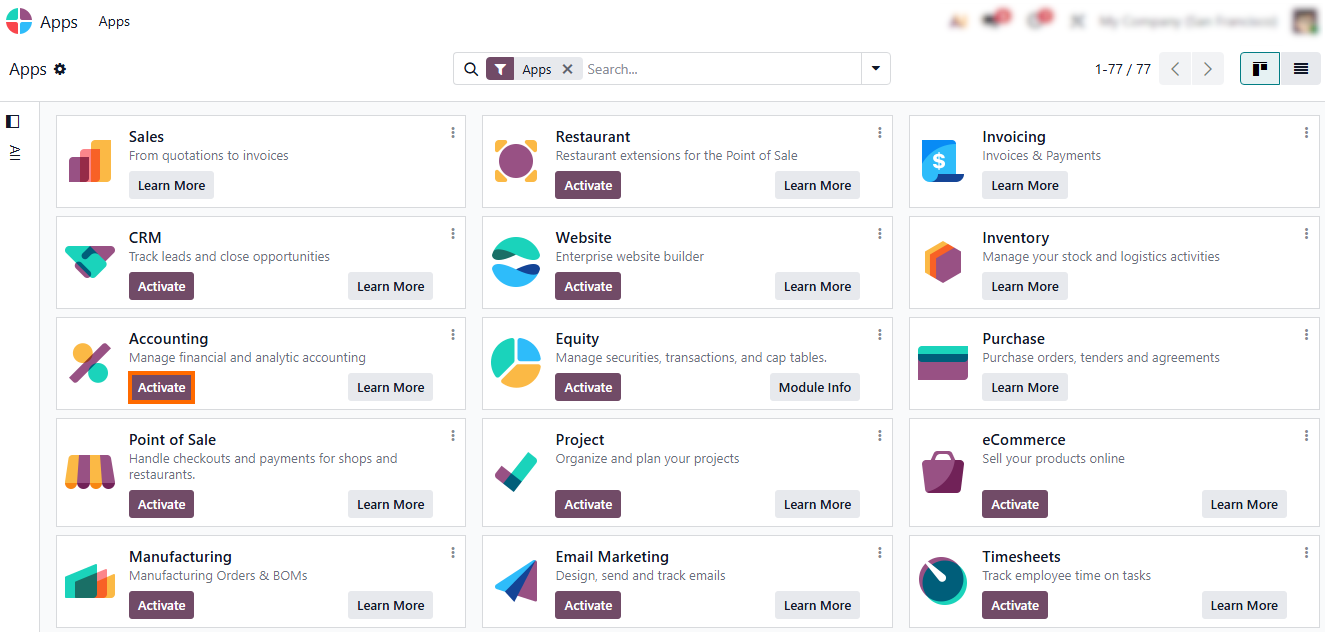
- Ensure the Odoo Accounting module is installed. This establishes the technical foundation for storno accounting in Odoo 19, enabling posted entries, structured reversals, and red storno logic without a separate storno configuration.
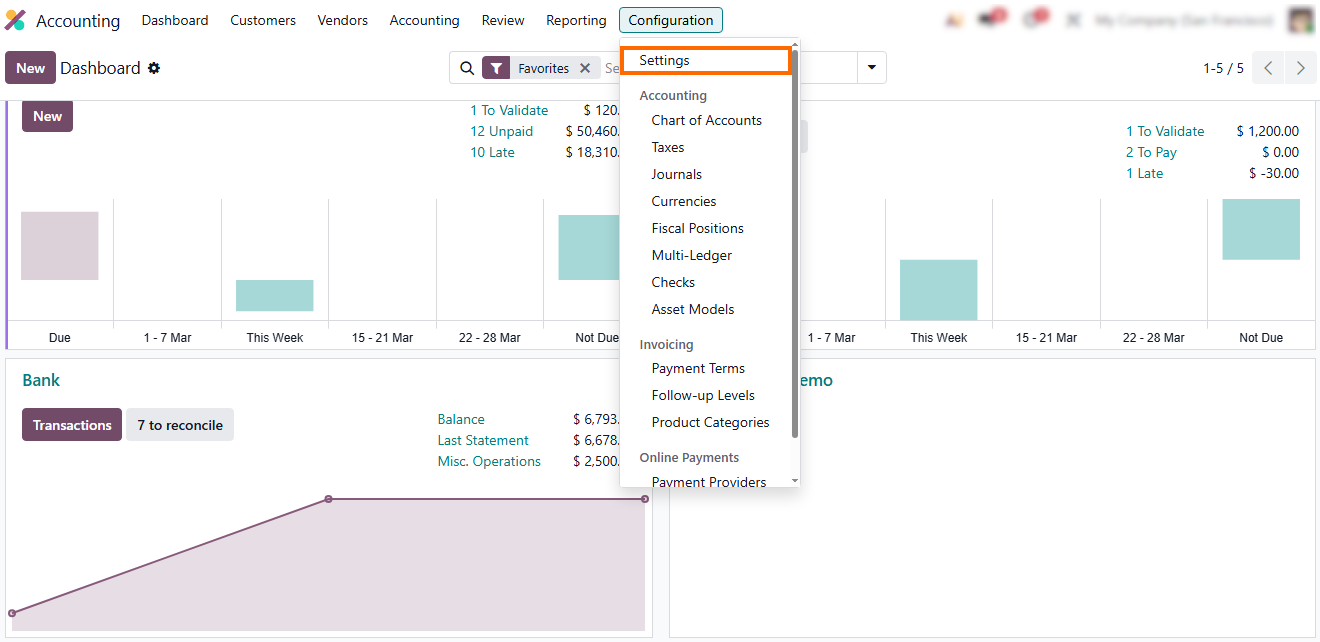
- Go to “Configuration”, check your journals, and ensure entries post before affecting accounts and cannot be edited, so storno accounting and red storno apply automatically.
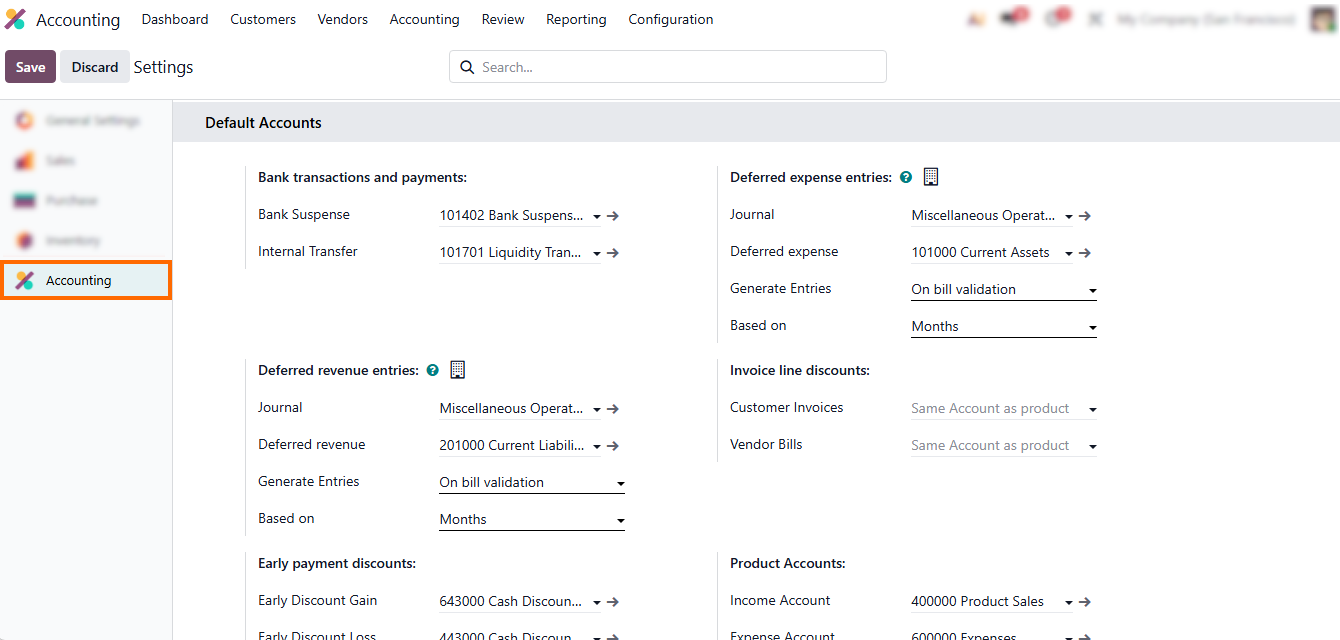
- Ensure all entries are posted before impacting the ledger, so storno accounting in Odoo uses reversals as the only correction method, preserving traceability and audit compliance.
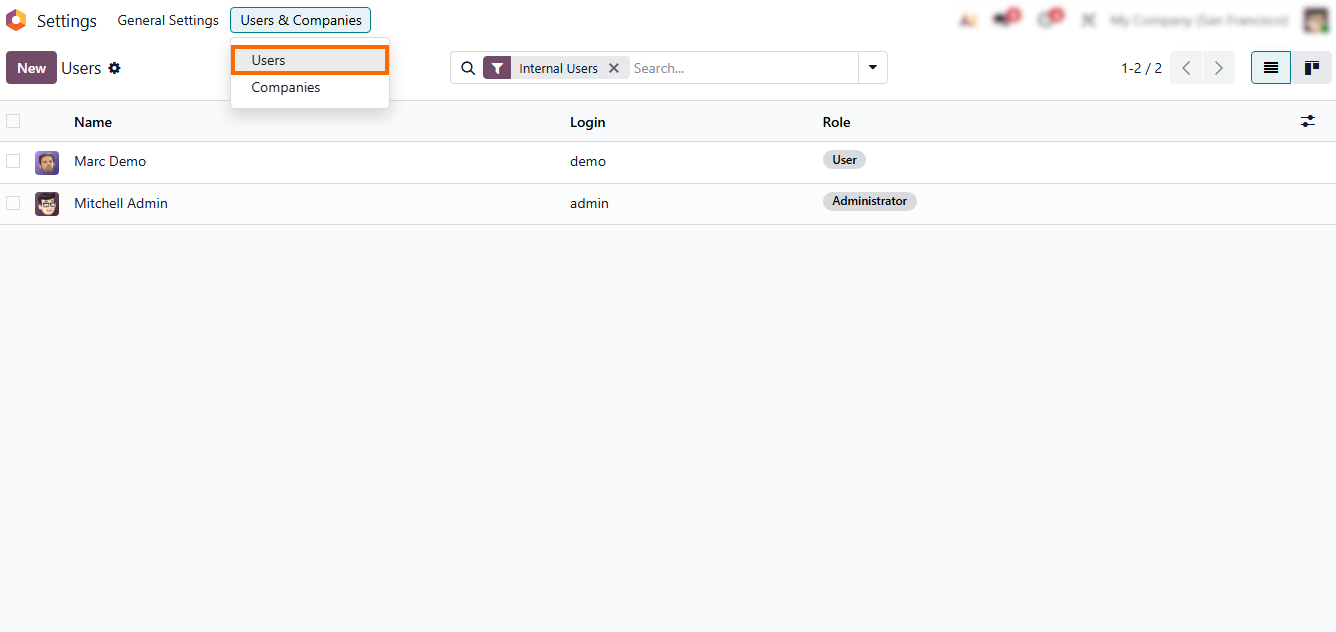
- Restrict editing of posted entries by navigating to “Settings”, then “Users”. This keeps storno accounting in Odoo 19 as the default correction method and reinforces red storno principles across all journals.
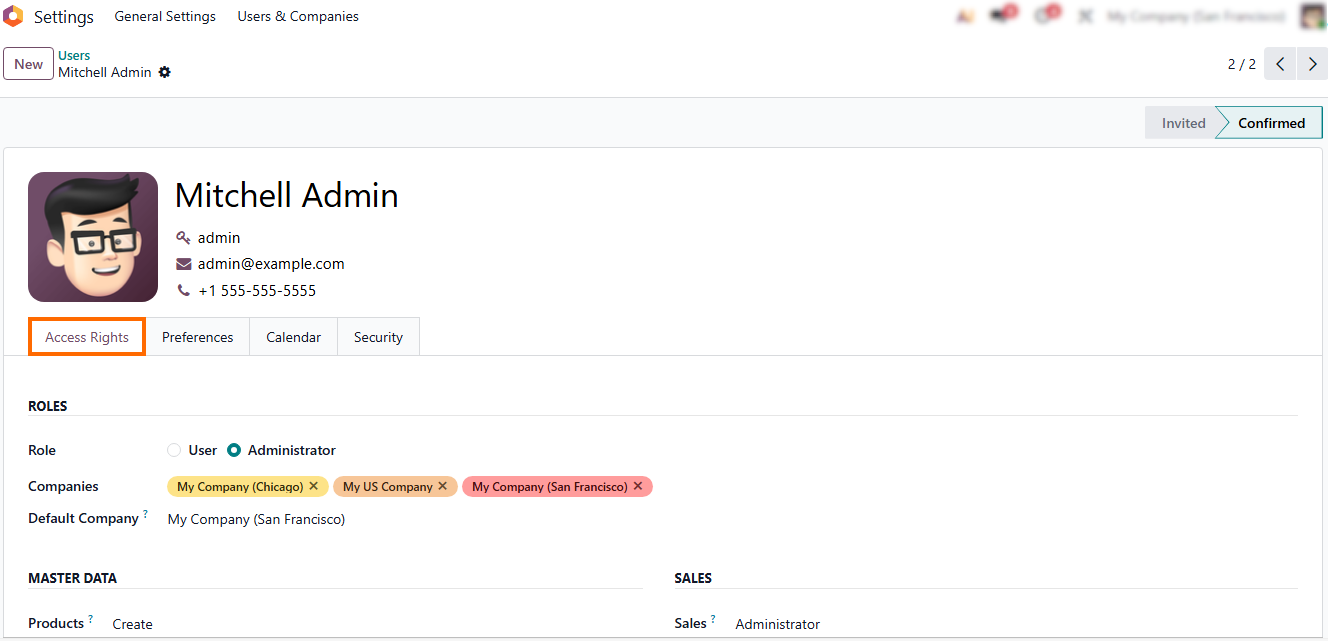
- Periodically review user roles to ensure only authorized personnel can post or reverse entries, maintaining consistency and compliance with red storno principles, and preventing untracked modifications in the ledger.
From
Posted Invoice to Storno Entry in Odoo 19: Storno Workflow
In storno accounting in Odoo 19, the process begins with a posted customer invoice that already affects the ledger. Once validated, the invoice cannot be edited, which is a fundamental rule of storno accounting and a practical answer to what is storno in real accounting workflows. At this point, the accountant identifies an issue – such as a wrong amount, incorrect account, or wrong tax. Instead of changing the original document, storno accounting in Odoo requires a controlled correction. The invoice remains untouched, and storno accounting in Odoo applies a red storno reversal that offsets the original entry. This demonstrates how storno accounting works in practice: the mistake stays visible, the correction is fully traceable, and red storno becomes the only compliant way to fix posted data in Odoo accounting.
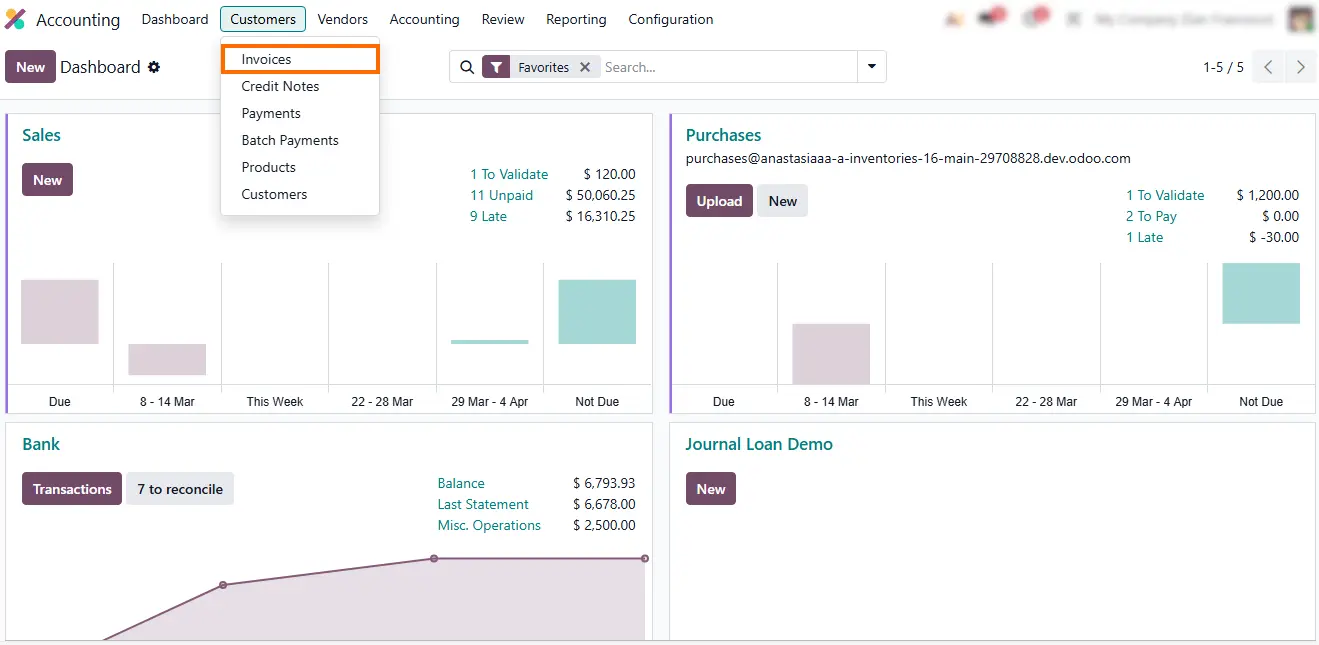
- Open the Accounting module, go to Customer Invoices, and locate the posted invoice that requires correction. All corrections start from posted invoices within this reversal process.
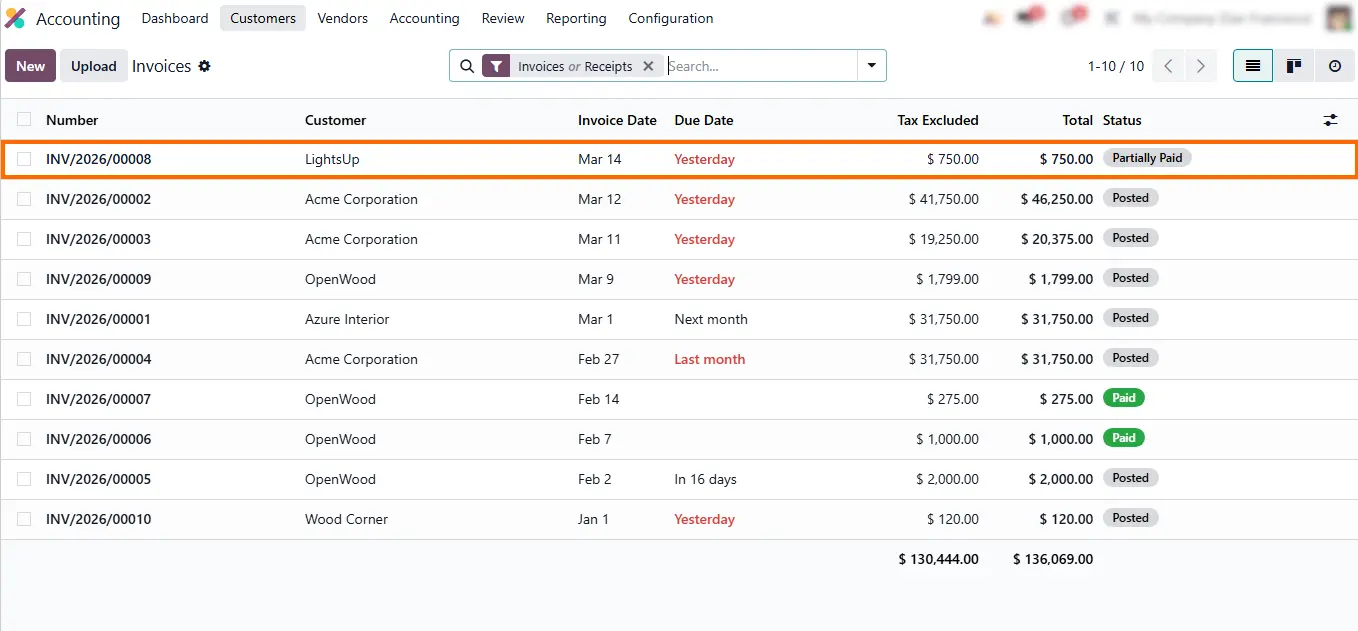
- Select the invoice with the error. The system prevents editing, enforcing controlled reversal rules and ensuring corrections are performed properly.
- Click "Credit Note" to initiate the reversal. This automatically creates a red storno entry that offsets the original invoice without deleting it, preserving the original posting for audit purposes.
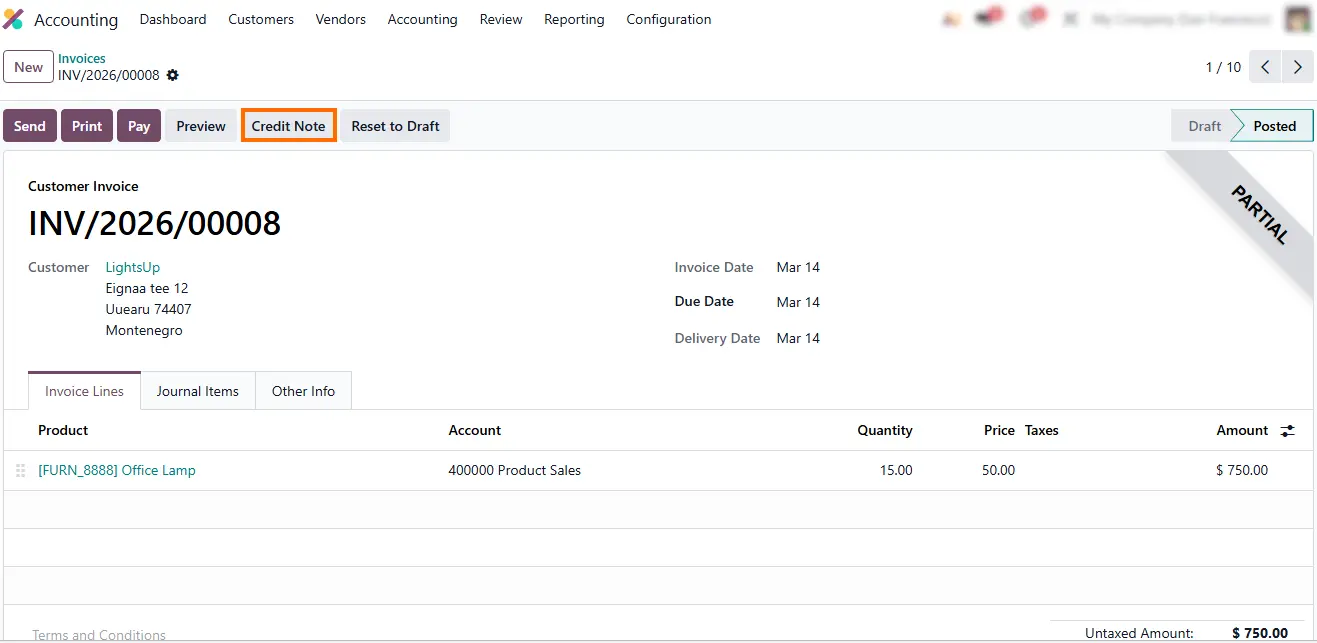
- Enter the reason for the Credit Note, verify the journal and date, then click “Reverse and Create Invoice”. This generates a draft Credit Note reflecting the correction and maintaining a clear link to the original posting.
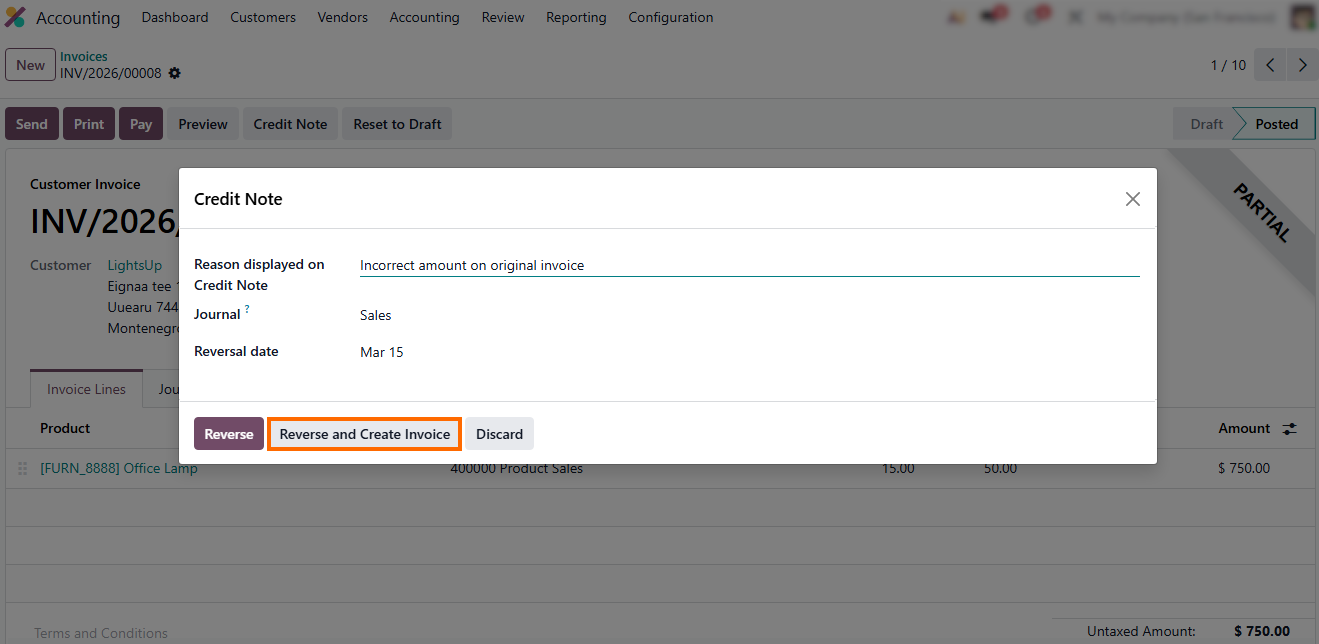
- Adjust the draft Credit Note as needed, ensuring the correction accurately reflects the intended financial outcome, then click “Confirm”.
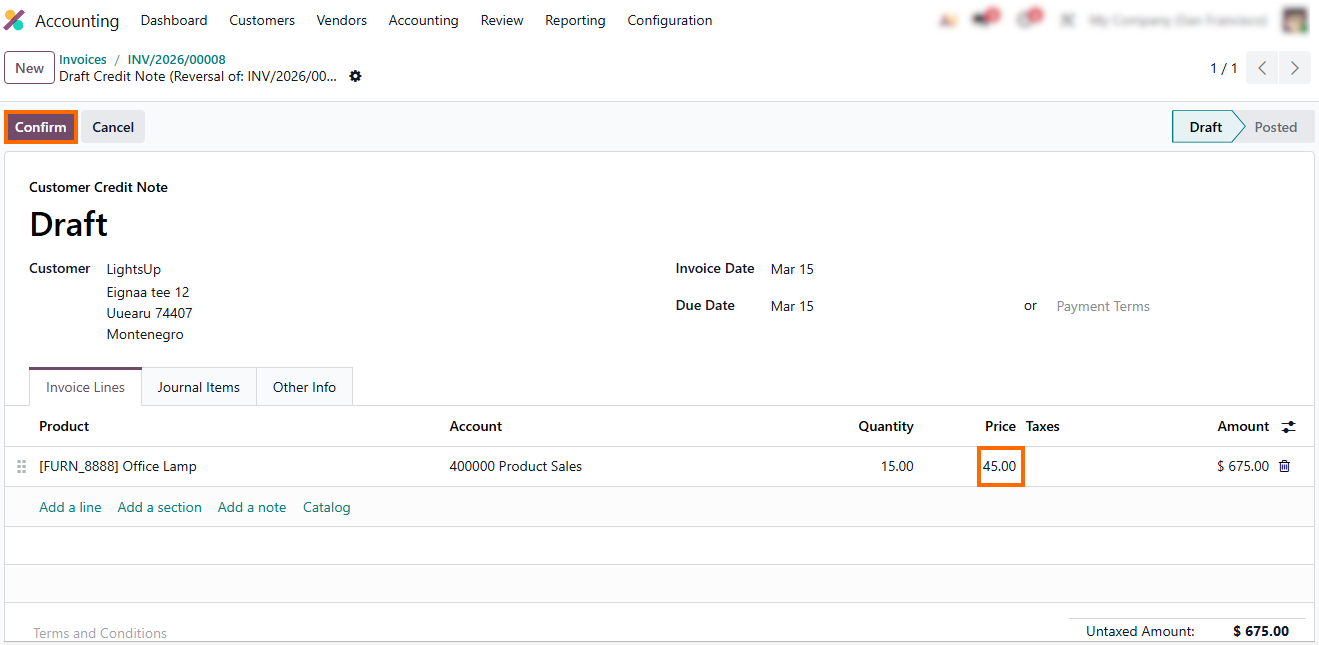
- The system posts the entry while keeping the original invoice untouched, ensuring full audit traceability while preserving the original posting logic in the ledger.
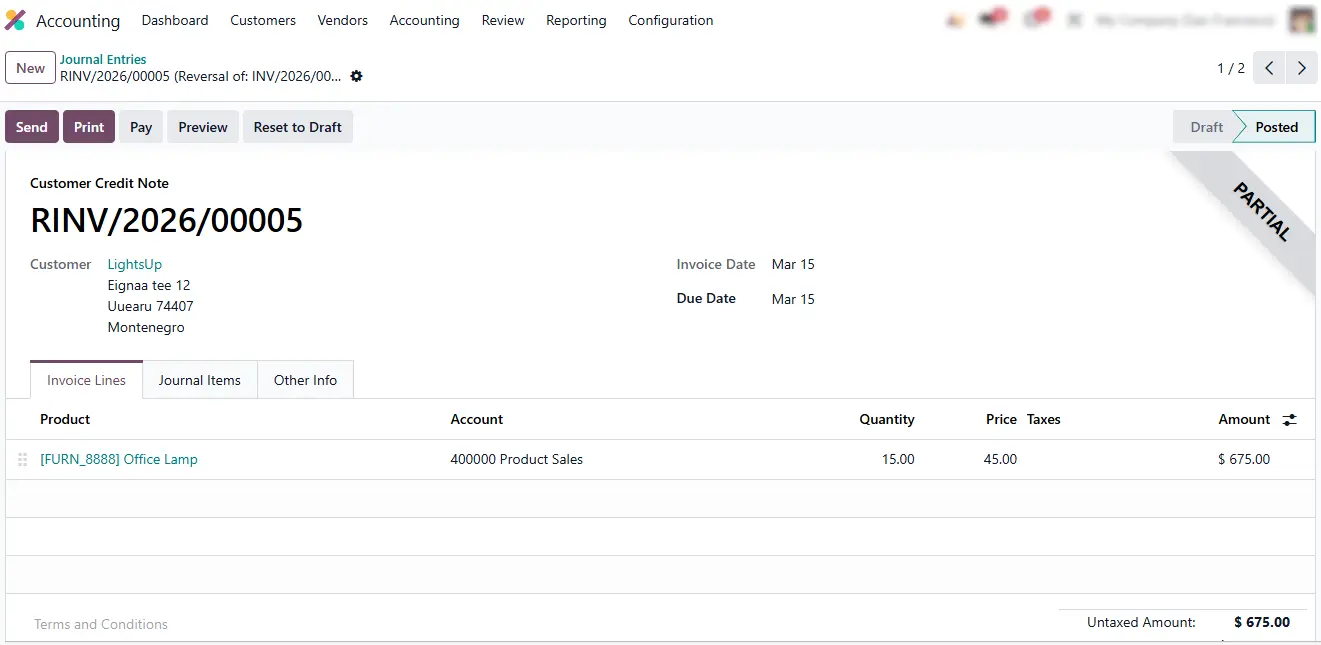
- Check the journal entries. The original invoice and the Credit Note are linked in the ledger, showing a clear correction history and demonstrating how storno accounting in Odoo 19 enforces controlled, auditable reversals.
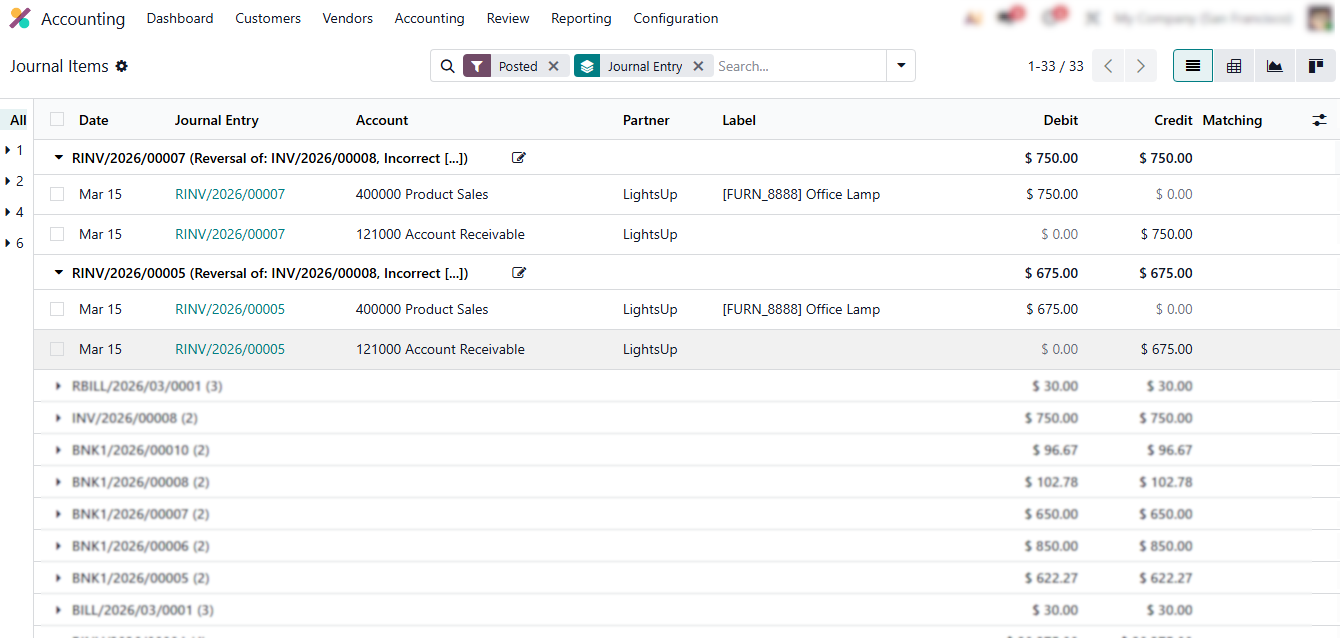
Correcting
Vendor Bills with Storno Accounting
In storno accounting in Odoo 19, correcting vendor bills follows the same controlled logic as customer invoices. This confirms that storno accounting is not limited to sales transactions. Once posted, a vendor bill affects expenses, taxes, and accounts payable, making direct edits impossible. Instead, storno accounting Odoo requires a structured reversal that preserves the original posting, and errors are corrected via a Credit Note, creating a red storno entry. This controlled approach enforces compliance with accounting standards while keeping historical data intact, and it applies uniformly across all users and journals, demonstrating how storno accounting in Odoo works in practice and providing a clear answer to what is storno in accounts payable workflows.
- Open the Accounting module in Odoo 19, then navigate to Vendor Bills. This ensures that all posted bills are visible and ready for controlled correction.
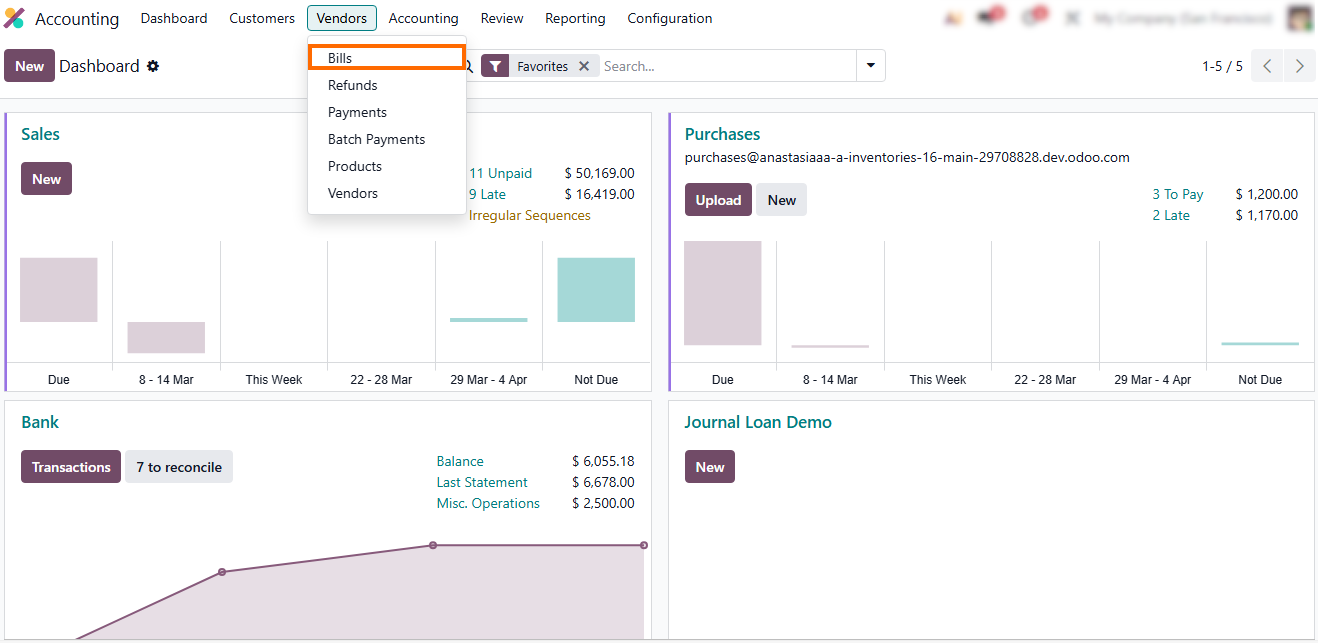
- Select the vendor bill that requires correction. Review the posted details carefully to identify the error before applying storno accounting Odoo.
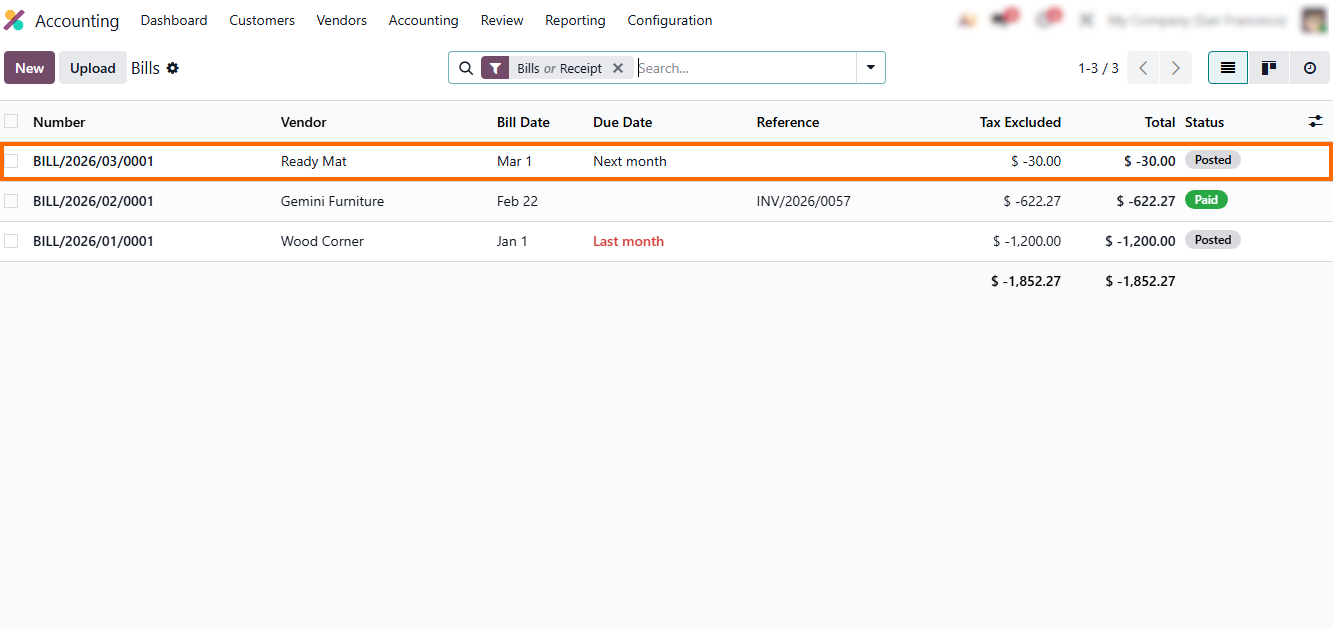
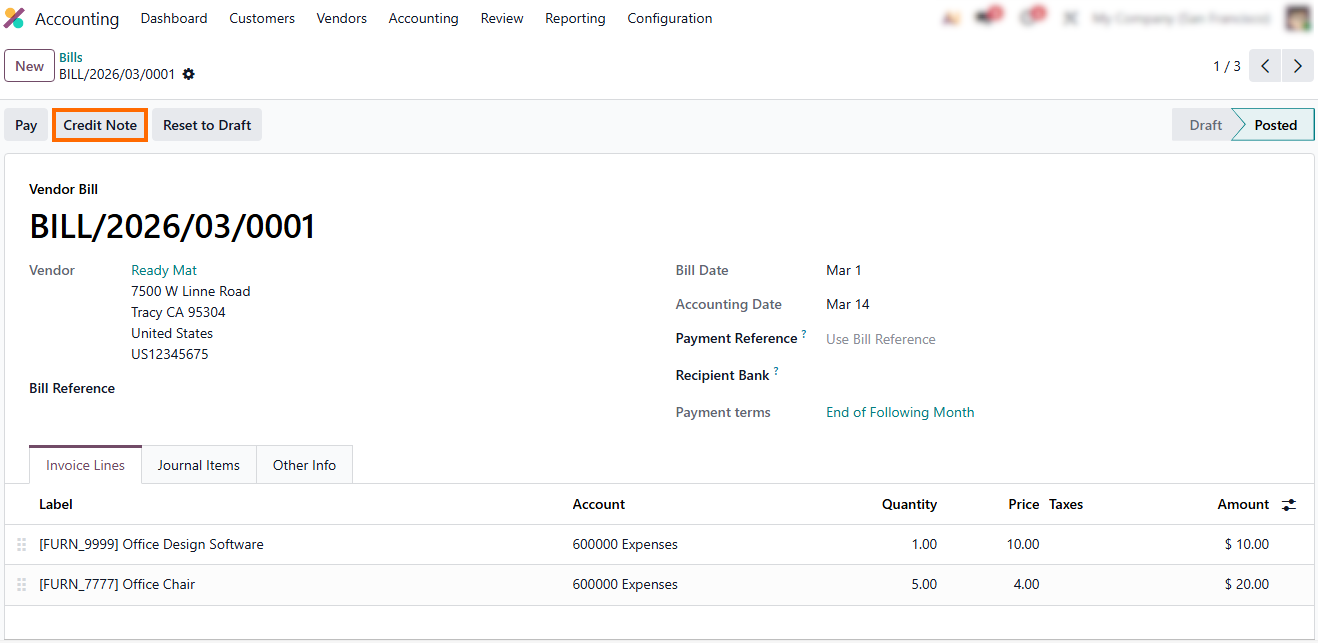
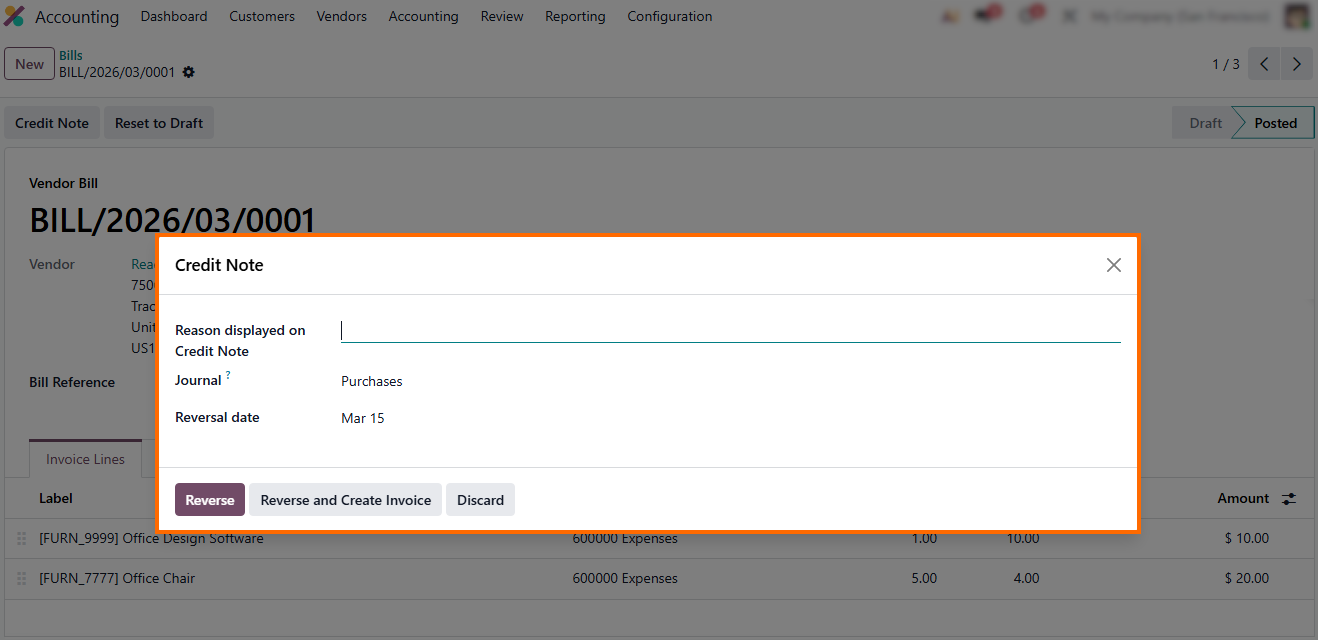
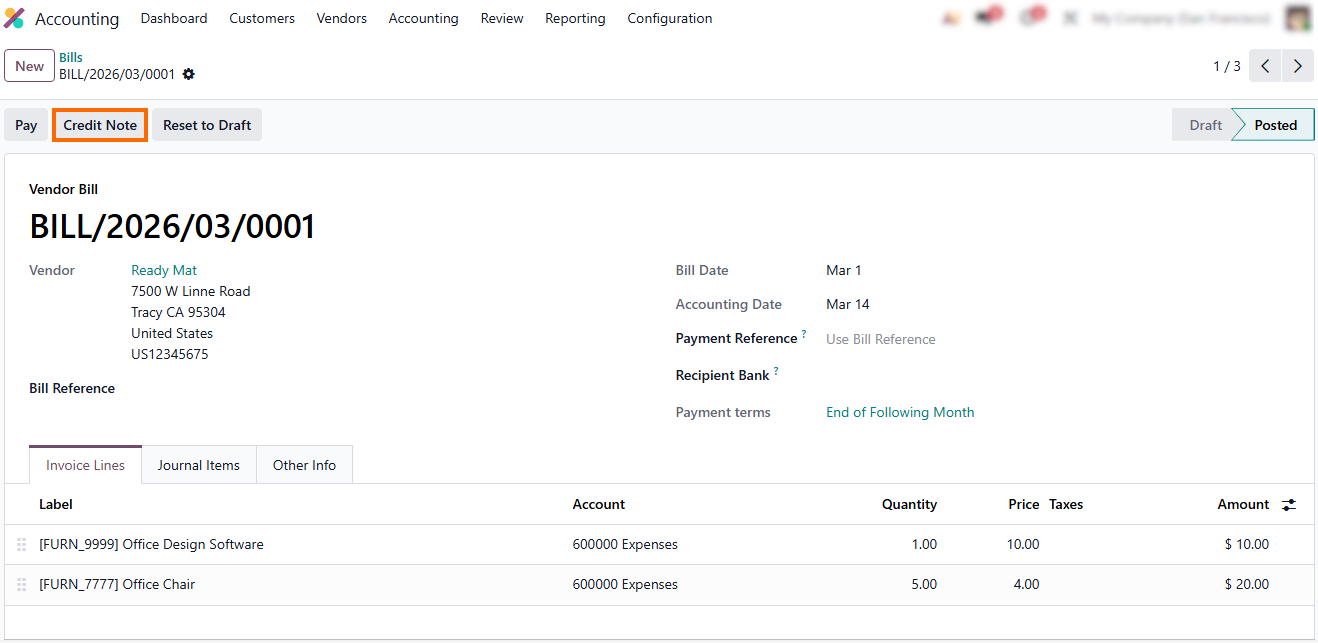
- Click “Credit Note” to initiate the reversal. This action applies storno accounting in Odoo and generates a red storno entry, immediately offsetting the original posting while preserving full visibility in the ledger.
- Make any necessary adjustments to the Credit Note, then click “Reverse” or “Reverse and Create Invoice” to complete the storno accounting process, ensuring audit trails, expense accuracy, and tax compliance.
Storno Accounting for Manual Journal Entries in Odoo 19
In storno accounting in Odoo 19, manual journal entries follow the same strict correction logic as invoices and vendor bills. Once a journal entry is posted, it directly affects the general ledger, making direct edits or deletions impossible. This restriction reflects a core principle of storno accounting: historical financial data must remain intact, while corrections are handled through structured reversals rather than informal adjustments. Instead of modifying the original journal entry, Odoo 19 requires a reversal that offsets the incorrect amounts using a red storno entry. This ensures that both the original mistake and its correction remain visible in the ledger, preserving audit trails and supporting transparent financial reporting.
- Return to the Accounting module and navigate to Journal Entries. This displays all posted manual entries eligible for storno accounting.
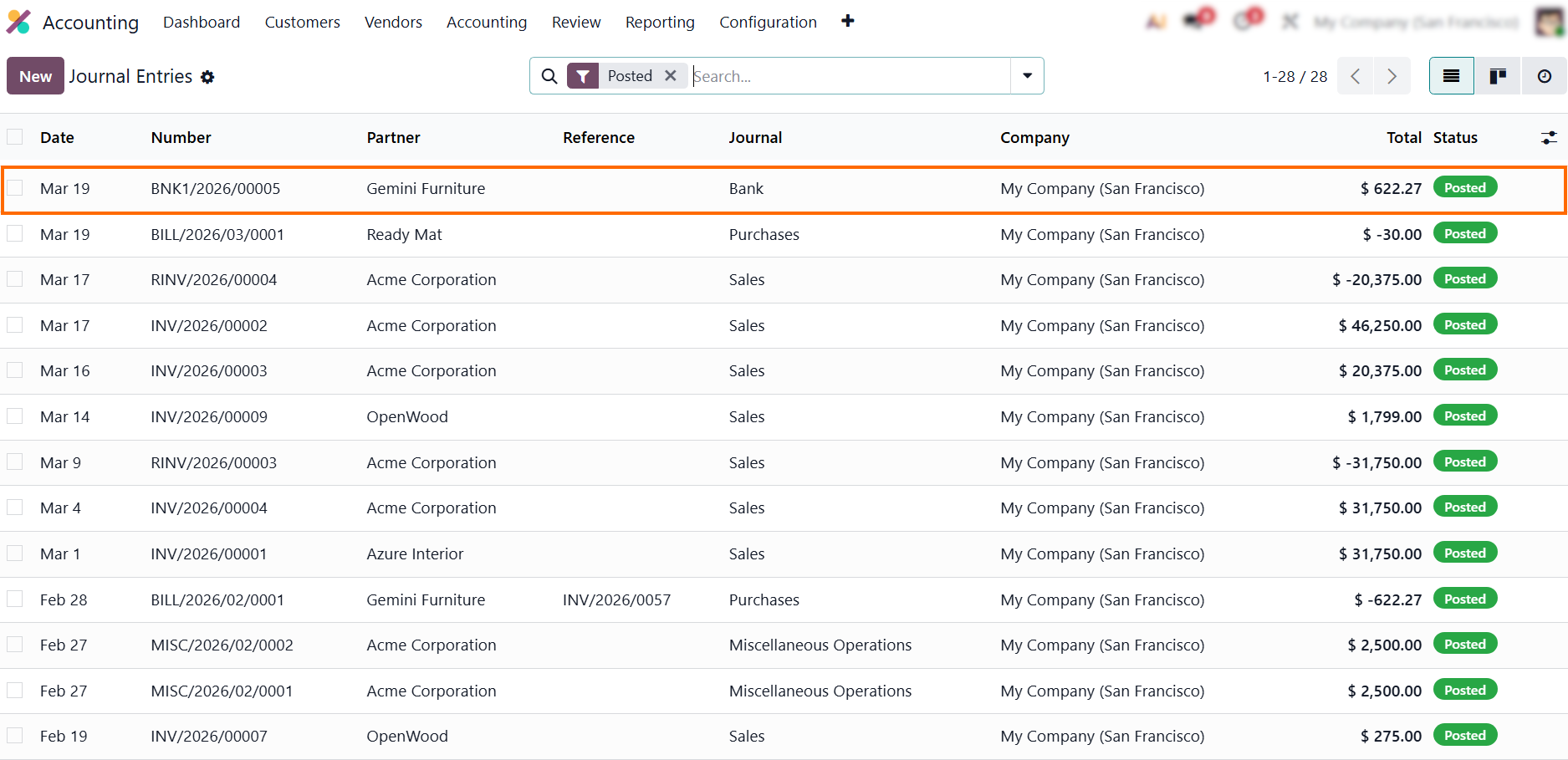
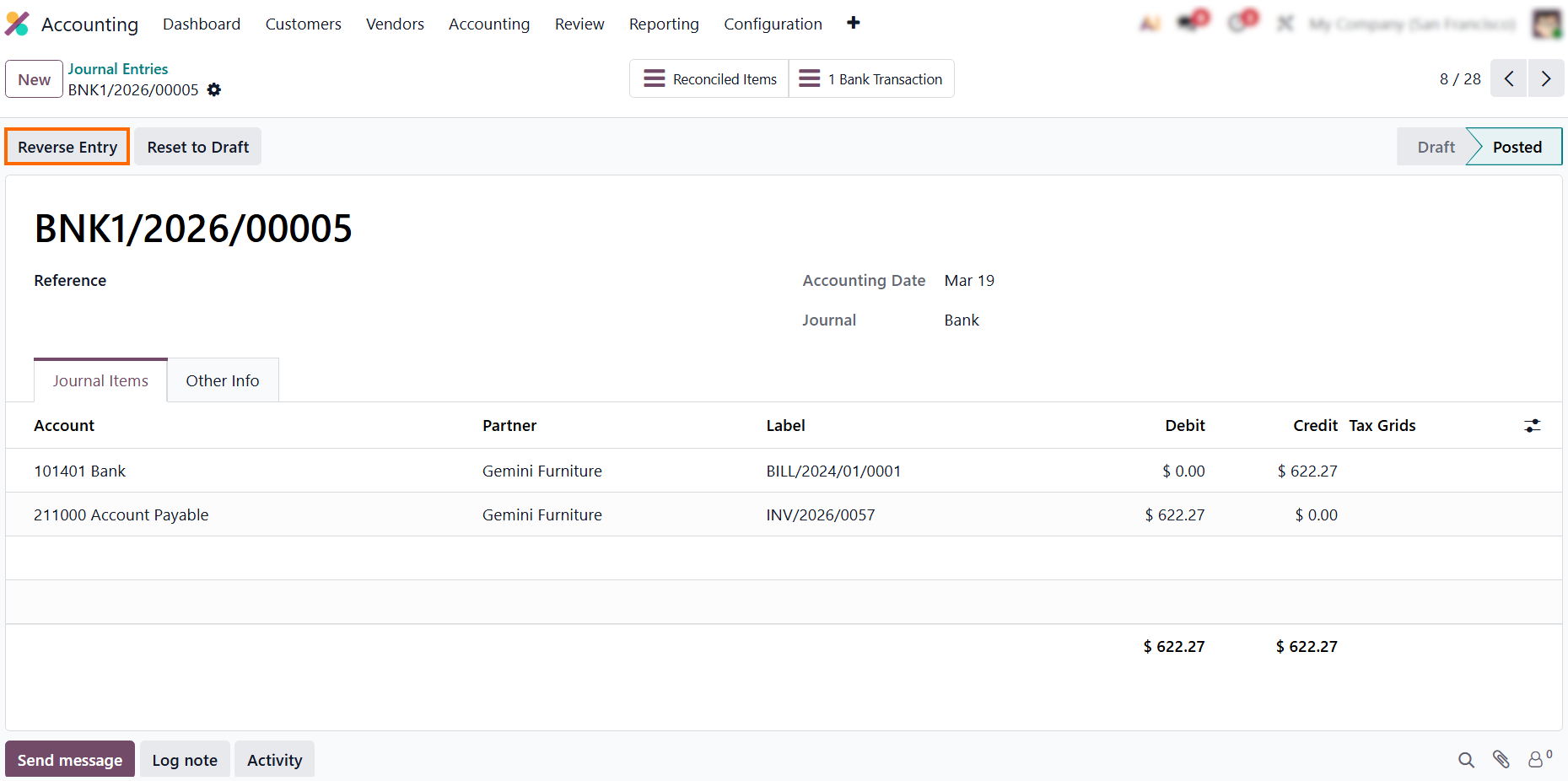
- Locate the posted journal entry that contains an error, as shown in the screenshot. In storno accounting in Odoo 19, corrections always begin from a posted entry.
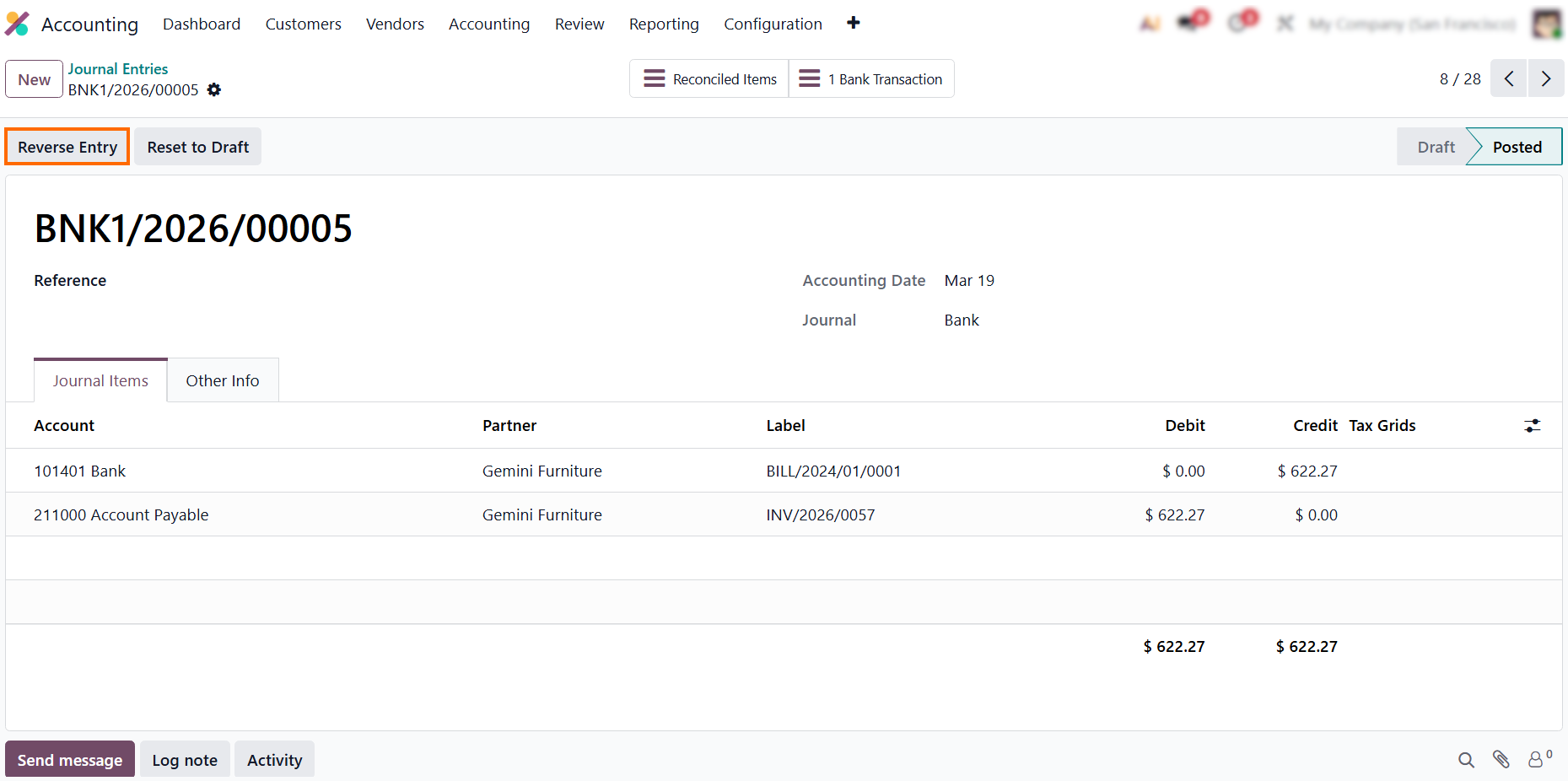
- Open the journal entry and click “Reverse Entry”. This initiates storno accounting and prepares a red storno reversal. This step preserves the original posting while clearly documenting the correction.
- Select the reversal date
and the journal and click “Reverse”. The system creates a reversing entry with
opposite values, fully offsetting the original posting.
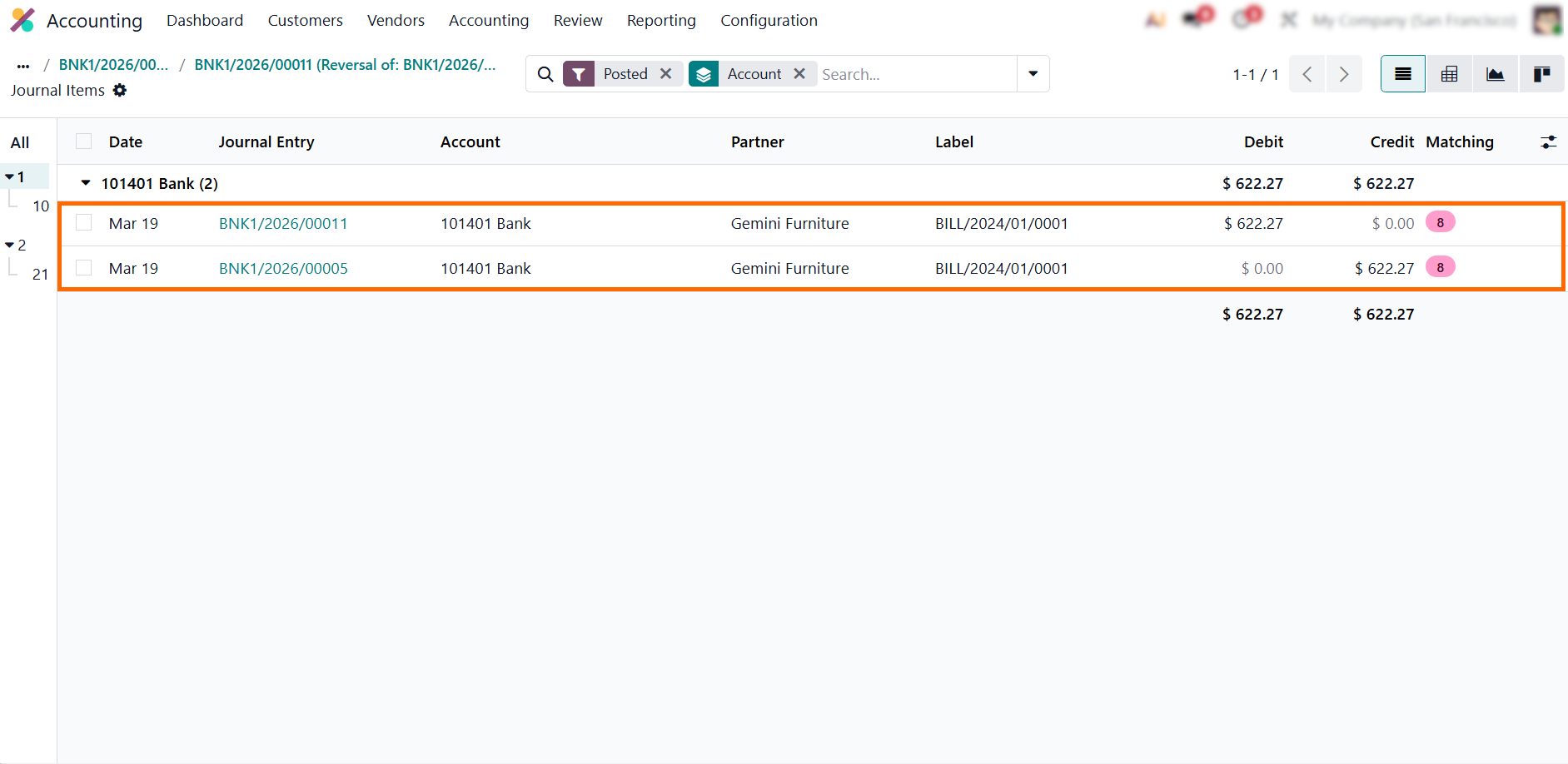
- Both entries remain linked and visible, demonstrating how storno accounting in Odoo 19 enforces controlled, auditable corrections for manual postings. This ensures that corrections remain transparent and fully traceable.
Red Storno
Procedures and Best Practices in Odoo 19
Effective storno accounting in Odoo requires more than creating simple Credit Notes—it demands structured processes, clear documentation, and consistent auditing. Understanding what is storno ensures that accounting teams can manage reversals efficiently while maintaining transparency and compliance. Applying storno accounting Odoo properly helps prevent errors from propagating in the ledger and reinforces internal control practices. By following these best practices, storno accounting Odoo becomes a robust framework for controlled, auditable, and transparent error correction, reinforcing trust in financial data and supporting long-term reliability.
Standardize Reasons for Red Storno Entries
Each Credit Note should have a clearly defined reason. In storno accounting in Odoo, this ensures that every red storno reversal is traceable and auditable, maintaining accountability across journals and reporting periods. Clear and consistent reasons also help accountants immediately understand what is storno in each correction scenario and why storno accounting was applied. This consistency is especially important when multiple users work with the same accounting data in Odoo 19.
Maintain Detailed Documentation for Reversals
Attach explanations, references, or notes for each reversal. Storno accounting Odoo preserves both the original entry and the correction, so full context is always available for review. This documentation reinforces storno accounting principles and clearly explains what is storno for auditors, controllers, and internal reviewers. Well-documented reversals reduce questions during audits and internal controls.
Review Ledger Accuracy for Red Storno Entries
Periodic reviews of posted invoices and their corresponding red storno entries help ensure storno accounting in Odoo reflects all required corrections. Regular monitoring strengthens storno accounting discipline and prevents small errors from accumulating across reporting periods. This practice also helps identify process gaps that lead to repeated corrections. Pro tip: Schedule periodic reviews of red storno entries by journal and user to identify recurring correction patterns early.
Train the Accounting Team on Storno Procedures
Training accountants on storno accounting principles ensures consistent application of red storno rules across the organization. When teams clearly understand what is storno, they apply storno accounting in Odoo correctly, avoiding manual adjustments and protecting audit trails. Team alignment prevents inconsistent corrections.
Leverage Reporting to Track Red Storno Entries
Generate regular reports on Credit Notes and reversals. Analyzing storno accounting Odoo entries helps finance teams identify recurring errors and evaluate how storno accounting impacts financial results. This set of insights turns red storno from a corrective tool into a source of process improvement. Over time, reporting supports better decision-making and cleaner accounting cycles across the organization. Pro tip: Track red storno frequency over time to detect process weaknesses, not just accounting errors.
Conclusion
Storno accounting in Odoo 19 provides a structured framework for handling errors in customer invoices, vendor bills, and manual journal entries. By applying red storno, companies can reverse incorrect postings without altering the original transactions, ensuring audit compliance, financial transparency, and ledger accuracy. This approach transforms traditional error correction into a fully controlled financial reversal process, keeping errors visible for audit and compliance.
Proper Odoo Accounting configuration is essential for effective storno accounting. Correct setup of journals, posting rules, fiscal periods, and user access rights ensures that all corrections follow standardized procedures, preserving traceability and supporting management reporting. When combined with disciplined documentation, regular ledger reviews, and team training, storno accounting becomes a strategic tool for maintaining internal controls, tax compliance, and the long-term reliability of financial data.
Whether applied to posted invoices, vendor bills, or other accounting entries, storno accounting in Odoo 19 ensures consistent correction practices, minimizes the risk of unauthorized edits, and strengthens confidence in reported results. Understanding what storno accounting is and implementing it systematically enables organizations to achieve not only accurate financial records but also improved decision-making, process efficiency, and overall financial governance in Odoo 19.
Accounting teams using Odoo 19 should treat storno accounting not as an optional technique, but as a standard practice for compliant, transparent, and auditable financial operations.