Odoo data cleaning focuses on keeping records consistent and usable across the Odoo database. When companies work with the latest version of Odoo and extend the standard Odoo module list, data issues usually appear gradually rather than all at once. Duplicate contacts, inconsistent product naming, or leftover values from past imports are common examples. Without regular cleanup, these issues start affecting search, reporting, and everyday user workflows.
For teams working with Odoo for developers, data quality is directly tied to system reliability. Custom logic written in the Odoo development language relies on predictable field values and stable relations between records. In real projects, however, fields often contain mixed formats or outdated references, including tax-related fields such as AvaTax tax code and other AvaTax codes used in accounting integrations. Odoo data cleaning helps reduce these inconsistencies before they turn into technical debt.
This guide presents Odoo tutorials that explain how to detect duplicates, normalize fields, and manage obsolete records using native tools. The goal is not theoretical best practices, but practical control over data in installations that use an Odoo enterprise subscription code or consider Odoo as an open source alternative. Each example is tied to concrete modules and configurations, without relying on abstract scenarios.
How Odoo Data Cleaning Works in the Latest Version of Odoo 19
Odoo data cleaning in the latest version of Odoo is not implemented as a single, isolated tool. Data quality depends on how records are created, imported, and validated across the entire Odoo module list as systems grow and evolve. As standard modules are extended, inconsistencies such as duplicated partners, outdated references, and conflicting AvaTax tax codes appear gradually. For teams working with Odoo for developers, the Odoo development language is used in real implementations. Custom fields and integrations rely on predictable structures, making Odoo data cleaning a continuous operational requirement rather than a one-time fix.
Data Consistency Across the Odoo Module List
In real environments, data inconsistencies rarely stay within a single module. Partner and product records flow across CRM, Accounting, Inventory, Manufacturing, and Projects, increasing risk as the Odoo module list expands. Odoo data cleaning starts by identifying where the same records are reused across multiple workflows. The latest version of Odoo provides filtering and archiving tools to isolate such records, though consistency still depends on governance.
Why Developers Must Prioritize Odoo Data Cleaning
For Odoo for developers, data cleaning cannot be treated as a purely administrative task. Every custom module introduces assumptions enforced through the Odoo development language, and uncontrolled values quickly undermine system reliability. This makes Odoo data cleaning part of long-term development maintenance. In practice, this approach reduces refactoring costs and keeps custom logic compatible with future upgrades in the latest version of Odoo.
Cleaning Tax and Accounting Data Using AvaTax Codes
Tax configuration is one of the most sensitive areas for data inconsistencies in integrated systems. Outdated or duplicated AvaTax tax codes and AvaTax codes often remain after imports or integration updates, directly affecting accounting accuracy. Targeted Odoo data cleaning helps normalize tax mappings across products and fiscal positions. For accounting teams, this prevents situations where identical transactions are processed using different AvaTax tax codes.
Practical Odoo Tutorials for Detecting and Cleaning Records
Most Odoo tutorials related to data cleaning focus on native tools instead of custom scripts. Advanced search, grouping, mass editing, and controlled archiving allow teams to detect duplicates without modifying code. In the latest version of Odoo, these tools support incremental cleanup rather than risky bulk changes. This makes Odoo tutorials suitable for both administrators and Odoo for developers who need safe cleanup in production environments.
Enterprise and Open Source Perspectives on Data Cleaning
Organizations using an Odoo enterprise subscription code benefit from additional safeguards that reduce data inconsistencies but do not eliminate them. Structured Odoo data cleaning remains necessary even with enterprise features. For teams using Odoo as an Odoo open source alternative, responsibility for data quality lies entirely with developers and administrators. In both models, long-term data reliability depends more on internal processes than on licensing.
Security Changes and Hidden Data Risks in Odoo 19
Some data quality issues are triggered by infrastructure changes rather than user actions. In Odoo 19, updates such as the new self-signed certificate expiration date can disrupt integrations and leave incomplete records behind. From an Odoo data cleaning perspective, these incidents require periodic audits to prevent long-term inconsistencies. Treating security-related failures as data hygiene issues helps avoid silent corruption across modules.
Installing
Modules as a Starting Point for Odoo Data
Cleaning
Odoo data cleaning often starts during module installation, when new models, fields, and default records are added from the Odoo module list. In the latest version of Odoo, uncontrolled installation can leave unused data that later requires cleanup. For Odoo for developers, module installation is part of data governance defined by the Odoo development language. Accounting and tax modules may automatically introduce AvaTax tax codes and AvaTax codes across products and transactions, increasing data complexity. Odoo tutorials recommend reviewing dependencies and default values immediately after installation. This limits unnecessary data growth in systems using an Odoo enterprise subscription code or an Odoo open source alternative and helps avoid later issues caused by integrations or security changes such as a new self-signed certificate expiration date.
-
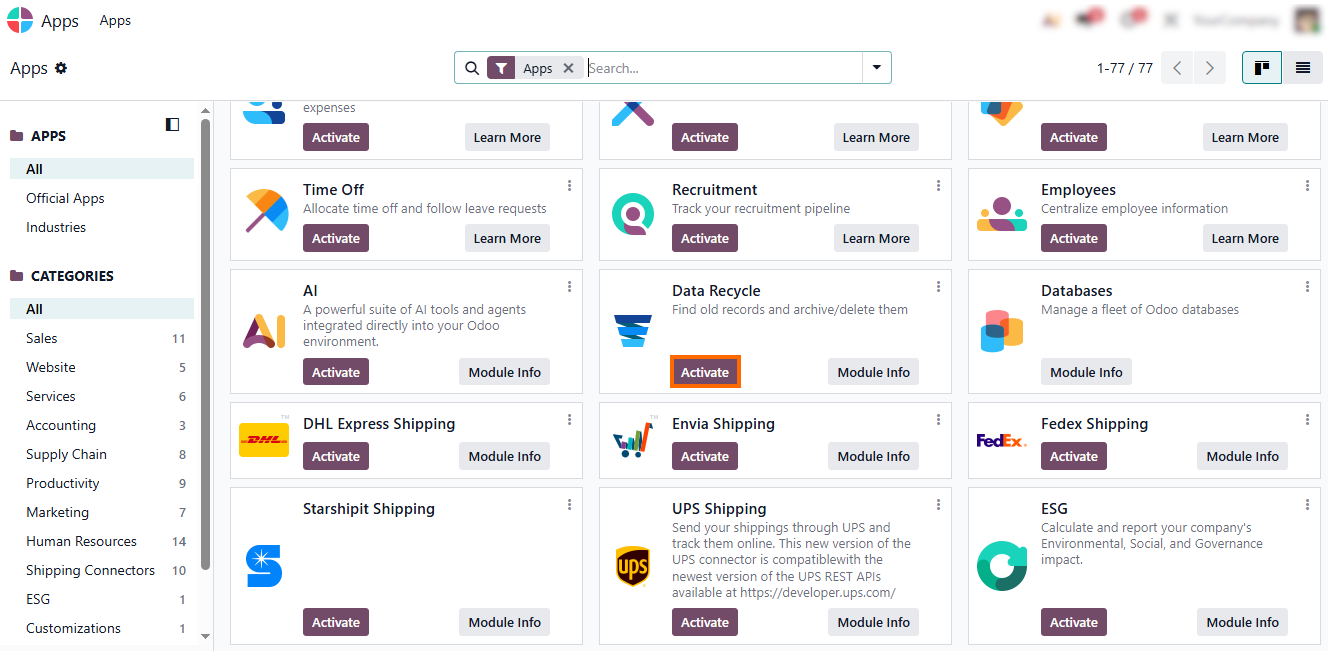
Open the Apps menu and
activate the “Data Recycle” module by clicking the “Activate” button. This
installs the module and enables data cleaning features without changing existing
records.
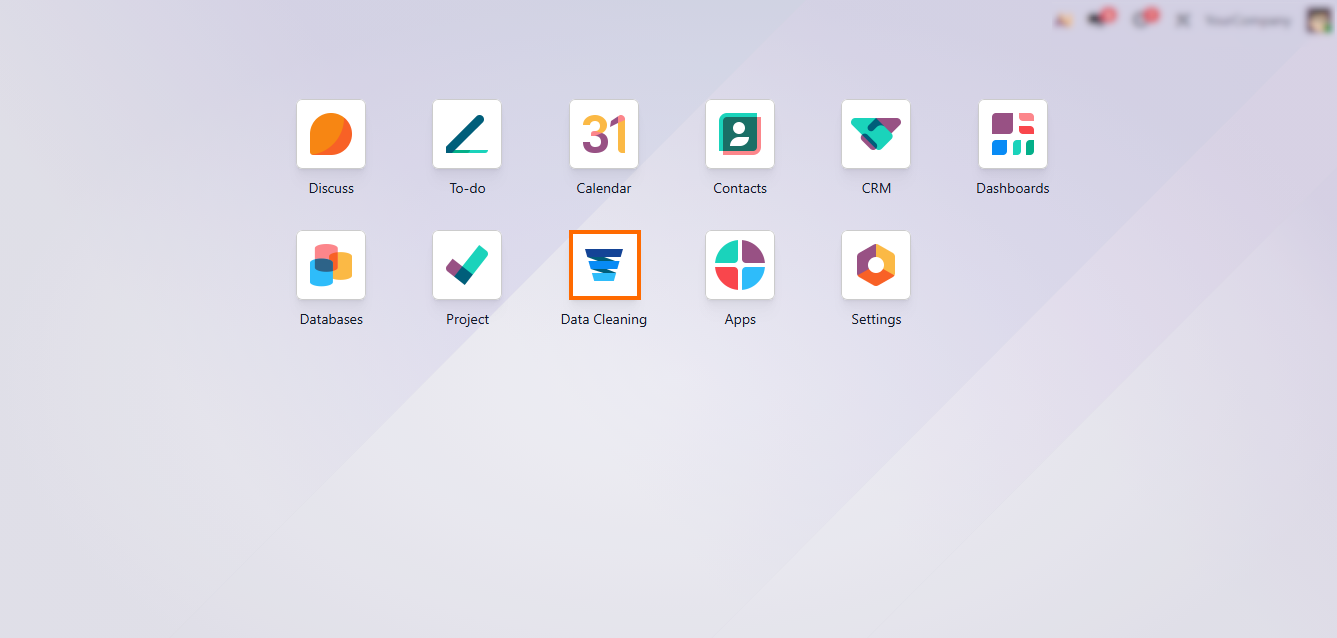
- After installation, review the module interface to understand available tools and default settings. The dashboard provides access to detected data issues and cleanup actions.
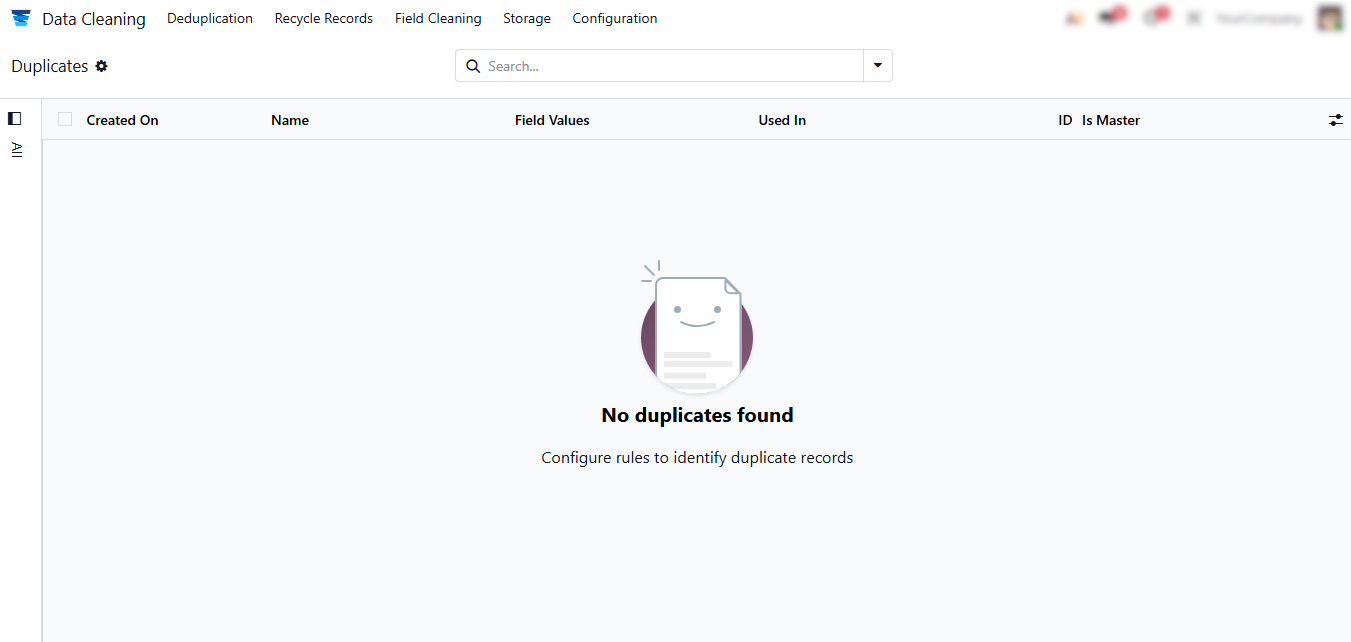
- On the main screen,
the system may indicate that no duplicates were found. This reflects the
current matching rules and does not guarantee that all inconsistencies have
been identified.
Configuring Deduplication Rules for Odoo Data Cleaning
Odoo data cleaning becomes effective only after deduplication rules are configured. In the latest version of Odoo, duplicate detection is managed through configuration rules that define how records from the Odoo module list are compared. For Odoo for developers, these rules formalize data assumptions created by the Odoo development language. Without clear rules, duplicates created by imports, integrations, or accounting logic – including AvaTax tax codes and AvaTax codes – remain invisible and continue to spread across modules. Odoo tutorials recommend configuring deduplication rules early, especially in systems using an Odoo enterprise subscription code or running as an Odoo open source alternative. Proper rules reduce manual cleanup and help avoid unexpected duplicates or inconsistencies that can arise from integrations or other system changes.
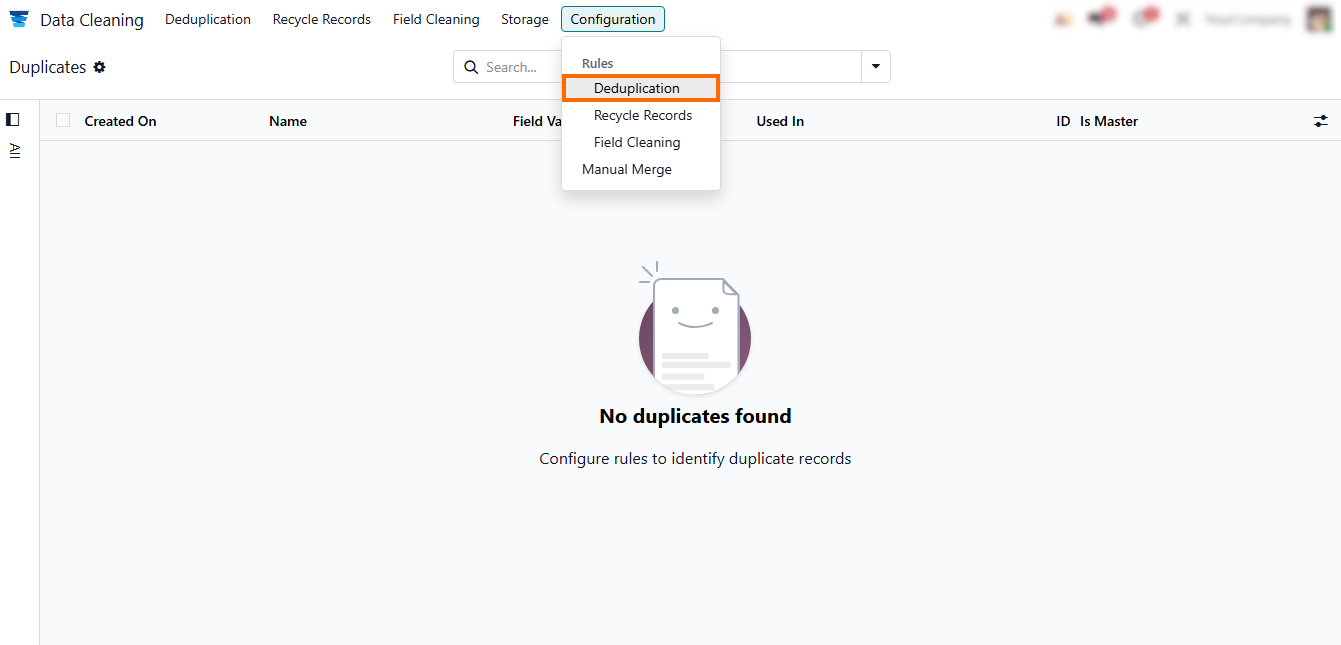
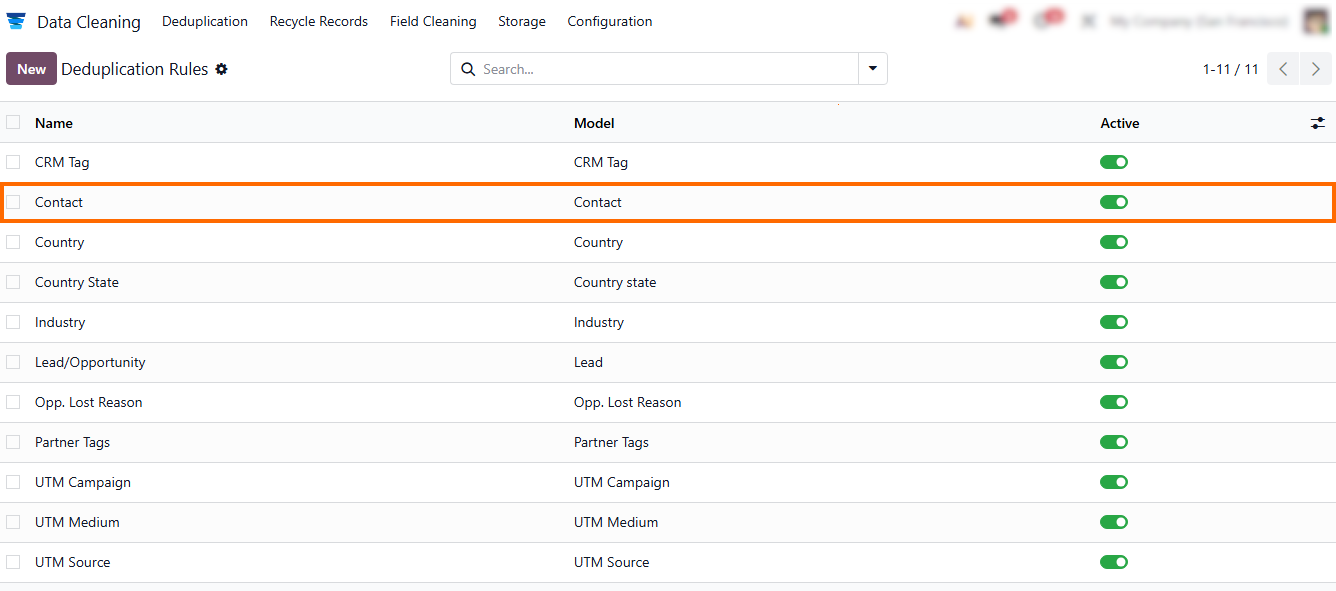
- Open Configuration, then select “Deduplication Rules” in the Odoo Data Cleaning module to access duplicate detection settings. This section centralizes all rule-based logic used by Odoo data cleaning across models.
- Choose an existing
rule – edit it before creating a new one to ensure it aligns with
your current data standards and avoids conflicts with existing duplicate logic.
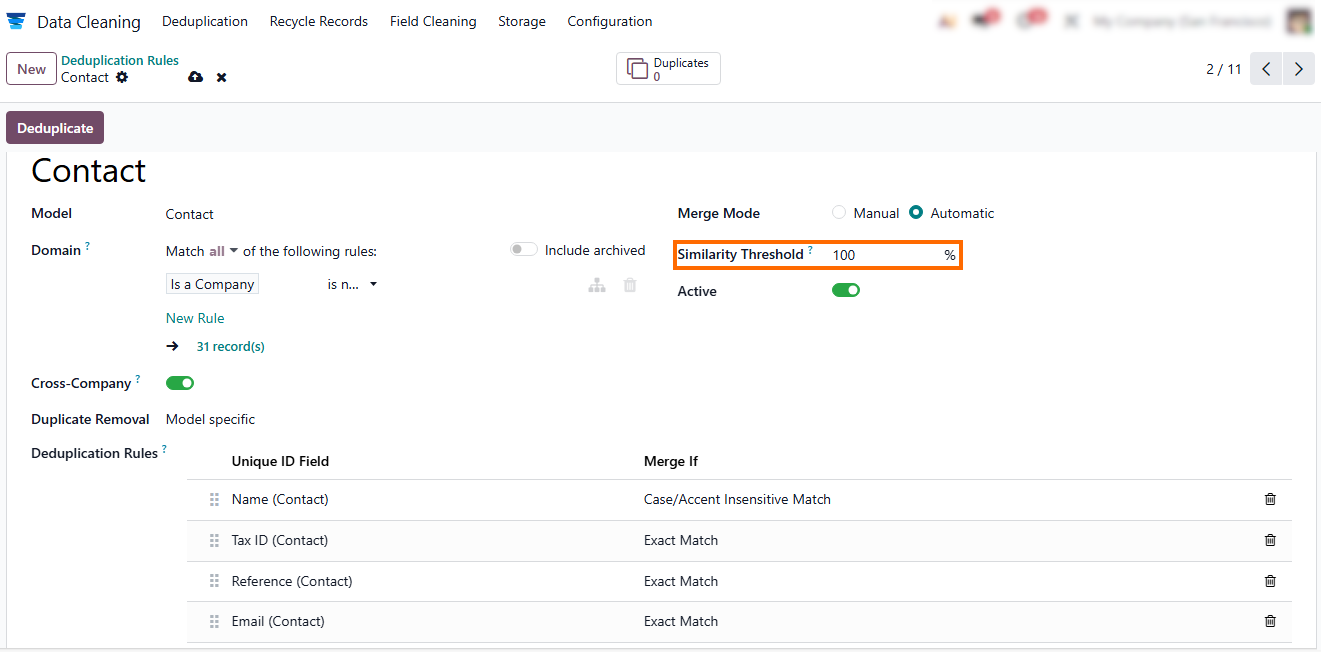
- Check that the settings are up to date, for example, set the “Similarity Threshold” to 100% so the system immediately identifies exact duplicates. This is recommended when working with structured identifiers such as AvaTax tax codes.
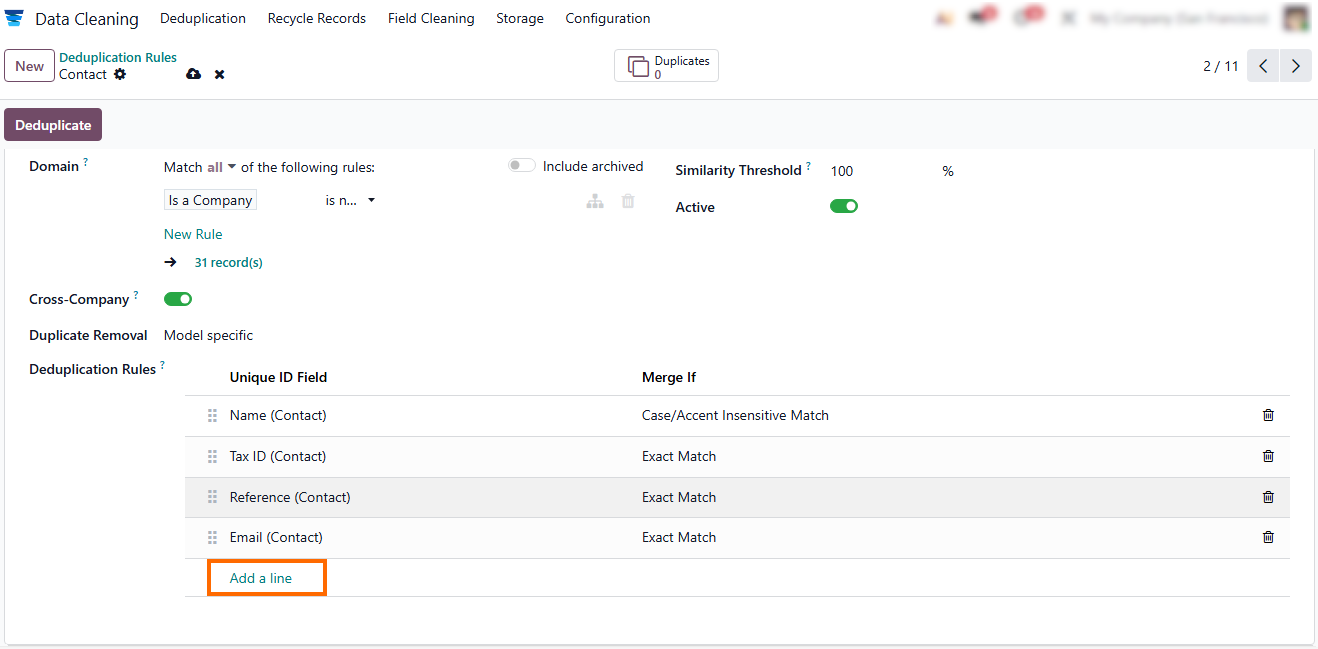
- Use the “Add a Line” option within the same rule to define additional comparison criteria as needed. You can select the field and comparison type from the drop-down menus for precise matching.
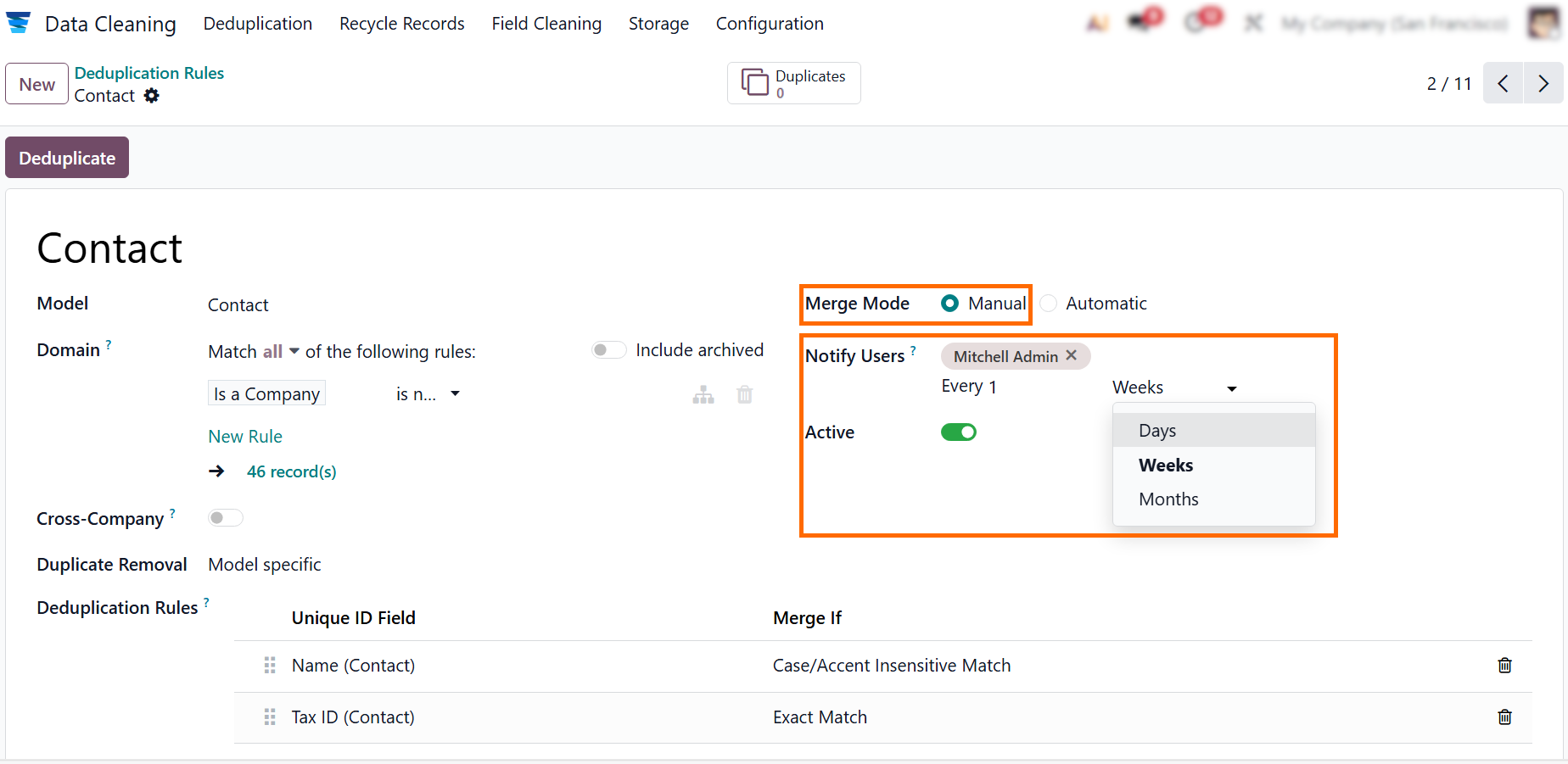
If you need “Manual Merge Mode”, set the rule to “Notify User” and define the notification frequency, as shown in the screenshot below. This approach is recommended when duplicate resolution requires human review rather than automatic merging.
Reviewing Deduplication Results in Odoo Data Cleaning
Odoo data cleaning produces actionable results only after the deduplication process is executed and reviewed. In the latest version of Odoo, duplicate detection does not rely on probabilistic scoring or estimated confidence levels. Instead, the system applies predefined rules from the Odoo module list and immediately displays all detected duplicates. For Odoo for developers, this predictable output reflects the deterministic nature of the Odoo development language, where data behavior is defined by configuration rather than interface. This approach is especially relevant in environments that rely on structured identifiers. These include accounting data, integration workflows, and tax configurations, such as AvaTax tax codes and other AvaTax codes. Odoo tutorials often highlight this step because it exposes real data conflicts before they propagate across modules in systems running under an Odoo enterprise subscription code or deployed as an Odoo open source alternative.
- After completing the configuration
steps, click “Deduplicate” to start the duplicate
detection process. This action forces Odoo data cleaning to apply the configured rules across the selected models from the Odoo module list.
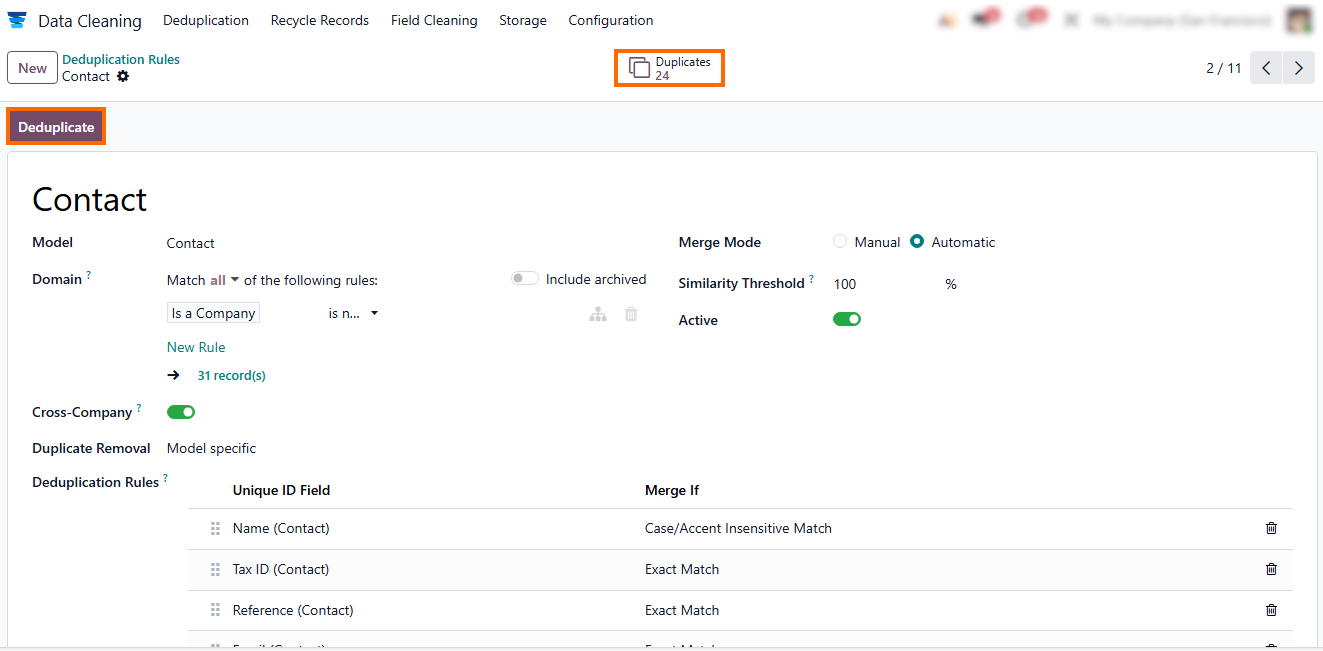
- Review the result counter displayed by
Odoo, which shows the total number of detected duplicates, for example, 24
records. The number reflects exact rule-based
matches, not estimated similarity or probabilistic scoring.
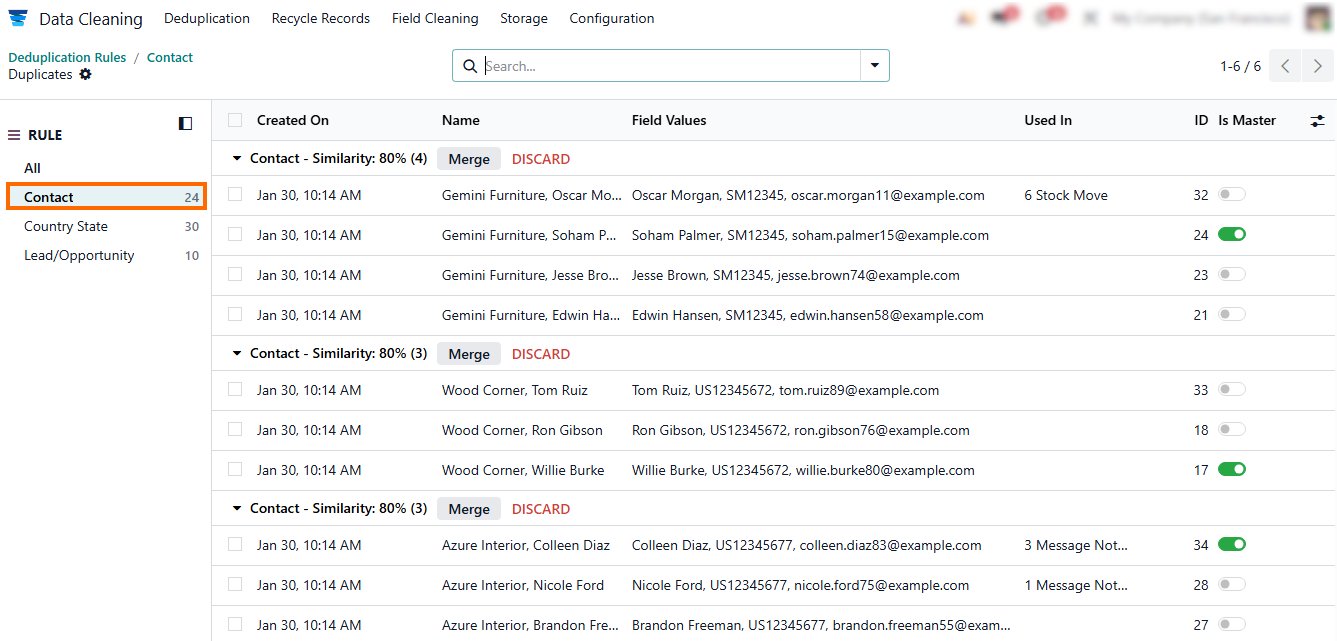
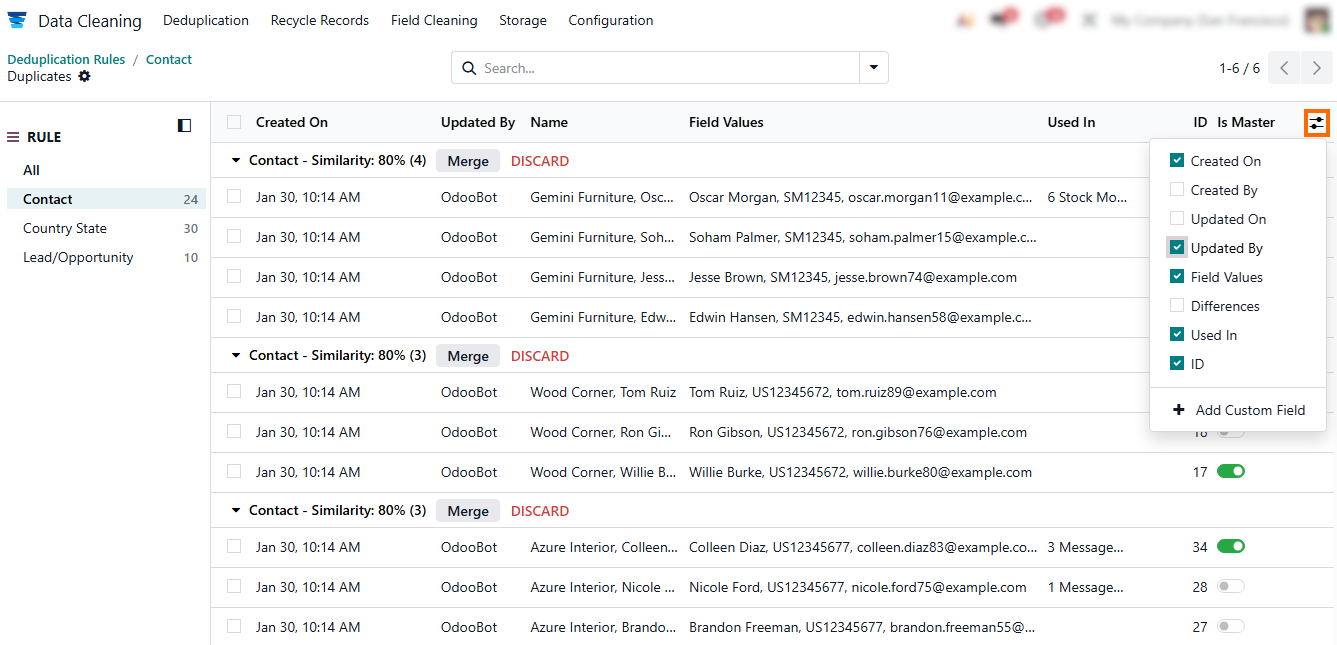
- Apply custom filters to narrow down the list by model, field values, or operational context before taking further actions. This is especially important when reviewing records linked to integrations, accounting logic, or AvaTax tax codes.
Resolving
Duplicates and Merging Records in Odoo Data
Cleaning
Detecting duplicates is only half of the Odoo data cleaning process. Data control starts when teams resolve duplicates without disrupting workflows, accounting, or integrations. In the latest version of Odoo, duplicate resolution is structured and affects multiple modules at once, not just individual records. For organizations using Odoo for developers, this step requires special caution. Merging or archiving records directly affects relational integrity defined by the Odoo development language. This is critical for shared objects like partners, products, and tax-related configurations, including AvaTax tax codes and other AvaTax codes in accounting and integrations. Mistakes at this stage can silently corrupt reports, fiscal positions, or historical transactions.
- Discard unnecessary duplicates – use the “Discard” action for records that are clearly redundant, inactive, or no longer needed. This removes them from active workflows while keeping historical links safe.
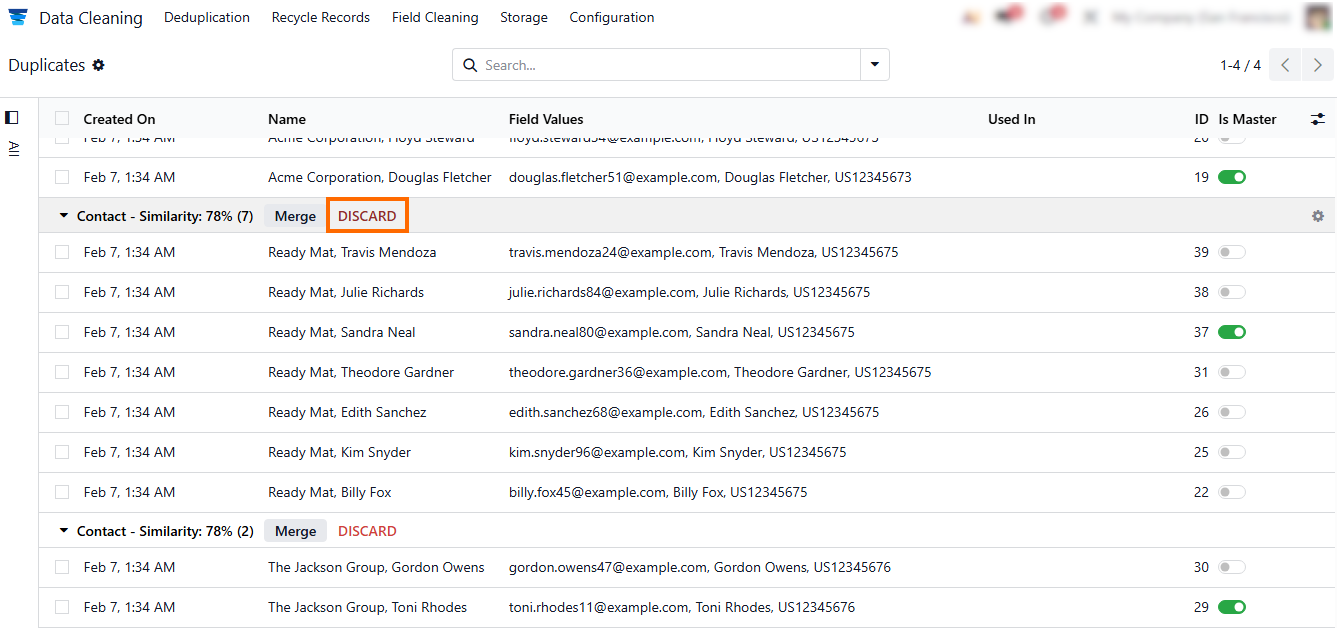
- Merge duplicate records – after discarding unnecessary entries, use “Merge” to combine true duplicates into a single master record, keeping key fields, fiscal settings, and integrations intact.
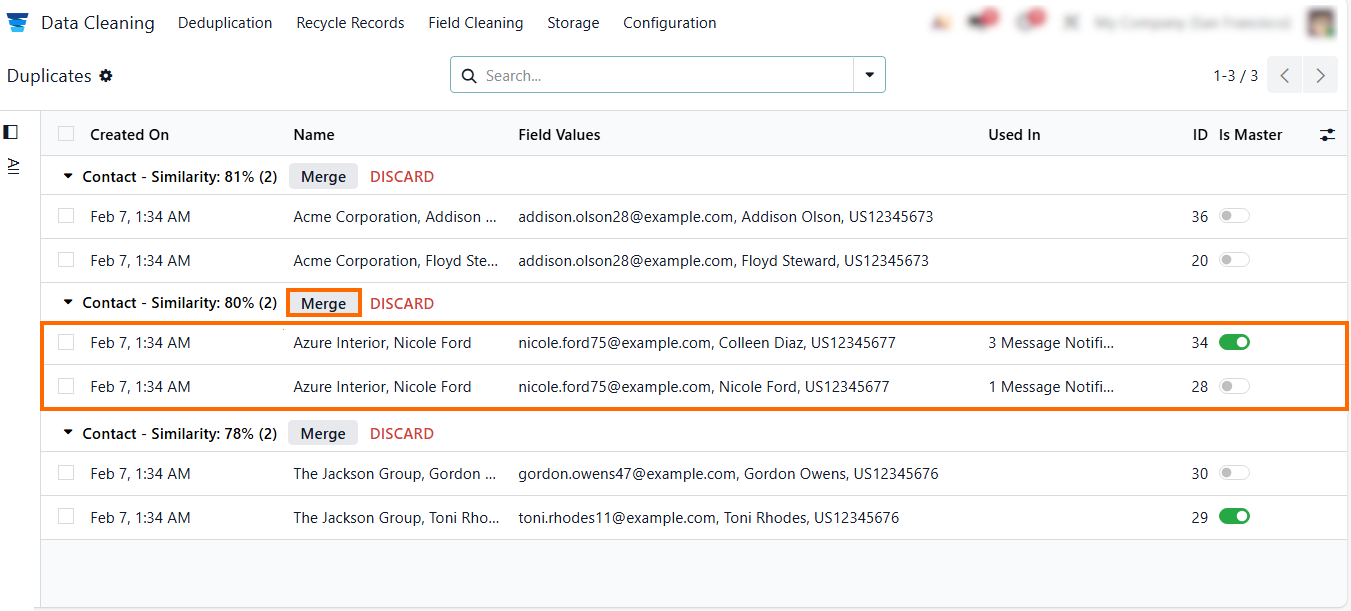
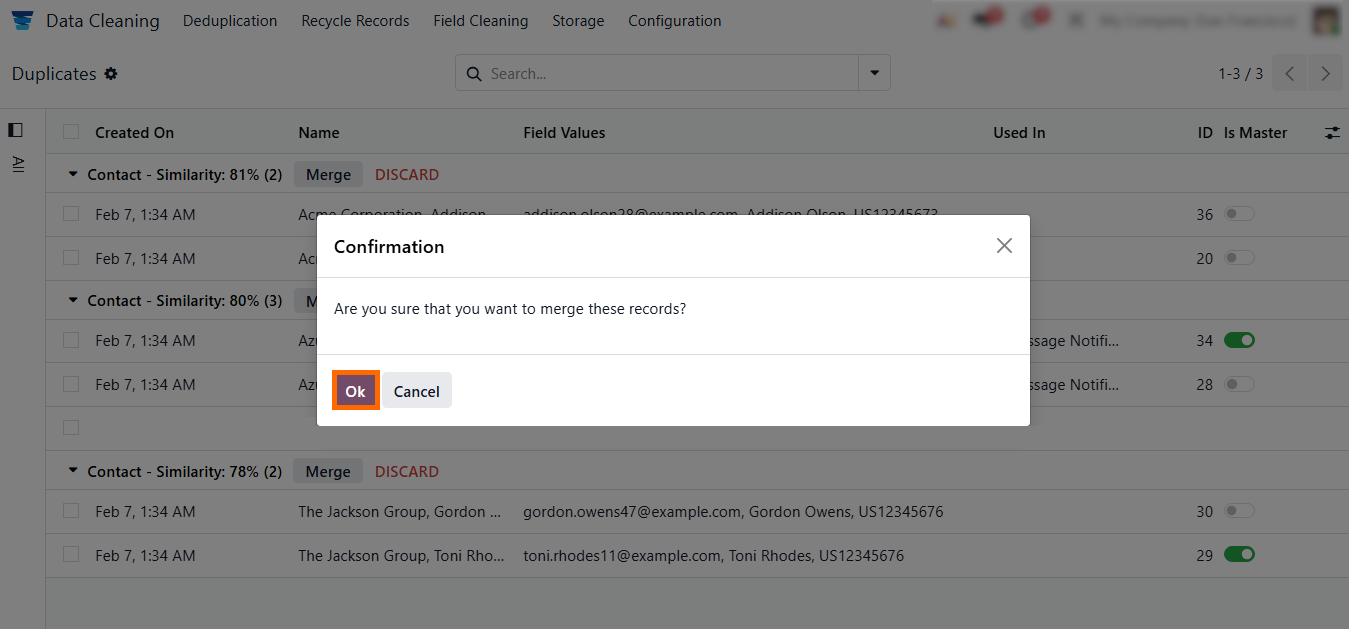
- Confirm the merge – after selecting the master record, click “OK” to finalize the merge and update all related records across the Odoo module list, as shown in the screenshot below.
Best Practices for Odoo Data Cleaning: Accuracy and Reliable Workflows
Maintaining clean and reliable data in Odoo 19 is a continuous process that ensures system integrity, reporting, accuracy, and smooth workflow across all modules. Effective Odoo data cleaning reduces errors, prevents duplicate entries, and supports stable operations in environments using an Odoo enterprise subscription code or an Odoo open source alternative. Consistent cleanup routines help maintain the integrity of key records and configurations, such as AvaTax tax codes and AvaTax codes, ensuring accurate accounting and seamless integration across the Odoo module list. By following structured best practices, organizations can proactively prevent data issues, improve operational efficiency, and maintain trust in their Odoo system.
Establishing Regular Deduplication Cycles
A mid-sized retailer implemented weekly deduplication checks using the Odoo Data Cleaning module. By consistently reviewing duplicates across the Odoo module list, including partners, products, and AvaTax tax codes, the team prevented errors from propagating into Accounting, CRM, and Inventory. This routine minimized manual corrections and maintained clean historical data in the latest version of Odoo.
Ensuring Clean Data During Module Installation
A manufacturing company introduced a step to review records immediately after installing new modules. Default partners, products, and AvaTax codes were audited before workflows went live. This early intervention reduced unnecessary duplicates, simplified deduplication later, and prevented issues related to the new selfsignedcertificate expiration date in integrations.
Coordinating Developers and Administrators
A service company aligned Odoo for developers with system administrators using shared conventions for field naming, default values, and integration setups. Custom modules built with the Odoo development language followed these standards, ensuring that automated scripts and workflows did not introduce conflicts. This collaboration maintained data consistency across the Odoo module list.
Linking Odoo Data Cleaning to Reporting and Governance
An IT consultancy tracked duplicate resolutions and discarded entries using dashboards and logs. By validating key reports, workflows, and AvaTax tax codes after merges, the company ensured that Accounting, Projects, and Inventory remained accurate. Documenting cleanup actions also reinforced internal governance and provided a clear audit trail for compliance.
Conclusion
Odoo data cleaning features are not a background maintenance task nor a feature that can be “enabled and forgotten.” In the latest version of Odoo, data quality is an emergent property of how records are created, reused, merged, and governed across the entire Odoo module list. Duplicate partners, inconsistent AvaTax tax codes, or orphaned records are often caused by integrations and infrastructure changes. This includes updates to the self-signed certificate expiration date. These issues are not anomalies.
For Odoo for developers, this has direct architectural consequences. Custom logic written in the Odoo development language assumes stable identifiers, predictable field values, and consistent relationships between records. When Odoo data cleaning is treated as optional, technical debt does not appear immediately. Instead, it accumulates silently, surfaces during system upgrades, disrupts integrations, and raises long-term maintenance costs.
This risk exists regardless of whether the system runs under an Odoo enterprise subscription code or is positioned as an Odoo open source alternative. Licensing affects features, not data discipline. The real distinction is operational maturity. Teams that enforce deduplication rules, audit data after module installations, and review sensitive configurations such as AvaTax codes maintain control as systems scale. Teams that do not will eventually lose predictability. Proactive data governance ensures reliable reporting, smooth integrations, and long-term system stability. Treat Odoo data cleaning as a core practice—your system’s integrity depends on it.