For many growing companies, financial planning still happens outside the ERP, in spreadsheets, disconnected tools, or isolated reports. While this approach may work at an early stage, it quickly becomes a bottleneck as operations scale and more teams become involved. In modern Odoo business environments, budgeting is no longer just a finance function. It is a core part of operational control across purchasing, projects, production, and service delivery.
The Odoo budget functionality brings financial planning directly into daily workflows and allows companies to connect planned figures with real accounting and operational data. Instead of reviewing budgets once a month, Odoo users can track spending and revenue trends continuously using live data from purchase Odoo, invoicing, projects, and inventory movements. This creates a much stronger connection between strategic goals, operational execution, and financial performance.
With properly configured Odoo budgets, companies can align planning Odoo processes with real business activity, support more accurate Odoo forecasting, and ensure that departments stay within approved financial limits. As part of the broader ecosystem of Odoo business solutions, budget control integrates naturally with modules such as Projects, Manufacturing, Accounting, and service workflows built around the Odoo booking system and Odoo tasks.
What
Is New in Odoo 19 for Odoo Budget Management
and Financial Planning
With Odoo 19, budget management becomes more tightly integrated into operational workflows, making budgeting a practical control tool for everyday decisions, not just a financial reporting feature. Instead of treating Odoo budgets as static financial limits, the new version focuses on continuous monitoring, forecasting, and collaboration between departments. This approach fits well into modern Odoo business environments where purchasing, projects, and service delivery are all connected to shared financial goals. As a result, it supports faster decisions and reduces the risk of overspending across departments, especially in fast-moving Odoo business solutions with distributed teams.
Stronger Integration Between Purchase Odoo and Budget Control
One of the most practical improvements in Odoo 19 is how purchase Odoo flows interact with budget Odoo limits. Budget availability is now more visible during purchasing actions, allowing procurement teams to validate spending before commitments are finalized. This helps align supplier negotiations and internal approvals with actual budget capacity. For the Odoo team responsible for procurement and finance, this tighter integration simplifies approval workflows and reduces manual budget checks.
Improved Planning Odoo and Forecasting for Budget Adjustments
Budget planning is no longer limited to historical data but can be adjusted based on expected workloads, staffing plans, and project pipelines. This is especially useful for service companies and organizations using the Odoo booking system features to manage capacity and scheduling. By combining forecasts with actual spending, companies can update their Odoo budget dynamically instead of waiting for monthly financial reviews. This makes Odoo budget management more flexible and better aligned with real business conditions, especially when demand or production volumes change.
Better Visual Budget Tracking with Odoo Kanban and Dashboards
Odoo 19 improves how budget data can be visualized through multiple views and financial dashboards. Budget stages, approval statuses, and spending thresholds can be reflected in more intuitive layouts that are easier for non-financial users to understand. This is particularly helpful when managing Odoo project budget scenarios, where project managers need quick insight into remaining funds while working with Odoo tasks and delivery milestones. Instead of navigating complex accounting reports, teams can track budget health directly from operational screens.
Budget Control Across Products, Projects, and Services
In Odoo 19, budget tracking is strengthened across product Odoo, project costing, and internal activities. Budget lines can be linked to analytic structures for products, services, and cost centers, keeping spending under a single control framework. This supports clearer ranking of projects and departments in Odoo by profitability and cost efficiency, while treating budgeting as part of daily operations rather than only an accounting function as often described in an Odoo development book.
More Collaborative Budget Workflows for Odoo Users
Another important change in Odoo 19 is how budgeting supports collaboration across roles. More Odoo users can participate in budget planning, monitoring, and adjustment without full accounting permissions. This allows department managers and project leads to take responsibility for their own budget areas. For growing Odoo business organizations, this reduces bottlenecks and improves financial accountability across teams. Budget ownership becomes distributed, while financial control remains centralized through standard approval and reporting mechanisms.
- First, activate the “Accounting” application from the Apps menu, as this enables all financial and analytic structures required for budget Odoo configuration.
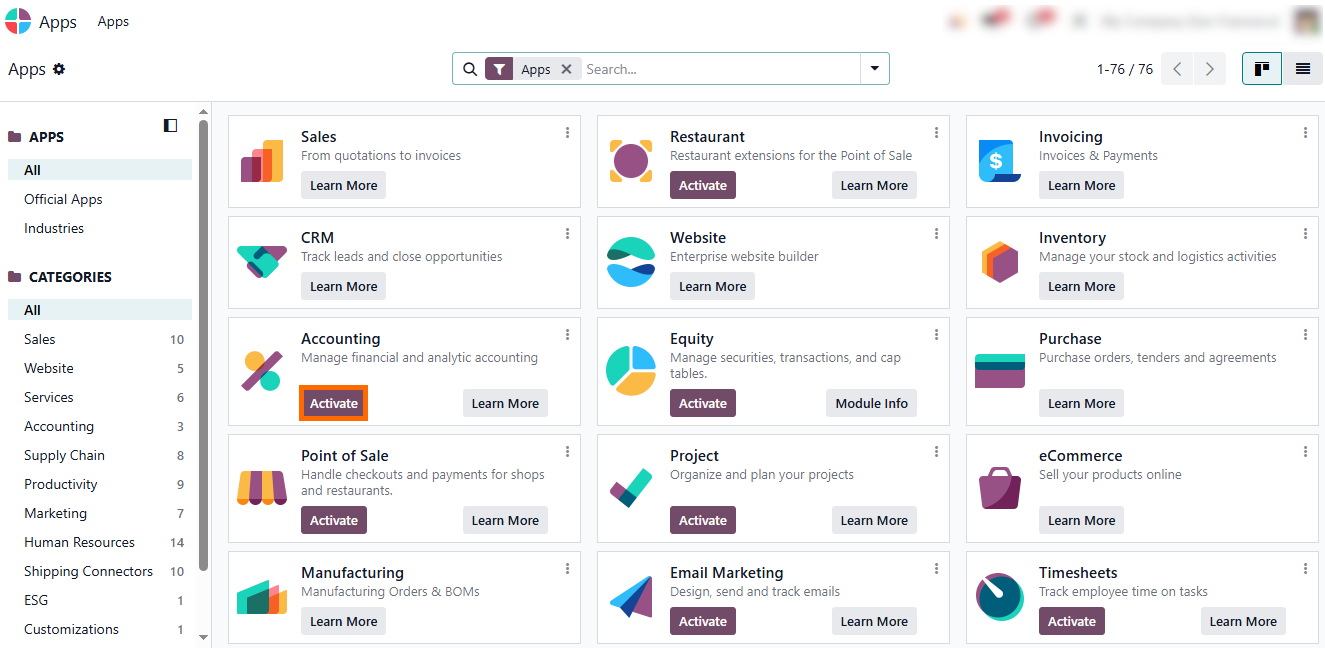
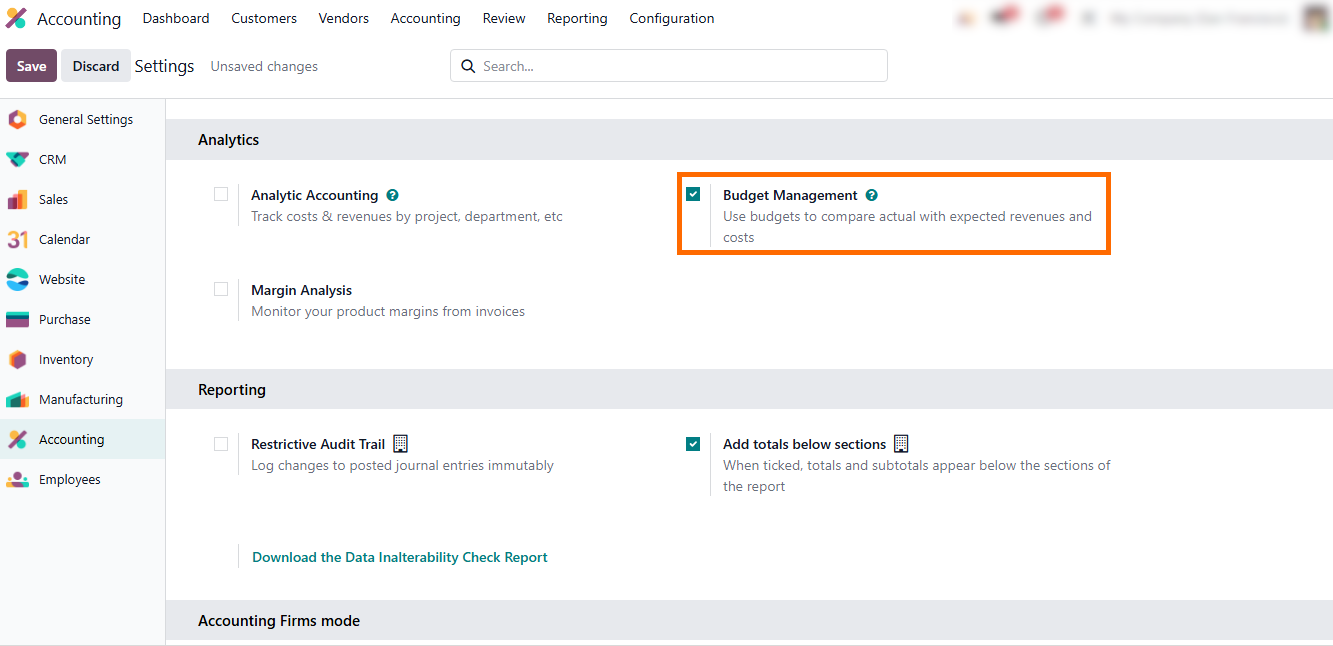
- Go to the “Accounting” module settings and enable “Budget Management”, which allows the system to track planned versus actual spending and link budgets to projects, departments, and purchase orders.
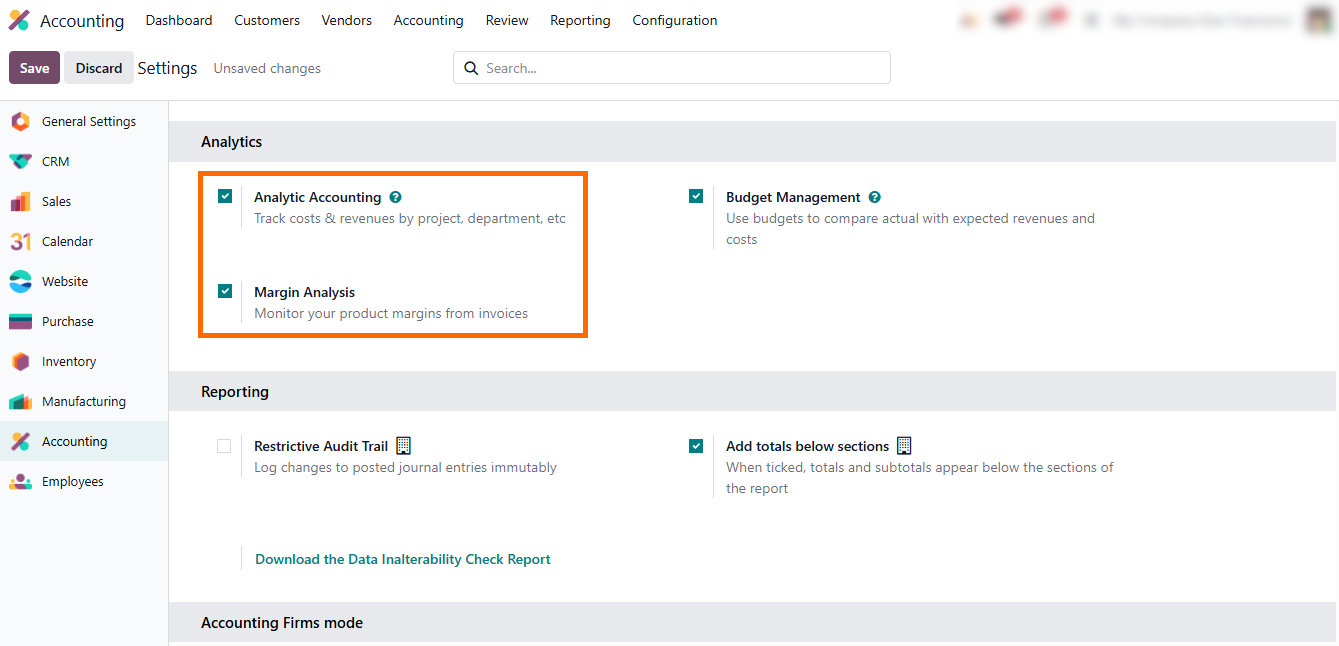
Also, enable “Analytic Accounting” and “Margin Analysis” to track costs, revenues, and profitability per project, product line, or department, providing detailed insights that support operational decisions and more accurate Odoo budgeting.
Step-by-step
Guide to Creating and Managing Odoo Budgets
Effective Odoo budget management begins with connecting financial planning to actual business operations. In modern Odoo business environments, budgets are no longer isolated numbers in spreadsheets – they are actively linked to purchase Odoo workflows, project tracking, and service delivery. Every Odoo user can now interact with Odoo budgets, monitor expenses, and adjust allocations in real time, using tools like planning Odoo, Odoo forecasting, and Odoo kanban views. By tying Odoo project budget structures, analytic accounts, and operational data together, companies gain a clear picture of resource utilization and profitability. This approach turns budget Odoo into a dynamic tool that supports decision-making across products, projects, and services while enabling distributed Odoo teams to work within the same Odoo business solutions framework.
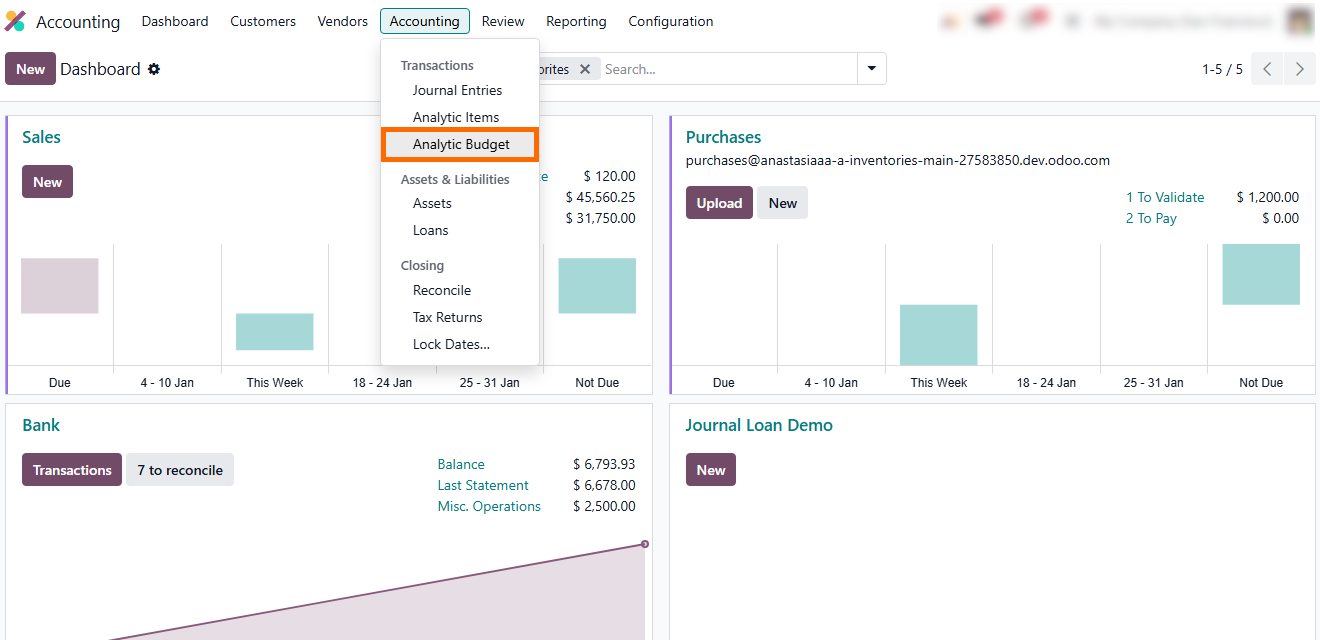
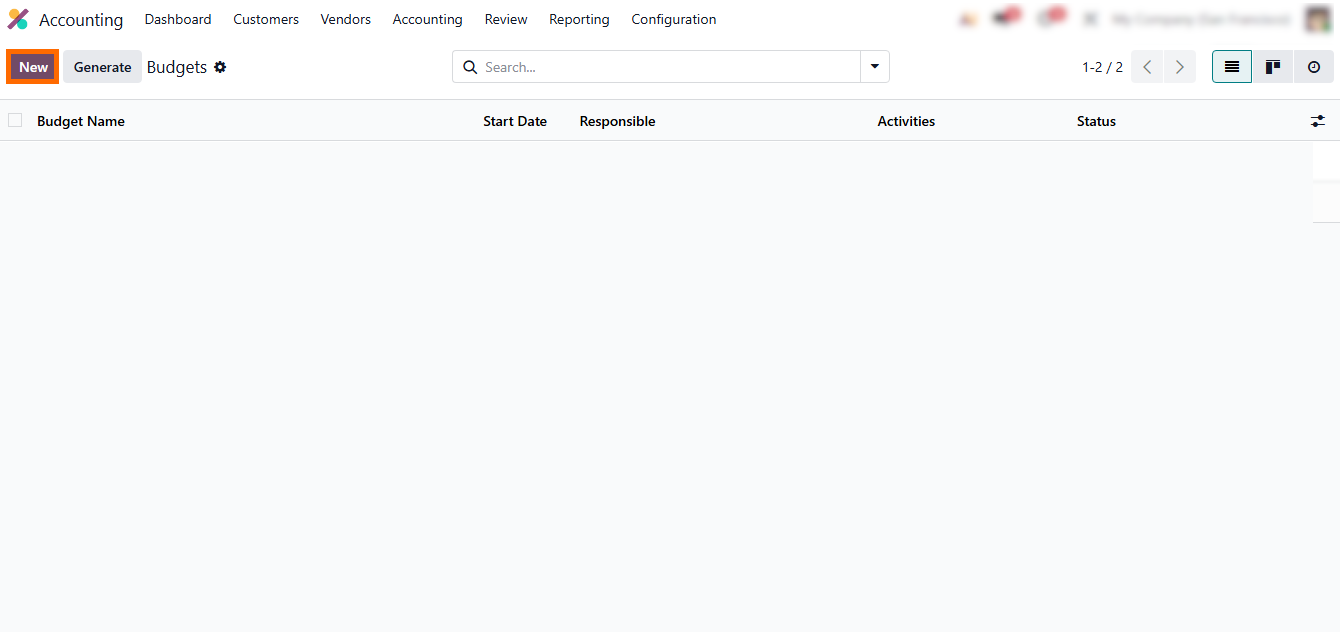
- Go to “Accounting” and open “Analytic Budgets” to access the budget management workspace, as shown in the screenshot.
- Click “New” to
manually create a budget for custom or one-time planning scenarios. This option
is used when flexible budget structures are required for specific
projects, departments, or cost categories.
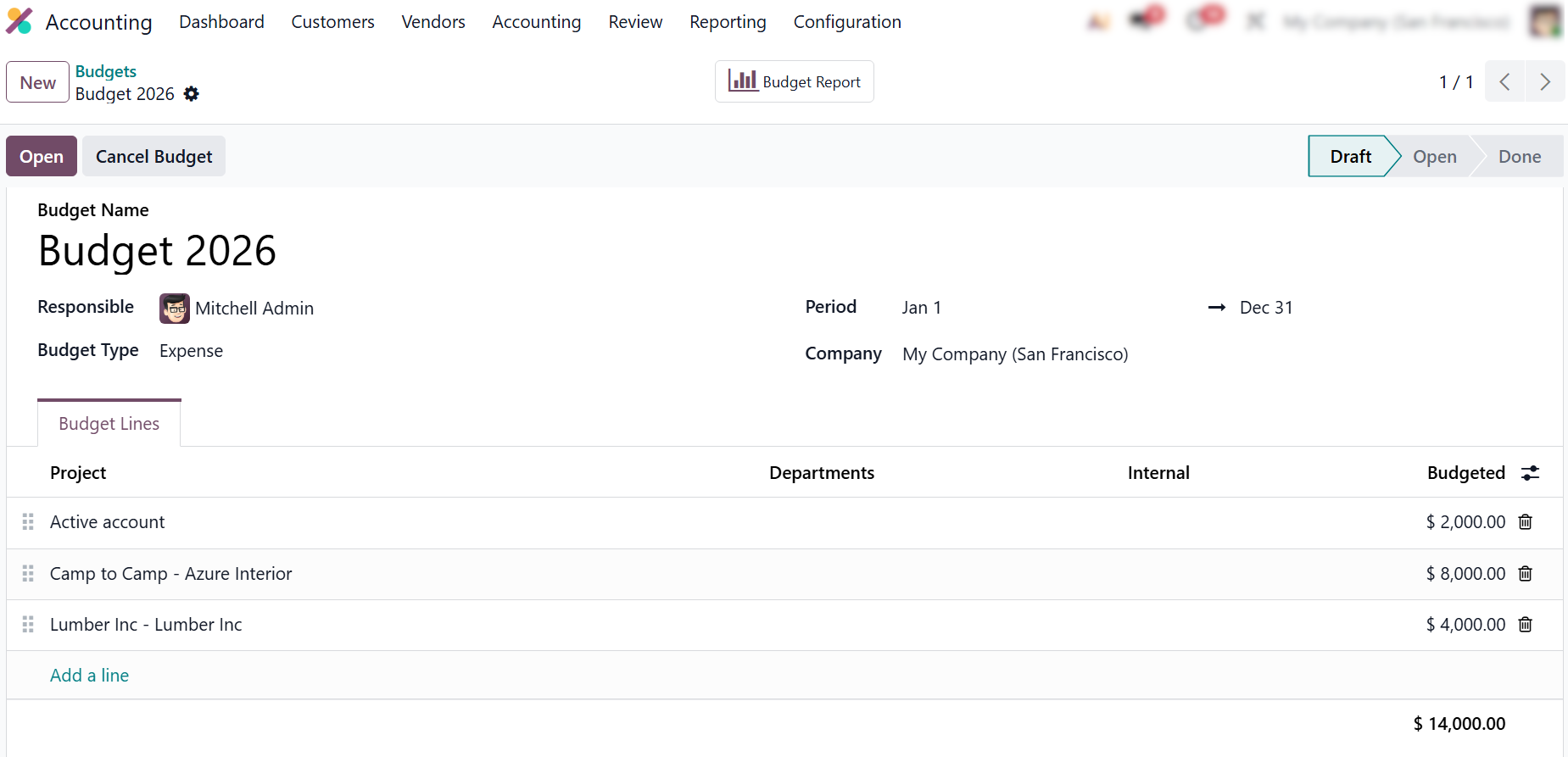
- In the budget form, define the validity period, select the analytic account or analytic plan, and add budget lines with planned amounts. These values determine how real expenses from purchase Odoo and operations will be matched to the Odoo budget.
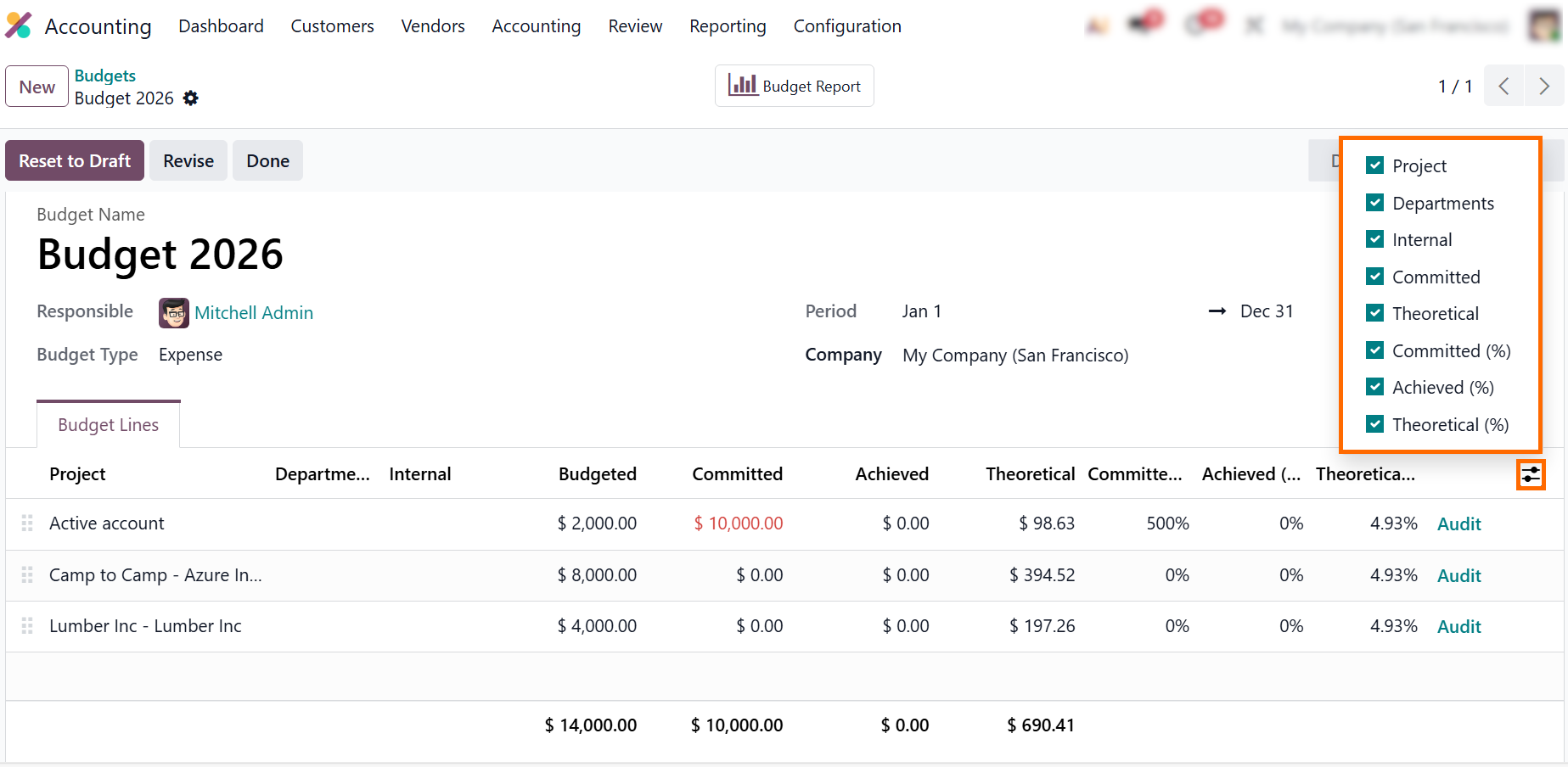
- After saving the
budget, click “Open” to activate it and start monitoring. Here, Odoo users can track theoretical, committed,
and achieved amounts to compare
planned, reserved, and actual costs and spot overspending early.
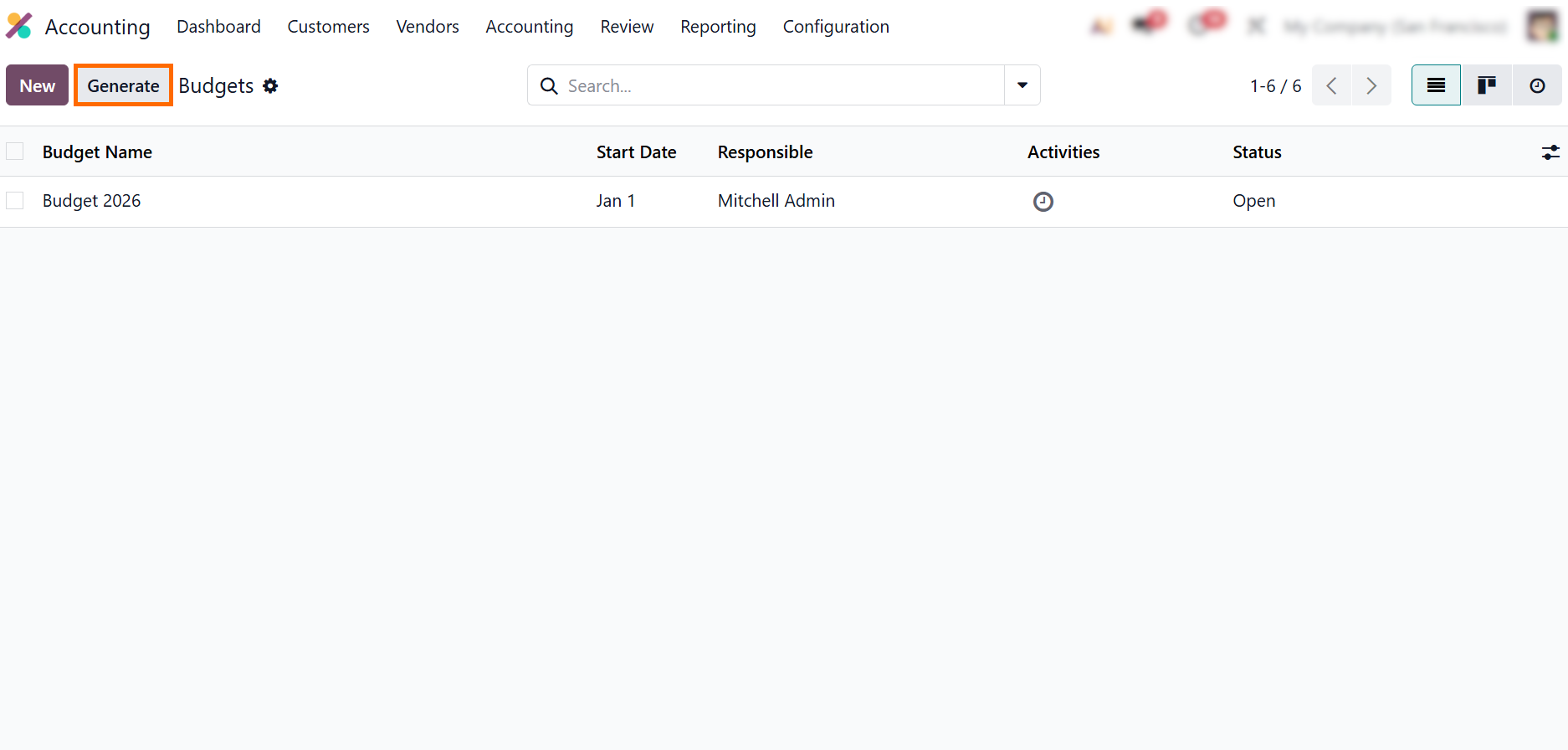
In growing Odoo business environments, manual budget creation quickly becomes inefficient, especially when multiple departments, projects, and product Odoo categories must be controlled at the same time. This is where automated Odoo budget management becomes essential. Instead of creating Odoo budgets one by one, Odoo users can generate structured budgets based on analytic plans, recurring planning cycles, and operational templates that reflect real business activity. By using the Generate option, companies align planning Odoo processes with purchase Odoo workflows, project pipelines, and capacity planning from the Odoo booking system. This approach supports more accurate Odoo forecasting, improves financial visibility across Odoo teams, and keeps budget Odoo fully aligned with operational execution.
Alternatively, click “Generate” to automatically create recurring or template-based budgets for multiple departments, projects, or product lines, reducing manual setup and ensuring consistent budget structures across the organization.
- Select the “From” and “To” dates, define the planning period (month, quarter, or year), and choose the analytic plan to ensure budgets follow the correct planning cycle and are linked to the proper analytic structure.
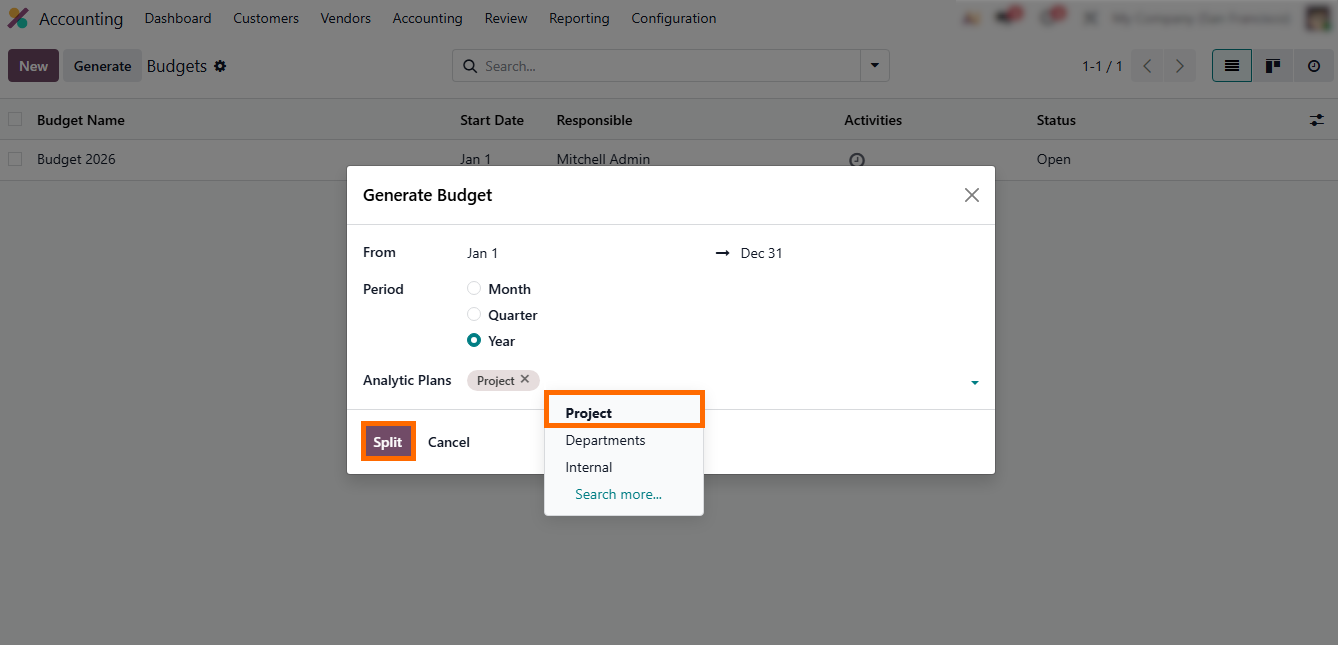
- Odoo 19 will then
generate a new budget based on the selected parameters. Review the budget
lines, enter planned amounts, and click “Save” to confirm the budget for
control and reporting.
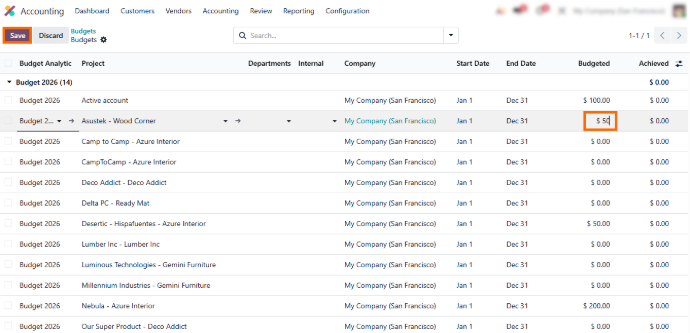
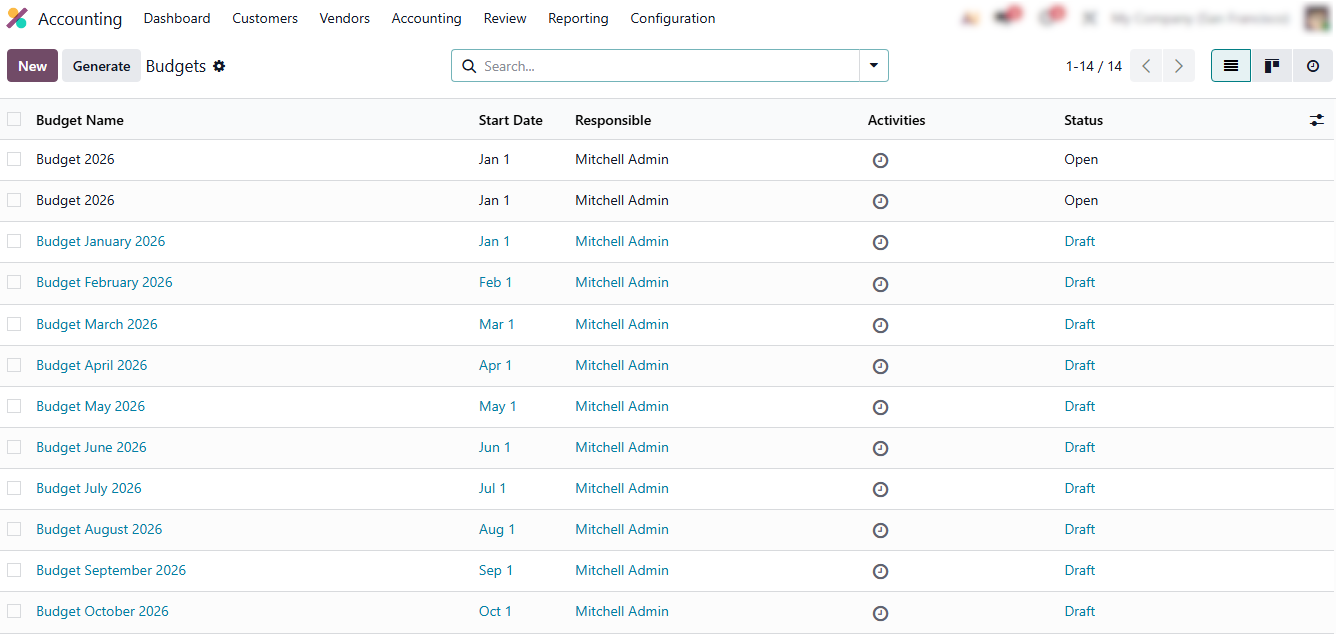
- Generated budgets follow the same project budget rules and can be monitored in Odoo kanban or dashboards for real-time budget tracking.
Real-Time
Odoo Budget Reporting and Monitoring
Budget reporting in Odoo 19 allows Odoo users to track how Odoo budgets perform against real transactions from purchase Odoo, project budget structures, and product costs. Instead of relying on accounting period reports, budget Odoo can be monitored continuously with planning Odoo and Odoo forecasting tools. Teams can review budget status while operational work is still in progress, not only after financial closing periods. This makes budget control part of everyday operational decisions rather than a finance-only review process, while also supporting day-to-day Odoo budget management and keeping spending aligned with approved limits across departments and projects within standard Odoo business solutions.
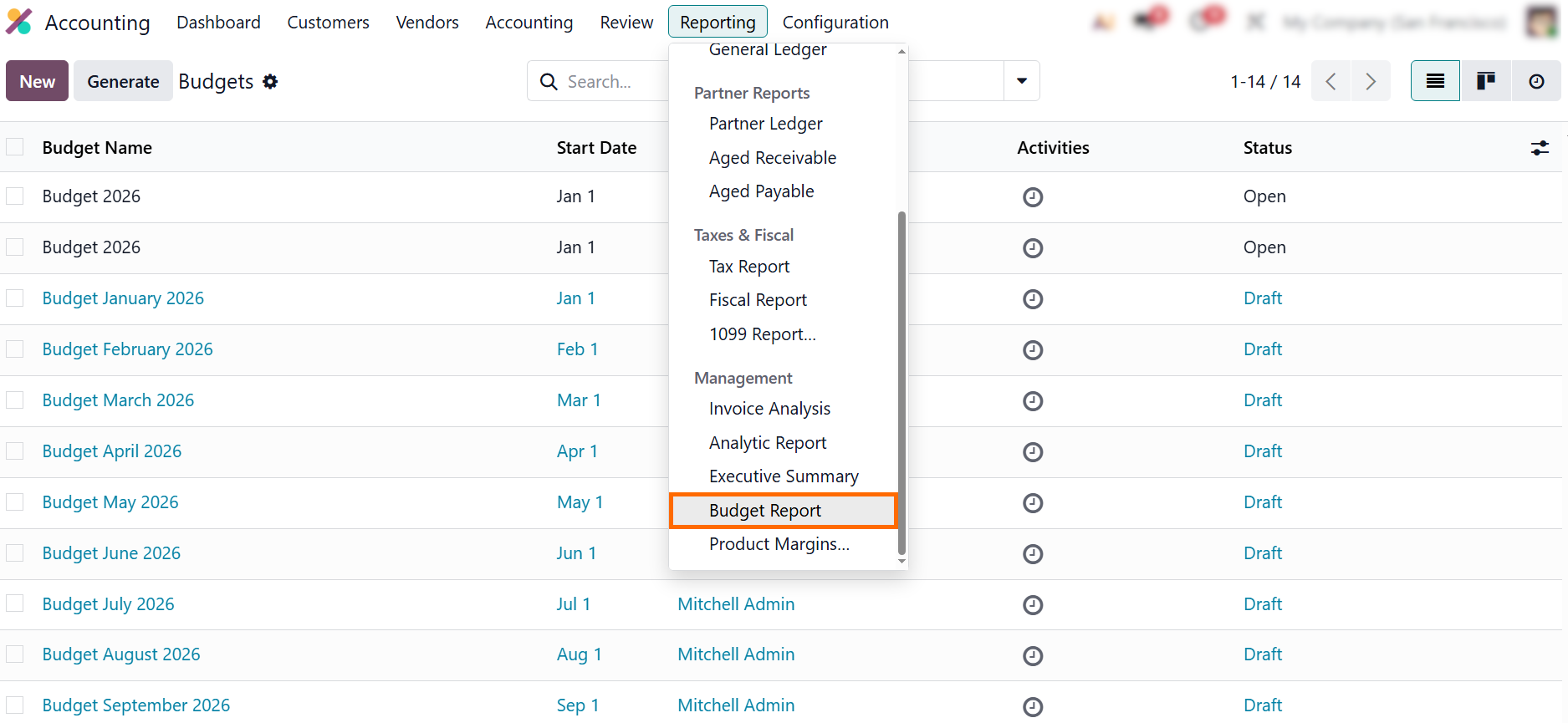
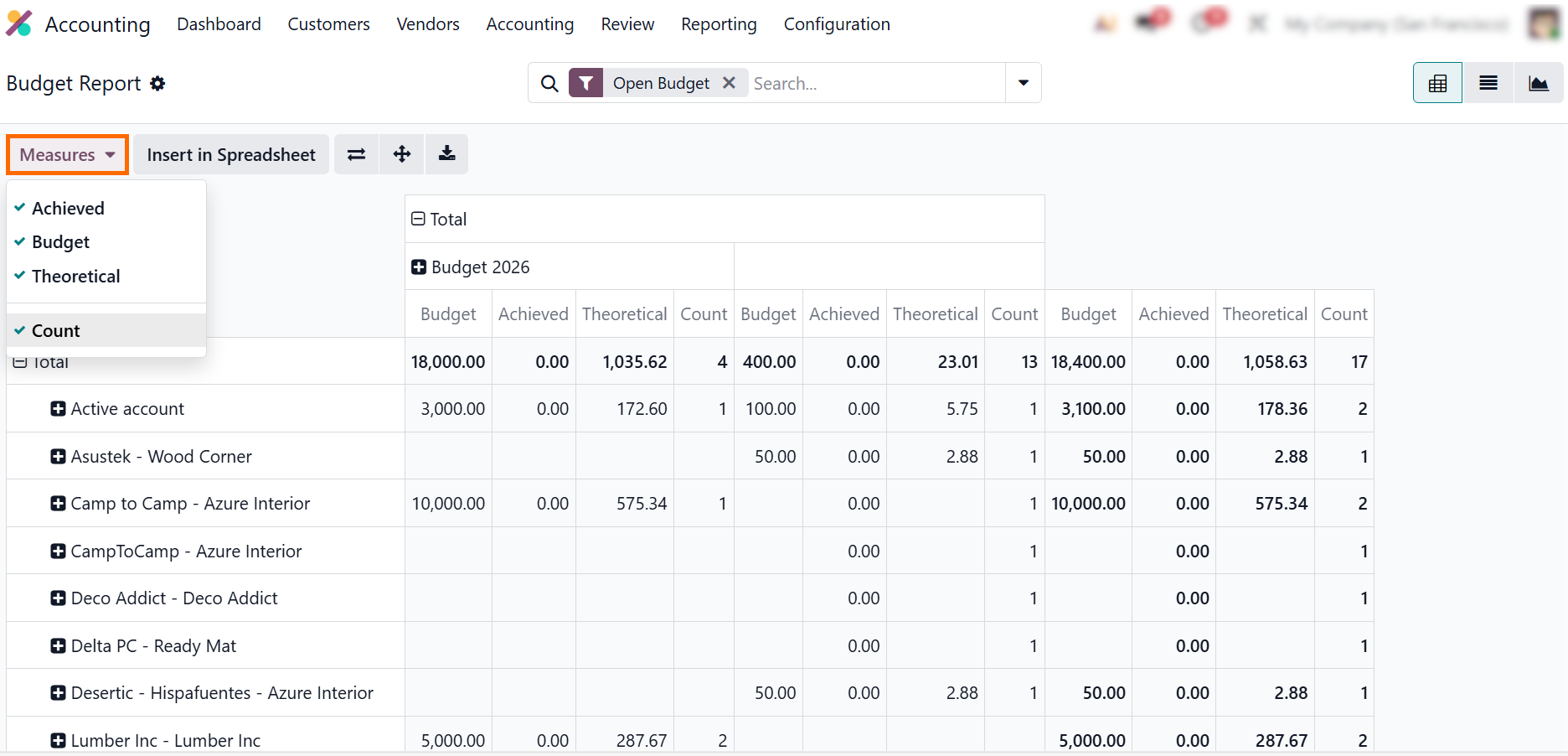
- Click “Reporting” and select “Analytic Report” to open budget-related financial data grouped by analytic accounts, projects, and cost centers linked to your Odoo budgets.
- Use the “Measures” menu
to switch between theoretical, committed, and achieved
amounts and compare planned versus actual spending.
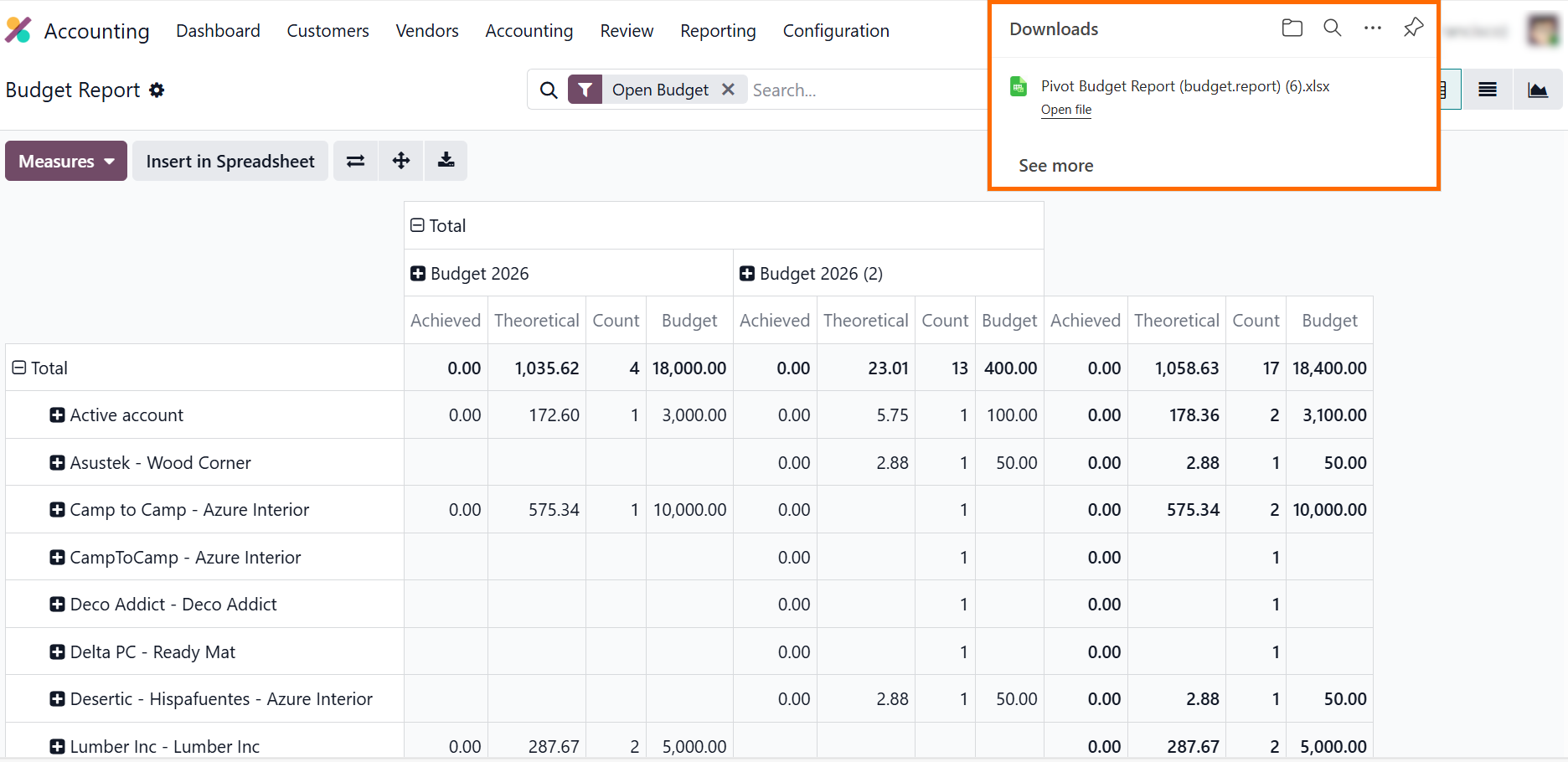
- Export the analytic
report to a spreadsheet if budget data needs to be shared with the Odoo team or used for additional forecasting
outside the system.
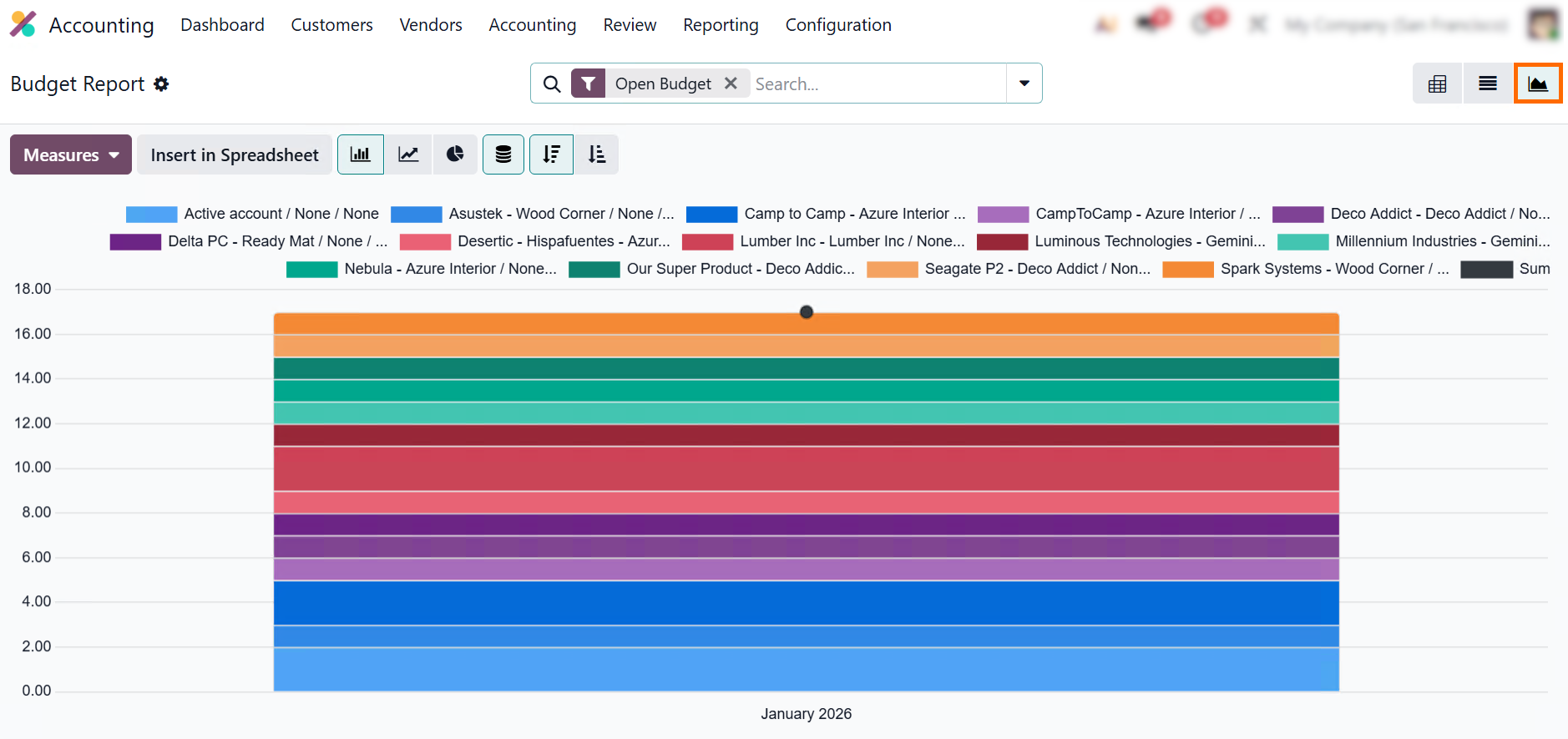
- Switch to “List” or
“Graph” view and select the “Line Chart layout” to analyze spending
trends over time and identify periods of budget deviation.
How
Companies Use Planning Odoo for Dynamic
Budget Control
Across industries, operational budget control on Odoo 19 has become a practical tool for aligning financial planning with daily business activity. Companies no longer treat Odoo budgets as static limits – they integrate purchase Odoo workflows, project tracking, and product Odoo costs into continuous monitoring. Below are several real-world examples showing how organizations turn budget Odoo into a dynamic asset, improving planning Odoo, forecasting, and financial accountability across teams.
Manufacturing Companies Linking Odoo Budgets to Production Lines
A mid-sized manufacturer used Odoo project budgets and analytic accounts to track costs across production and internal projects. By connecting Odoo budgets with product Odoo lines and Odoo tasks, the company improved budget visibility and resource allocation. Odoo users monitor theoretical, committed, and achieved amounts directly in Odoo kanban views, enabling faster decisions on materials and production planning.
Service Companies Using Odoo Booking System for Resource Planning
A consulting company integrated operational budget control with the Odoo booking system to manage staff assignments, project pipelines, and service delivery. Budget Odoo is updated dynamically as resources are booked and tasks completed, allowing Odoo teams to track spending in real time. This approach enhances planning Odoo accuracy and strengthens Odoo budget management across departments.
Retail Chains Aligning Purchase Odoo with Budget Odoo Limits
A retail organization applied Odoo budgets to control purchasing across multiple stores. By linking purchase Odoo flows to analytic accounts and project structures, managers can validate spending before commitments are finalized. Odoo leverages dashboards and Odoo kanban views to maintain compliance with financial limits, improving Odoo forecasting and cost efficiency.
IT and Consulting Firms Tracking Project Budgets Across Departments
IT companies and consultancy teams implemented Odoo project budgets to allocate costs per client project. Odoo budgets are tied to project structures and operational tasks, allowing every Odoo user to see their department’s impact on the overall budget. This system supports better Odoo ranking of projects by profitability and cost performance, making Odoo budget management a collaborative and strategic tool rather than a back-office-only process.
Conclusion
Effective Odoo budget management goes beyond back-office accounting. By connecting Odoo budgets to actual operations, purchase Odoo flows, Odoo tasks, and product Odoo lines, companies give every Odoo user a clear view of financial performance in context. Continuous tracking via Odoo kanban views, dashboards, and analytics, combined with planning Odoo and Odoo forecasting, ensures spending stays within limits while supporting better operational decisions.
This approach also improves collaboration across teams. Departments understand budget ownership, while insights emerge from linked Odoo project budgets, budget Odoo monitoring, and activity recorded in the Odoo booking system. Even when scaling or taking on new initiatives, the framework provided by Odoo business solutions keeps financial control practical, transparent, and easy to act on without overwhelming users with complex reports.
Ultimately, using Odoo budget practices helps companies align strategy with execution, optimize resource allocation, improve Odoo ranking of projects, and boost operational efficiency. Odoo users don’t just watch numbers – they work with a living system where budgets guide decisions, adapt to changes, and integrate seamlessly into daily operations. Budget Odoo becomes not just a tool but a core part of sustainable, scalable growth.