Choosing an ERP system is rarely about a single feature. Companies look for a platform that can connect sales, customer management, inventory, accounting, and manufacturing without forcing teams to work in disconnected tools. This is where Odoo stands out. As an integrated ERP system, Odoo is designed to support end-to-end business processes within one consistent system, rather than a collection of loosely connected modules.
The release of Odoo 19 continues this approach through targeted Odoo updates rather than radical redesigns. The latest version of Odoo focuses on improving how core features work together, refining daily workflows, and reducing operational friction. Companies exploring Odoo 19 features often review changes through Odoo preview release builds or Odoo runbot, following the direction defined in the Odoo roadmap and Odoo 19 roadmap to understand how new Odoo capabilities fit into long-term ERP planning.
This Odoo features overview focuses on what matters in practice: how Odoo CRM, Inventory, Accounting, Purchasing, and Manufacturing operate as a single operational flow. Whether deployed via Odoo online, Odoo enterprise, or Odoo opensource, the Odoo ERP system allows businesses to scale gradually by activating each Odoo module when it becomes operationally relevant. Rather than presenting Odoo as a list of tools, this guide explains what Odoo does when used as a coherent ERP platform.
Making
Odoo 19 a Unified ERP System Through
Integrated Modules
One of the defining strengths of Odoo lies in how its modules operate as a single, interconnected Odoo ERP system rather than independent applications. In Odoo 19, this modular architecture is further refined through consistent Odoo updates aligned with the official Odoo roadmap and Odoo 19 roadmap. Each Odoo module addresses a specific business function, yet all modules share the same data model and workflows, allowing companies to manage sales, customer relationships, inventory, accounting, purchasing, and manufacturing within one Odoo system.
Why Odoo CRM and Sales Form the Starting Point of the ERP Flow
Odoo CRM and Sales form the commercial foundation of the Odoo ERP system. Customer data, opportunities, quotations, and confirmed orders are managed in a single environment, ensuring that sales activity directly drives downstream processes. In Odoo 19, sales orders automatically trigger inventory reservations, delivery workflows, and financial entries, eliminating manual handoffs between departments. Pro tip: Companies evaluating new Odoo functionality often start with CRM and Sales to validate core workflows before extending automation to inventory and accounting.
How Inventory and Odoo Stocks Connect Operations in Real Time
The Inventory module and Odoo stocks act as the operational backbone of the Odoo ERP system. Stock levels, locations, and movements are updated in real time as sales, purchases, and manufacturing activities occur. This tight integration allows the latest version of Odoo to maintain accurate stock availability, support replenishment rules and logic, and synchronize warehouse operations with accounting and procurement without duplicate data entry. Reviewing inventory flows in Odoo preview release or Odoo runbot environments helps teams understand how stock logic behaves before rolling changes into production.
Why Accounting Unifies Financial Control Across the Odoo System
Accounting consolidates all operational activity into a single financial view. In Odoo 19, invoices, payments, valuation entries, and reporting are generated automatically based on actions taken in Sales, Inventory, Purchase, and Manufacturing modules. This ensures the system provides consistent financial traceability across the entire ERP lifecycle, rather than functioning as a standalone accounting tool. This tight coupling is one of the reasons Odoo software is positioned as a full ERP platform, not just a collection of operational apps.
How Purchase Management Supports Scalable Supply Chains
The Purchase module governs supplier relationships, RFQs, and purchase orders while remaining fully connected to inventory and accounting. By linking procurement activity to demand signals generated elsewhere in the Odoo ERP system, companies gain better cost control, predictable replenishment, and structured supplier management aligned with broader Odoo services and operational planning. This modular design allows purchasing processes to scale naturally as business complexity grows.
How Manufacturing Extends Odoo into End-to-End Production Planning
Manufacturing transforms Odoo from a transactional system into a full operational ERP. Bills of Materials, work centers, and production orders integrate with inventory, purchasing, and accounting. In new Odoo releases, this allows manufacturers to plan, execute, and cost production within the same ERP framework, reinforcing Odoo as a unified business platform rather than a collection of disconnected tools. Pro tip: For production-heavy businesses, enable Manufacturing only after Sales, Inventory, and Accounting are stabilized for cleaner data and reliable cost tracking.
Odoo 19 Feature: Unified Sales-to-Invoice Flow in Practice
Odoo 19 focuses on improving how core business processes work together in real operational scenarios. Instead of introducing radical changes, the latest version of Odoo refines cross-module workflows, reduces friction between departments, and improves data consistency across sales, inventory, and accounting. This walkthrough shows how Odoo 19 delivers a fully connected sales-to-invoice process using real transactions within a unified ERP system. The emphasis is not on isolated features, but on how everyday actions move smoothly across modules with fewer manual steps and clearer system behavior. In practice, this results in more predictable execution, cleaner data flow, and stronger operational control across the entire sales cycle.
- Always use the latest version of Odoo to evaluate real business workflows and ensure you are applying the most up-to-date best practices for your processes.
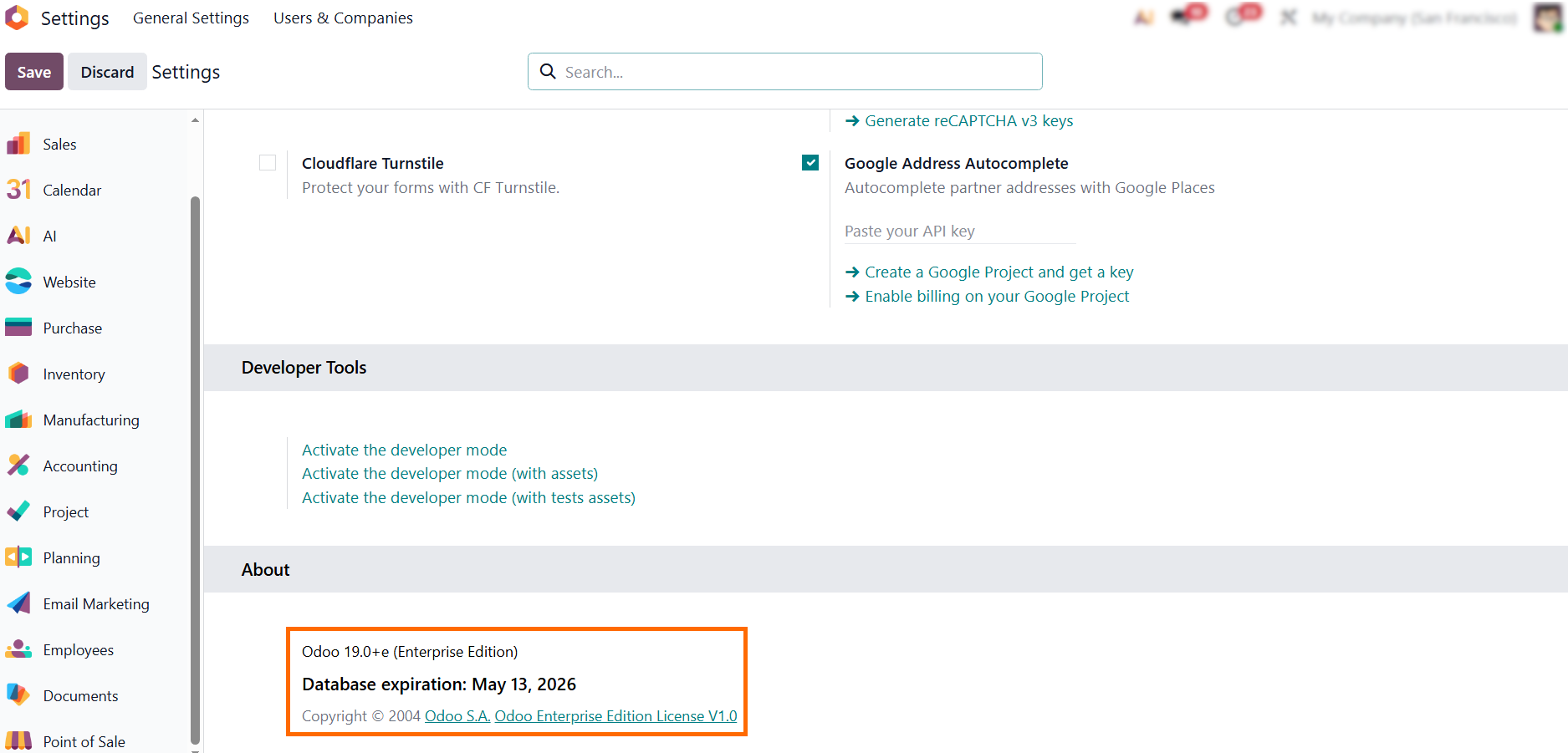
For advanced users: Using developer mode or Odoo runbot helps reveal how the Odoo ERP
system processes transactions between Odoo CRM, Inventory, and Accounting.
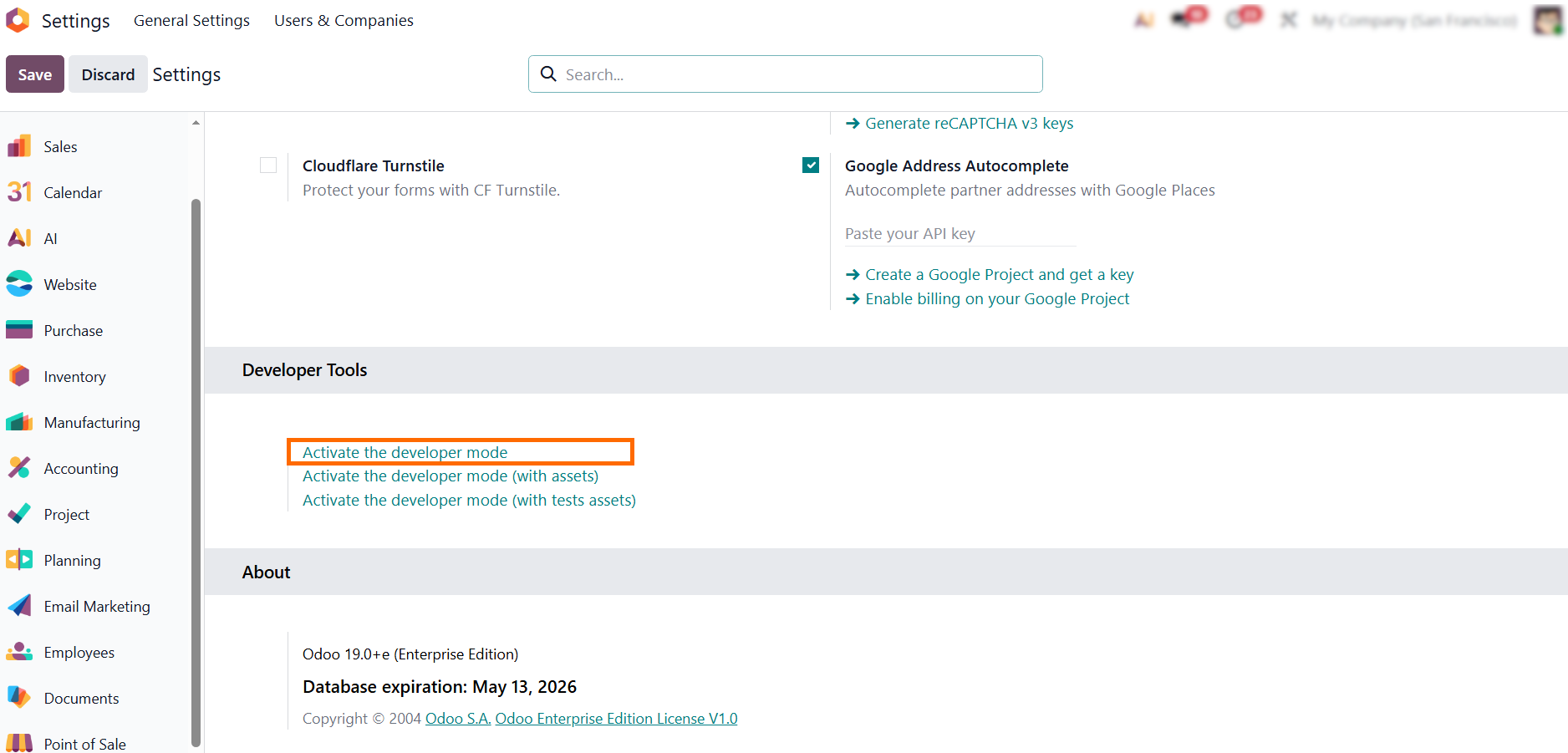
Initial Odoo 19 Setup for Core Business Processes
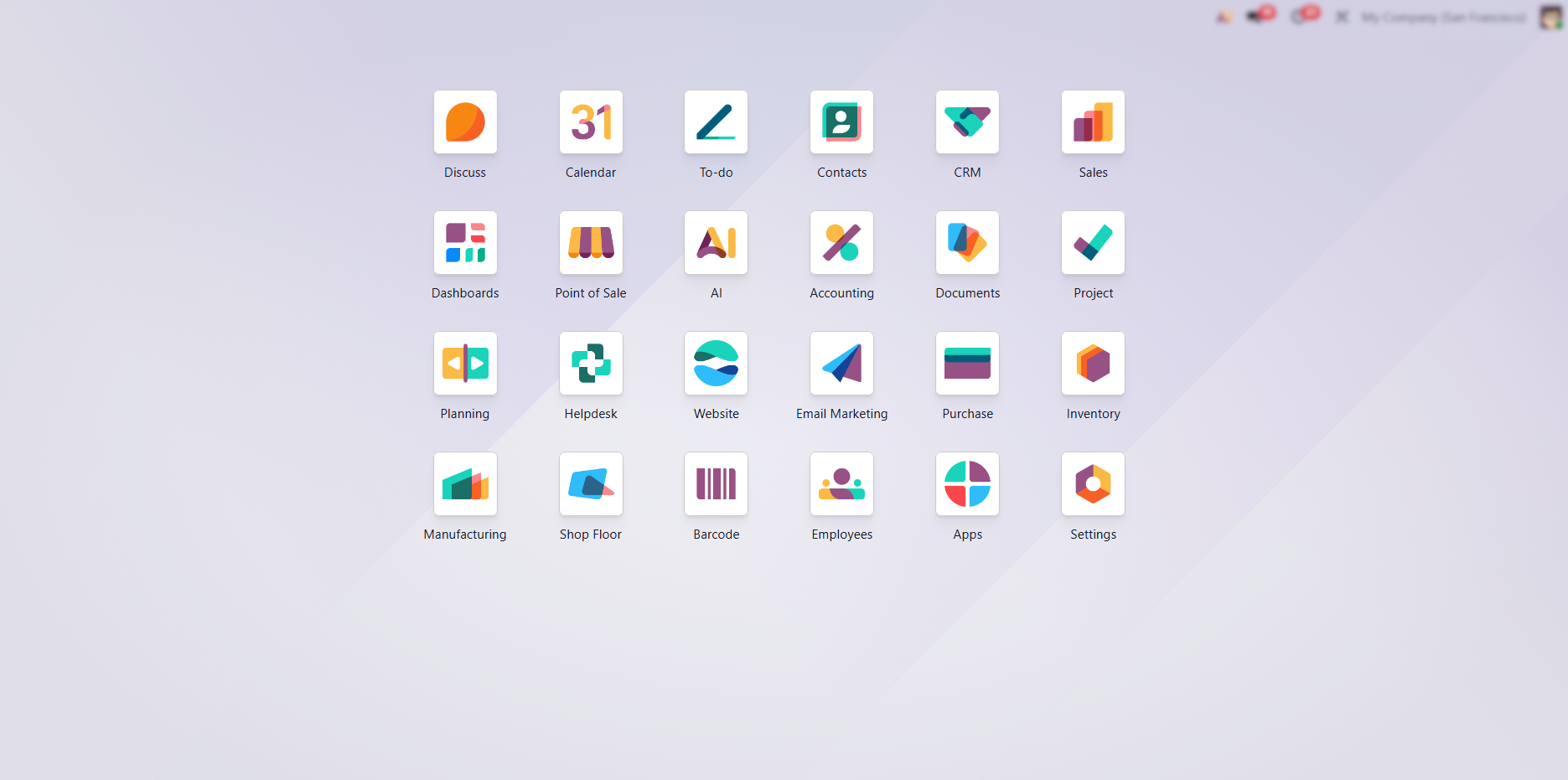
Configuring Odoo effectively starts with enabling the core business modules that define end-to-end operational flows. Companies often expect Odoo to function as a complete ERP immediately after installation, but in practice its capabilities depend on how foundational modules are activated and aligned. In Odoo 19, the system is designed to scale modularly, meaning that sales, CRM, inventory, accounting, purchasing, and manufacturing must be enabled in the correct sequence to operate as a cohesive Odoo ERP system. This initial setup establishes how data flows across the Odoo system, ensuring consistency between commercial, operational, and financial processes before deeper configuration begins.
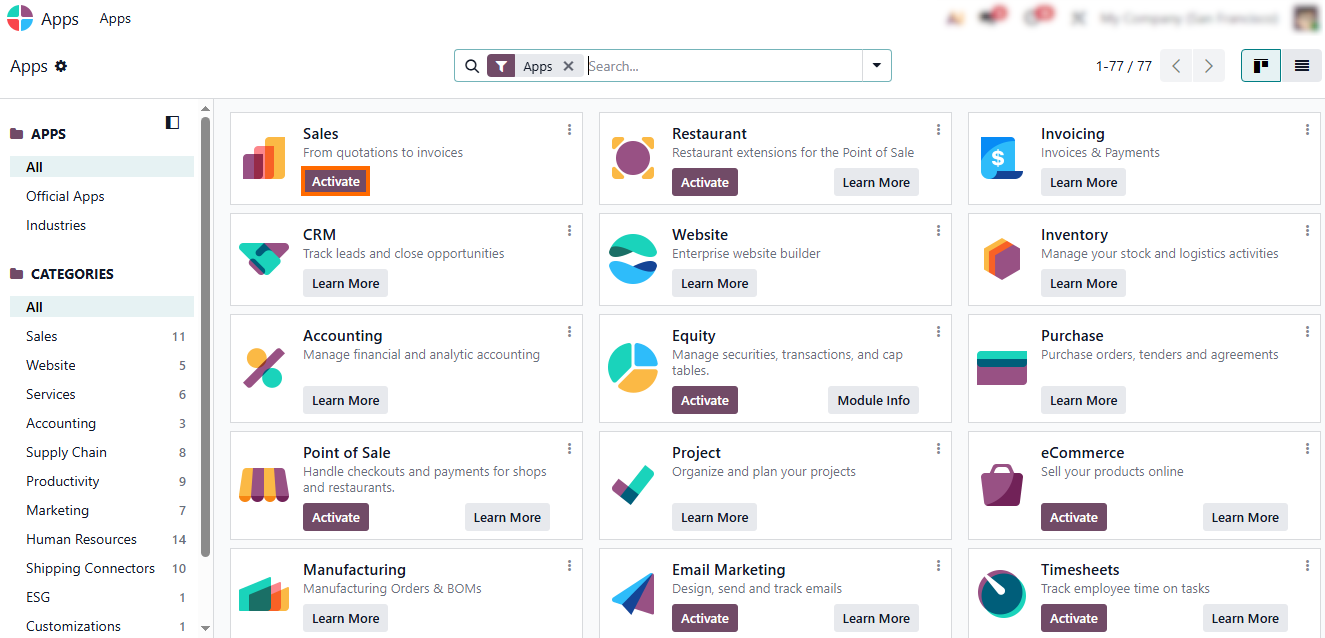
- First,
activate Sales, Odoo CRM, Inventory,
Accounting, and Purchase. These modules form the operational core of the Odoo system and define how sales orders
trigger stock movements, procurement actions, and accounting entries.
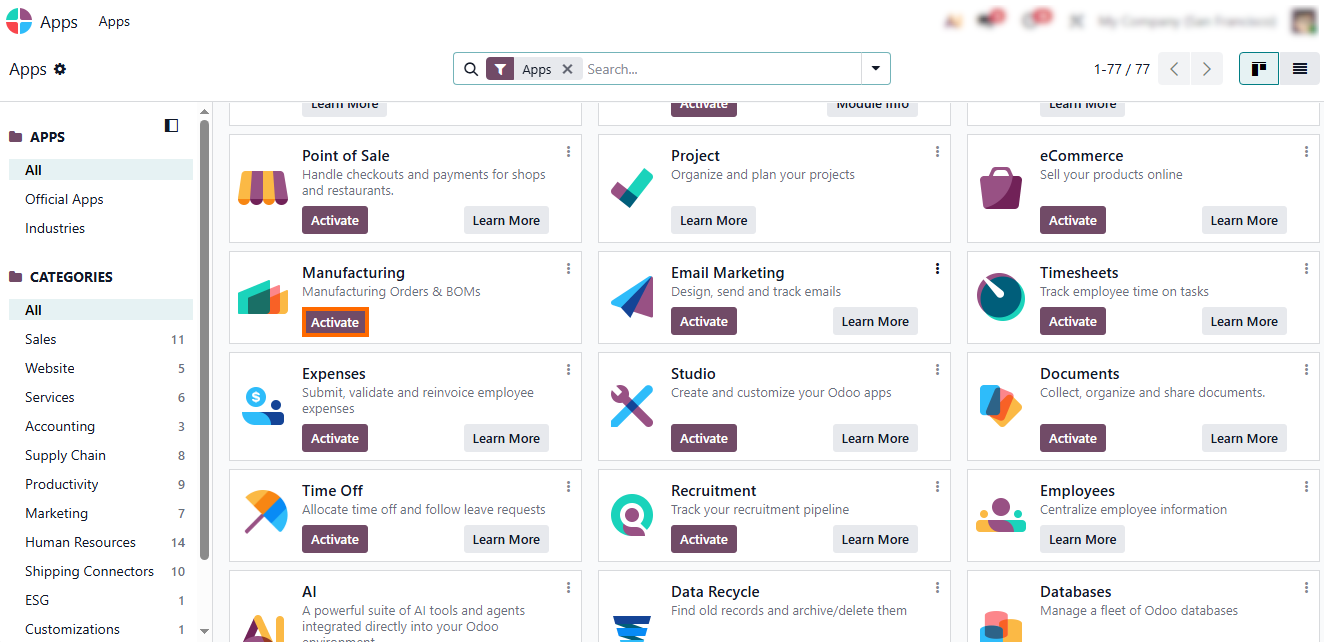
- After Purchase activation, enable Manufacturing if needed to extend the ERP flow into production planning, execution, and costing, tightly integrated with inventory and finance.
- This modular approach in Odoo allows businesses to begin with only the essential modules and gradually expand the system as operational needs grow.
From Setup to Real-World Use Cases in Odoo 19
Once the core Odoo 19 modules are configured, the Odoo ERP system shifts from setup mode to real operational use. This is where Odoo starts to show what it actually does in practice. Sales orders turn into deliveries, stock levels update automatically, and accounting records are created without manual intervention. Instead of isolated actions, the latest version of Odoo connects everyday business steps into a single, predictable workflow. Supported by ongoing Odoo updates and aligned with the Odoo roadmap, this transition marks the moment when configuration decisions are tested against real transactions, real data, and real operational pressure inside the Odoo system. This is where theory becomes daily execution.
- The first step in this end-to-end workflow starts with the Sales module, which initiates the entire operational chain from customer demand to fulfillment.
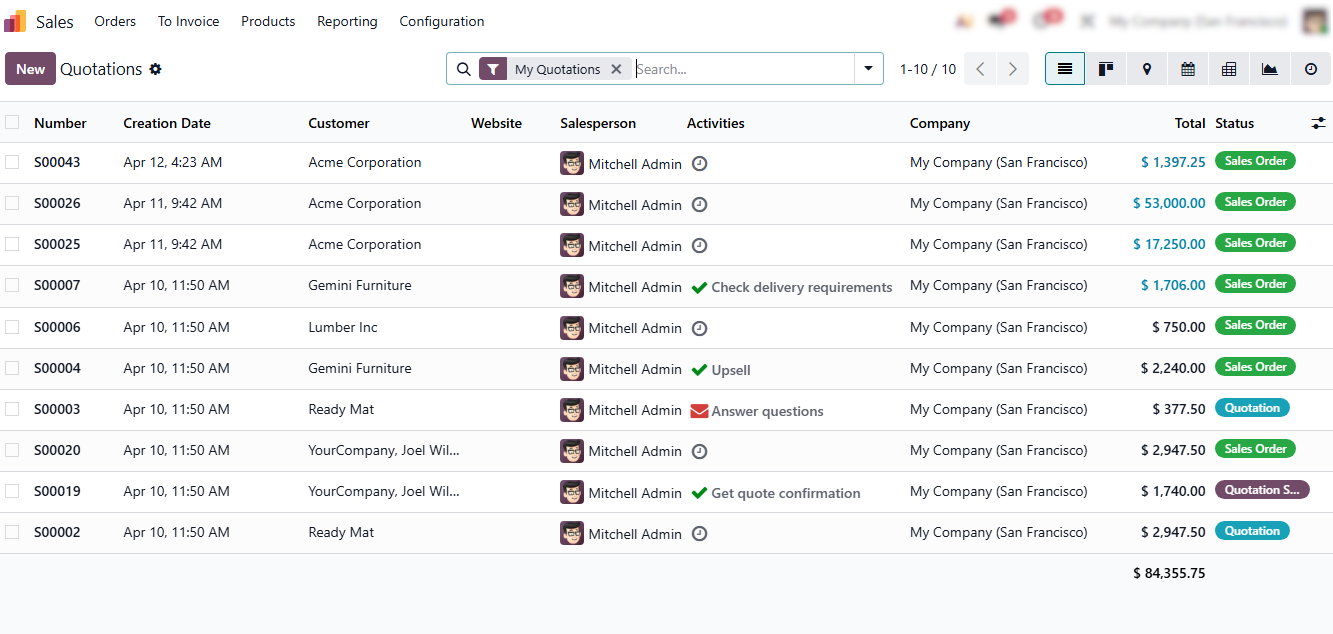
The workflow begins when a sales representative creates a New Quotation in the Sales module, capturing customer details, products, quantities, and pricing
conditions.
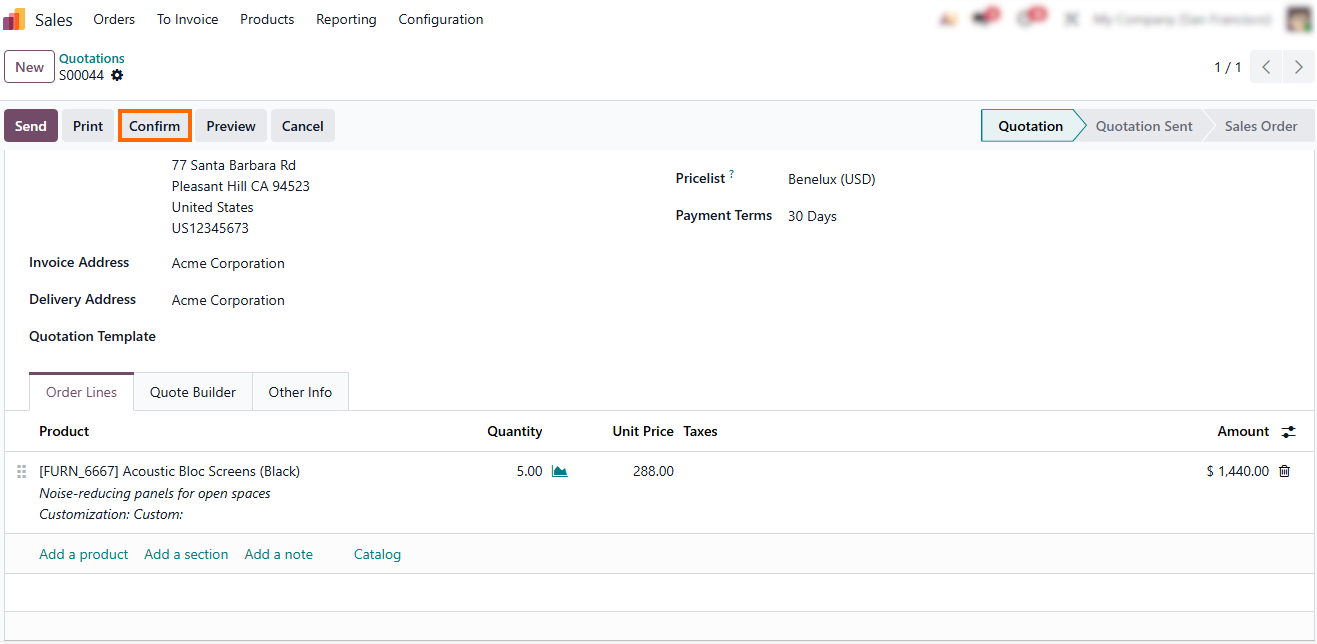
- Odoo automatically connects the sales process with inventory, procurement, and accounting depending on configured rules. After confirmation, Odoo generates a delivery order in the Inventory module.
From
Sales Order to Delivery Execution in Odoo 19
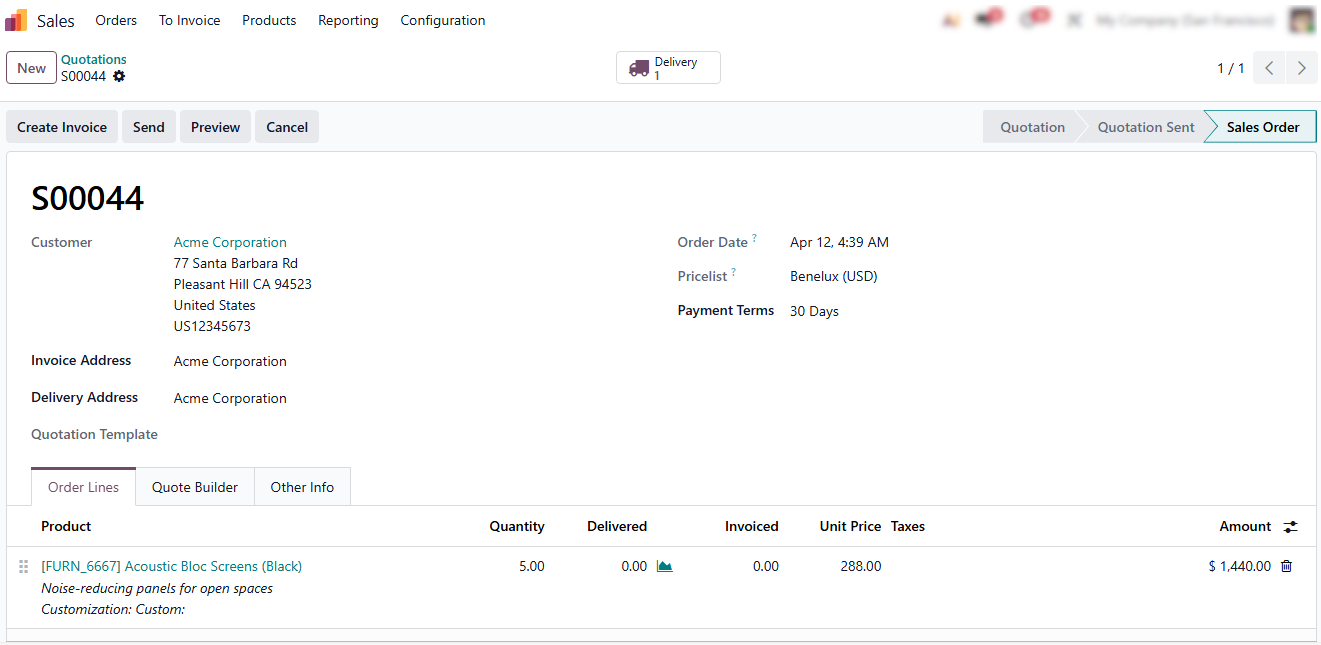
Once a Sales Order is confirmed, Odoo automatically transitions the transaction from a commercial document into an operational workflow. At this stage, the system connects sales with warehouse operations, ensuring that fulfillment begins without manual coordination between departments. The process becomes fully integrated across modules, allowing real-time synchronization between demand, inventory availability, and logistics execution. This ensures that every confirmed order immediately triggers a structured and traceable fulfillment flow within the system.
- After confirmation, Odoo generates a delivery order in the Inventory module, automatically linking it to the specific Sales Order and reserving stock when available to avoid allocation conflicts with other orders.
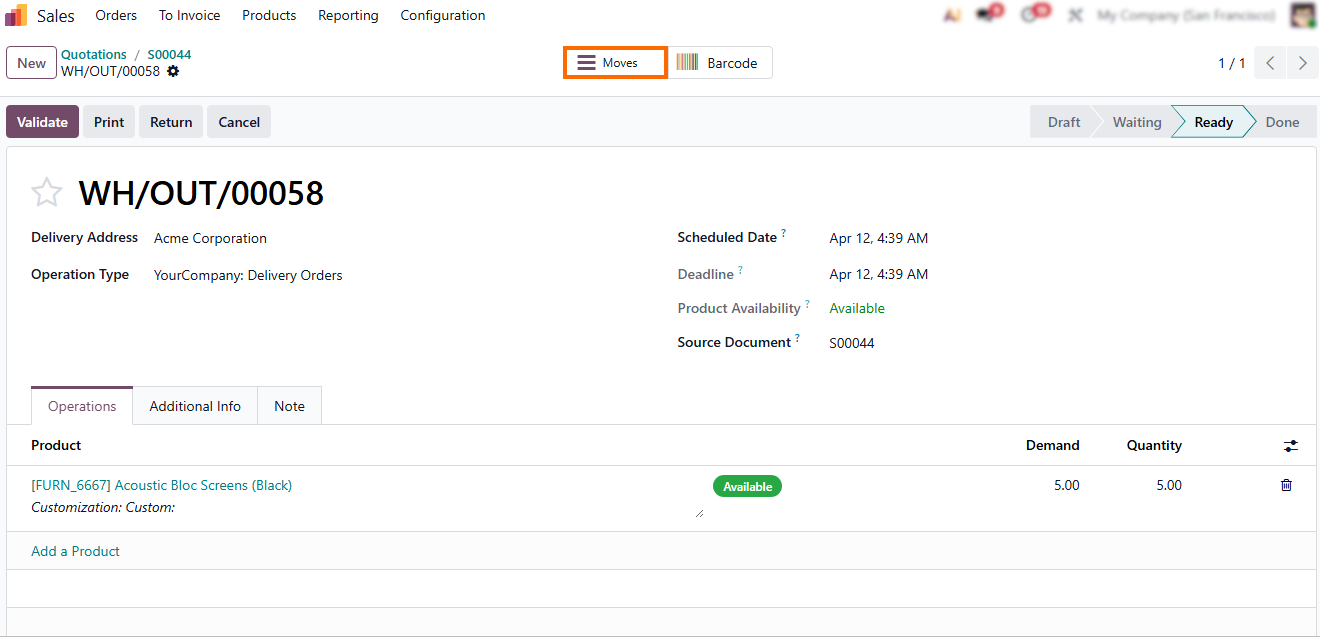
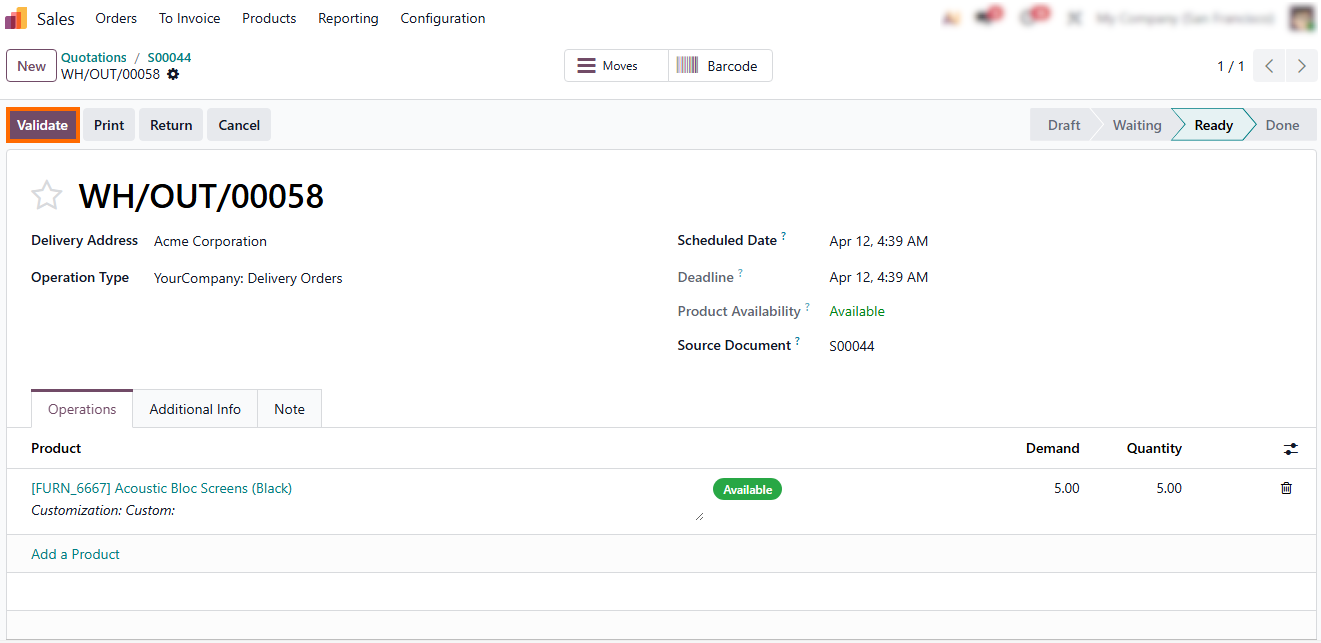
Odoo confirms that the goods have physically left the warehouse and completes the delivery process. It posts the final stock movement, permanently deducting delivered quantities and ensuring full traceability.
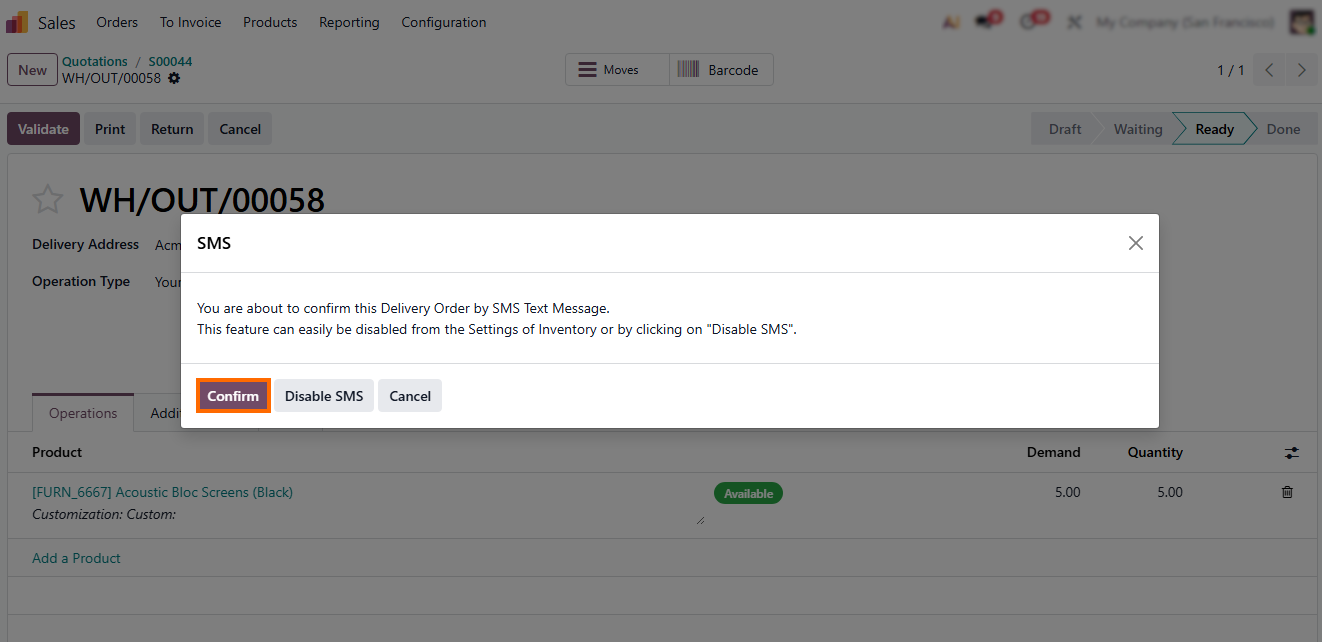
- Before final validation, Odoo may display a prompt such as: “You are about to confirm this Delivery Order by SMS Text Message.” It can easily be disabled in the Inventory Settings or by disabling the SMS option.
From Delivery Confirmation to Invoicing in Odoo 19
Once the delivery is completed, Odoo moves the process from physical fulfillment to financial execution, ensuring that every delivered product is properly reflected in accounting records and revenue tracking. At this stage, the system bridges warehouse operations with the Accounting module, turning operational activity into a formal financial transaction. This step ensures that all completed logistics actions are immediately aligned with financial reporting, enabling accurate revenue recognition and consistent document flow across the entire system. It also establishes a clear link between operational performance and financial outcomes within the same integrated workflow.
- Once goods are delivered, Odoo allows users to generate an invoice in the Accounting module directly from the Sales Order or Delivery Order using the Create Invoice action.
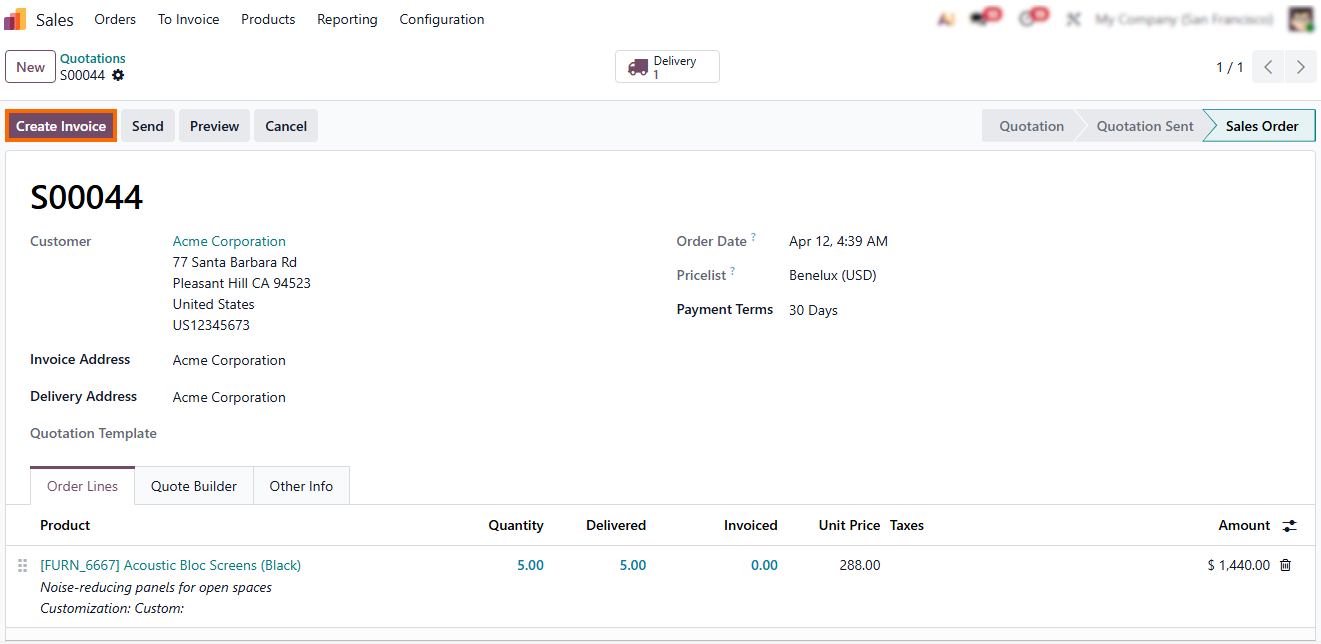
Next, the user selects the invoicing method, choosing between a regular invoice, a down payment based on a percentage, or a fixed amount down payment, depending on the agreed billing strategy and the Sales Order configuration.
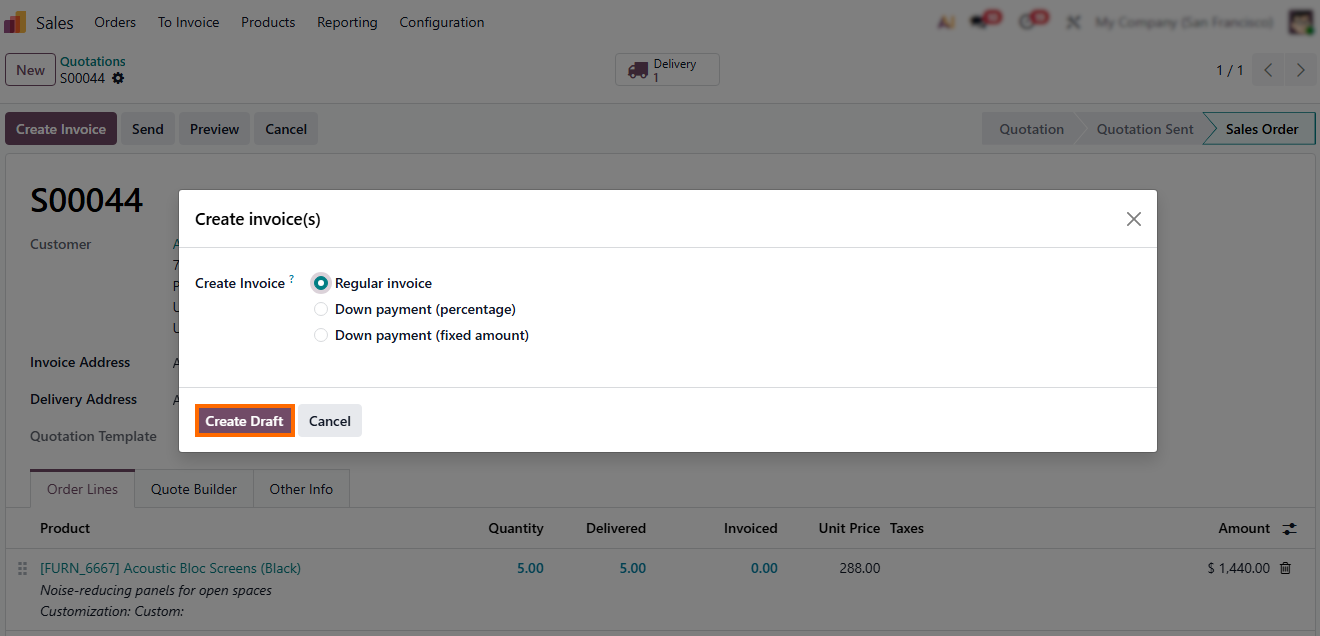
- This flexibility allows businesses to adapt invoicing to different commercial scenarios, from standard one-time deliveries to staged or prepayment-based contracts. The process is then finalized by confirming the invoice.
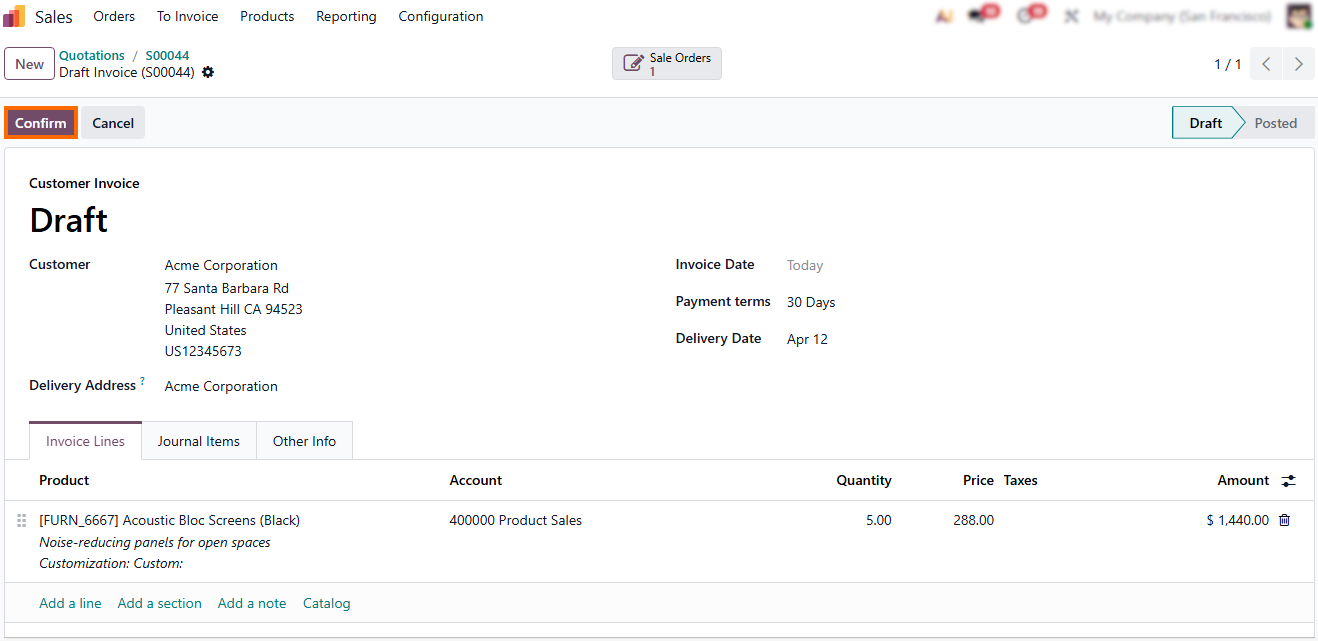
Payment Registration and
Closing the Sales Cycle
Once the invoice is posted, Odoo transitions the process from billing to payment collection, completing the financial lifecycle of the Sales Order. At this stage, the system ensures that incoming payments are accurately matched with outstanding invoices, enabling full financial control and real-time accounting updates across the database. This step is essential for closing the loop between operational execution and final revenue recognition, ensuring that every completed sale is properly reflected in the company’s financial statements and profitability tracking.
- After the invoice is confirmed, users can register a payment manually in the Accounting module or use automated payment processing via bank synchronization or integrated payment providers.
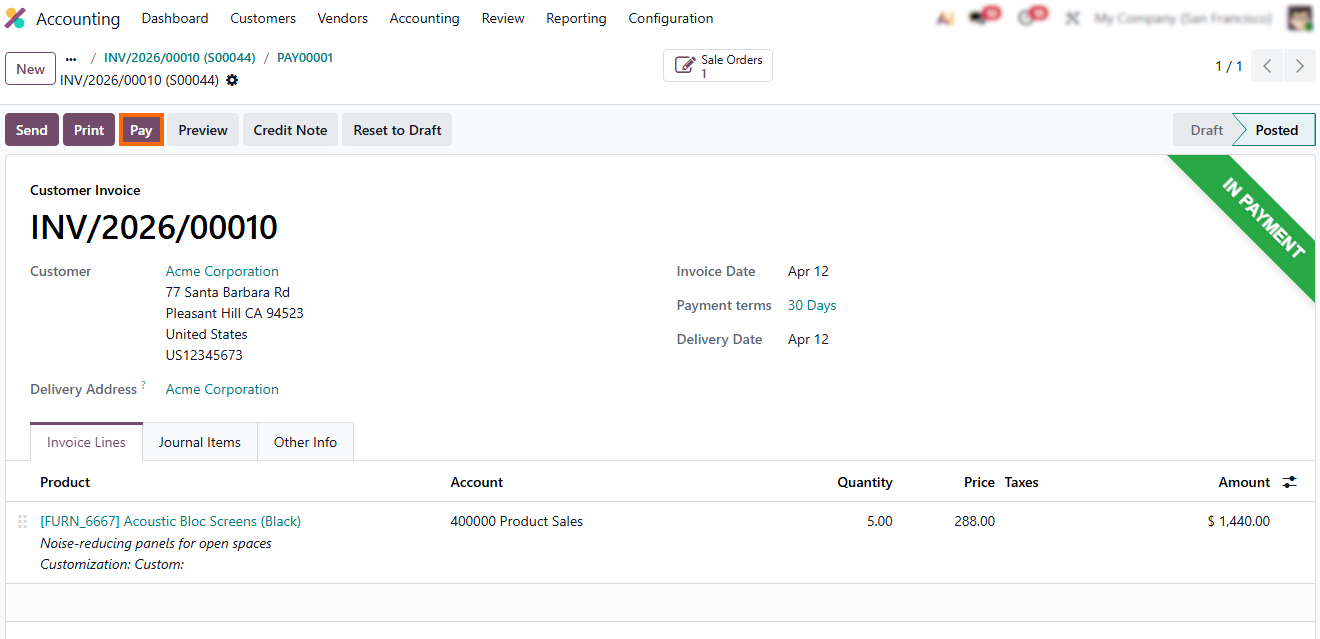
- The next step is to click Create
Payment, which opens the payment registration form where the amount, journal,
and payment method are automatically suggested based on the invoice data,
allowing the user to quickly validate the transaction.
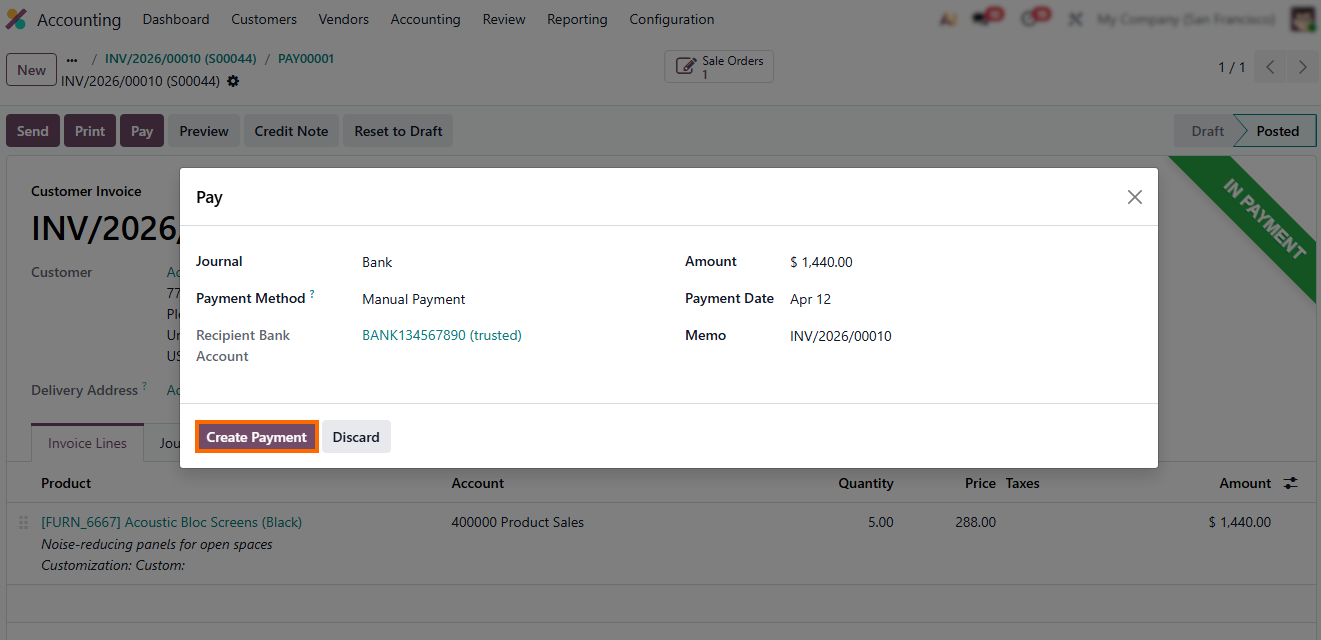
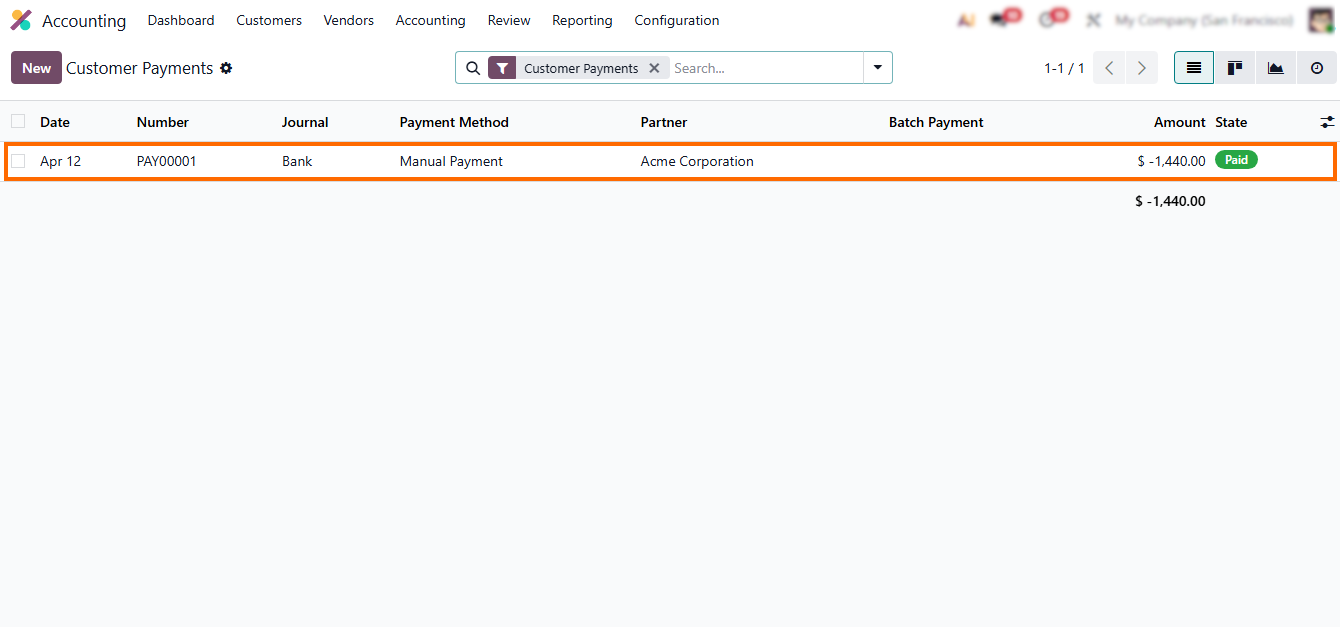
- Once the payment is completed, the status is updated to Paid, as shown in the screenshot below, and Odoo automatically reconciles it with the invoice, confirming that the transaction is fully settled and the Sales Order is closed.
What Happens After the Sale: Reporting, Automation, and Business Control in Odoo 19
Closing a Sales Order does not mark the end of operational value in the Odoo ERP system. Instead, it becomes the starting point for analytics, automation, and management control built on real transactional data. In Odoo 19, every completed sale continuously feeds reporting tools, automation rules, and performance dashboards, allowing companies to move from execution to insight without additional data preparation or manual consolidation. Odoo transforms completed sales, deliveries, and payments into structured business intelligence in real time, giving decision-makers direct visibility into revenue, margins, cash flow, and operational efficiency based on the same transactions that drive daily operations.
- Dashboards update automatically, allowing managers to track revenue, margins, and cash flow without manual reporting.
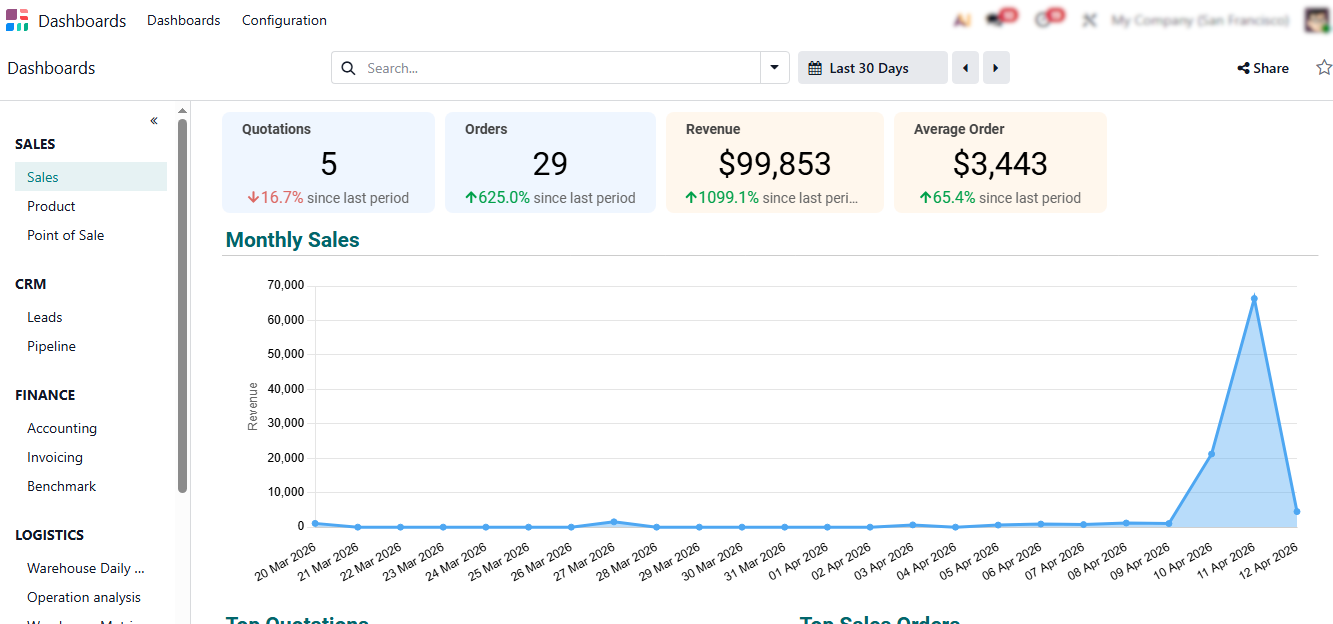
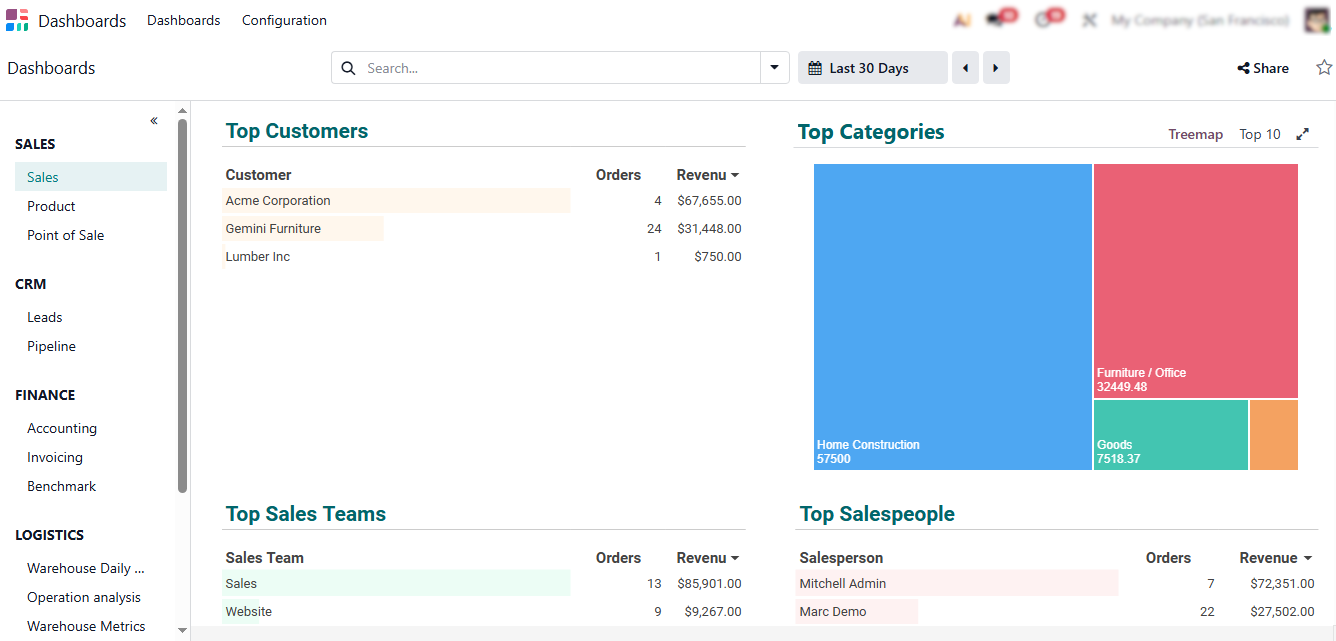
Users can analyze performance by product, customer, sales teams, category, or time period, enabling quick identification of trends, bottlenecks, and growth opportunities without exporting data.
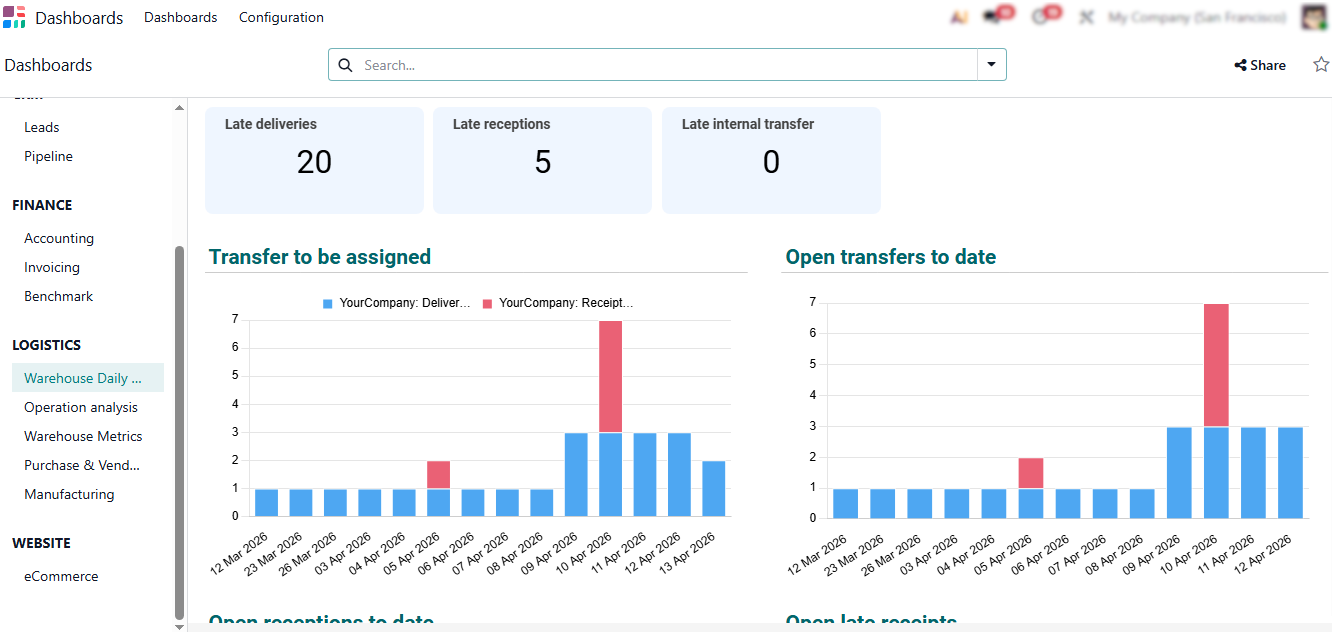
- The same analytical logic applies across the Odoo ecosystem: inventory turnover, purchasing performance, manufacturing efficiency, and financial results are all reported using consistent real-time data in a single integrated ERP system.
Where Odoo 19 Delivers the Most Value: Use Cases
and Automation Results
The real strength of Odoo 19 features becomes visible not at the module level, but in how the Odoo ERP system adapts to different business models and operational scales. Thanks to its modular architecture, unified database, and continuous Odoo updates aligned with the Odoo roadmap and Odoo 19 roadmap, the latest version of Odoo supports companies across multiple industries without forcing rigid workflows. Whether deployed as Odoo enterprise, Odoo opensource, or Odoo online, the system allows businesses to automate core processes while retaining flexibility for growth and customization. These real-world use cases clearly answer the question: what does Odoo do in practice, beyond individual features.
Sales-Driven Businesses and CRM-Centered Processes
For sales-focused companies, Odoo CRM acts as the commercial engine of the Odoo ERP system and a core part of modern Odoo software deployments. Customer data, pipelines, quotations, and confirmed orders flow directly into inventory, invoicing, and accounting without manual re-entry. In Odoo 19, refined automation reduces sales friction, improves data accuracy, and delivers real-time revenue visibility. This makes Odoo effective for fast-moving, sales-driven organizations managing complex customer lifecycles across teams within a growing Odoo company.
Inventory-Intensive and Distribution-Based Businesses
Wholesale, retail, and distribution companies operating in competitive Odoo market environments benefit from real-time inventory synchronization across sales, purchasing, and logistics. Stock movements, replenishment rules, and deliveries remain aligned automatically, helping reduce stockouts, limit overstocking, and improve fulfillment accuracy. With each Odoo update, inventory logic becomes more predictable, positioning Odoo ERP as a practical foundation for distribution-focused operations without fragmented warehouse systems.
Manufacturing-Intensive Organizations
For production-oriented businesses, Odoo extends beyond transactional ERP into operational and financial control. Manufacturing orders, bills of materials, procurement, inventory, and cost tracking operate within a single system, ensuring decisions are based on real demand and costs. In newer Odoo releases, tighter integration between manufacturing and accounting improves margin visibility and end-to-end traceability. This is further enhanced through tailored Odoo ERP development services, allowing manufacturers to adapt Odoo software to industry-specific production models.
Growing Companies and Long-Term ERP Scalability
A key strength of Odoo 19 is its modular scalability and long-term adaptability. Companies can start with core Odoo software modules and expand functionality as operational complexity grows. Supported by preview environments, testing tools, and improvements defined by the Odoo roadmap, this approach allows each Odoo company to scale its ERP system without disruptive migrations. As a result, Odoo functions as a long-term ERP foundation that evolves alongside business growth and market demands.
Conclusion
Odoo 19 features demonstrate a clear evolution of the platform as a unified ERP rather than a collection of standalone tools. Across sales, inventory, accounting, purchasing, and manufacturing, the latest version of Odoo focuses on strengthening cross-module workflows, improving data consistency, and reducing operational friction. Instead of introducing disruptive changes, Odoo 19 builds on existing logic through continuous Odoo updates aligned with the Odoo roadmap, making day-to-day operations more predictable and easier to scale.
What stands out in Odoo 19 is not a single new feature, but the way the Odoo ERP system supports real business processes end to end. From the first customer interaction in Odoo CRM to delivery, invoicing, payment, and reporting, all actions remain connected within one database, eliminating manual reconciliation and fragmented workflows. This integrated approach answers the practical question of what Odoo does in real-world operations: it turns routine transactions into reliable operational and financial visibility.
For companies evaluating ERP Odoo solutions, Odoo 19 offers a balanced combination of flexibility, scalability, and long-term stability. Whether deployed as Odoo enterprise, Odoo opensource, or Odoo online, the system allows organizations to grow at their own pace while staying aligned with future Odoo roadmap developments.